A marketing manager has two CVs for a junior designer role. Both say “proficient in Photoshop and Illustrator”. One also says “Adobe Certified Professional in Visual Design”, with a link beside it. Click the link and it opens a public badge page showing exactly which exams that person passed. It won’t tell her who has the better eye. But it’s the only line on either CV that someone else has actually checked.
That’s what Adobe Certified Professional (ACP) is: Adobe’s official certification for its Creative Cloud apps. Each exam covers one app, such as Photoshop, Illustrator, InDesign, Premiere or After Effects, and lasts 50 minutes. It’s delivered only through Certiport, part of Pearson VUE, and in the creative apps it combines selected-response questions with tasks you complete live in the software. You need 700 out of 1,000 to pass, and the certification stays valid for three years. The programme used to be called Adobe Certified Associate (ACA), so you’ll still see that name around.
This guide is for both sides of the desk: people deciding whether to take it, and employers wondering what it proves.
What happens on exam day?
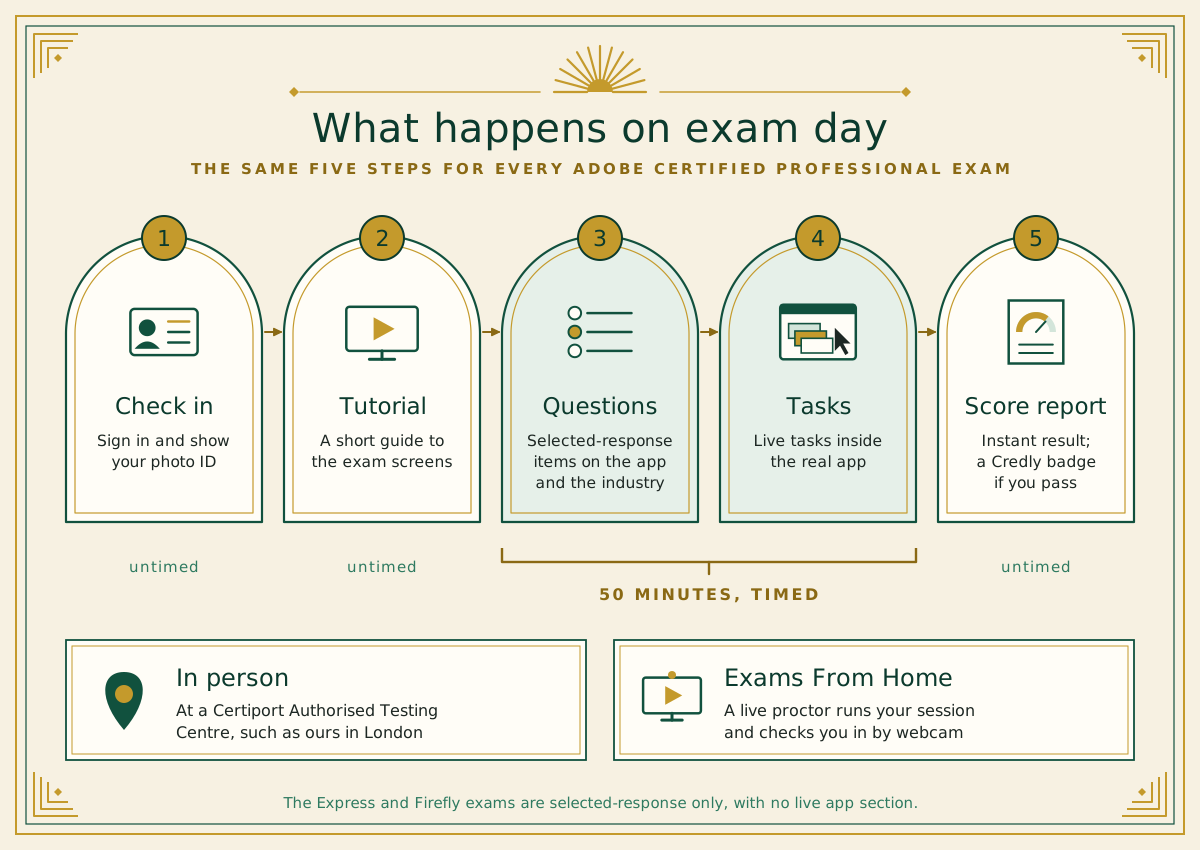
Whichever app you choose, the day follows the same pattern:
Check in. You sign in to your Certiport account and show government-issued photo ID, either at a testing centre or to a proctor over webcam.
Tutorial. A short guide to the exam screens.
Questions. Selected-response items on the app and on industry practice.
Tasks. In the Photoshop, Illustrator, InDesign, Premiere and After Effects exams, you then carry out tasks inside the real app. Questions and tasks share the 50 minutes.
Score report. Your result appears straight away. If you pass, your certificate goes into your Certiport account and Credly emails you an invitation to claim your digital badge.
Expect 30 to 35 items in the creative-app exams. Express and Firefly are selected-response only, with no live app section. Either way, allow more than 50 minutes in total, because signing in and the tutorial aren’t timed.
Which Adobe Certified Professional exam should you take?
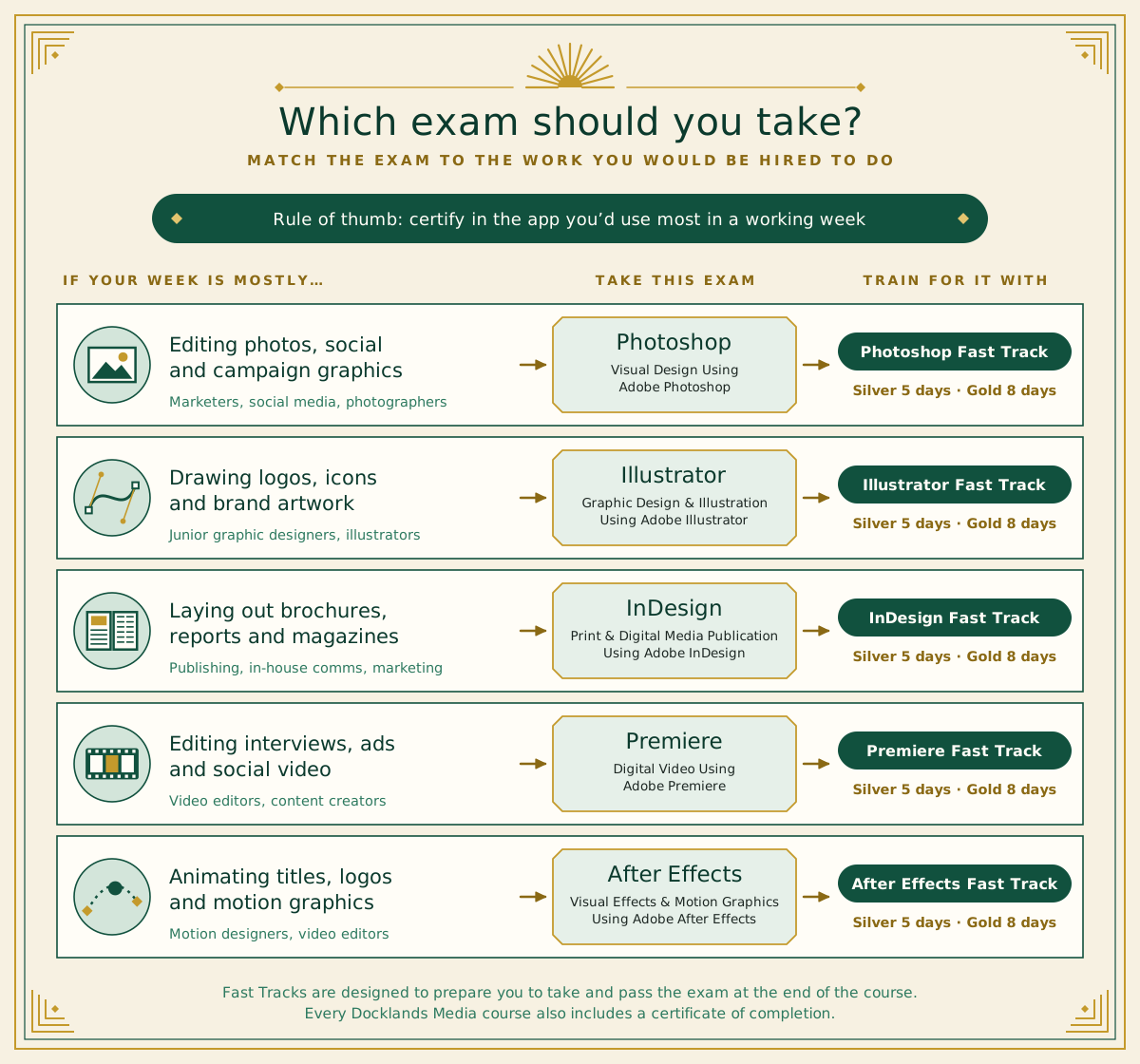
There are ten ACP exams. For most people in design, marketing and video, the choice comes down to five, and the best guide is your working week, not the app that sounds most impressive.
Photo editing, social graphics and campaign images: Visual Design Using Adobe Photoshop. Train for it with Photoshop Fast Track Silver or Photoshop Fast Track Gold.
Logos, icons, illustration and brand artwork: Graphic Design & Illustration Using Adobe Illustrator, with Illustrator Fast Track Silver or Gold.
Brochures, reports, magazines and in-house comms: Print & Digital Media Publication Using Adobe InDesign, with InDesign Fast Track Silver or Gold.
Interviews, adverts and social video: Digital Video Using Adobe Premiere, with Premiere Fast Track Silver or Gold.
Animated titles, logo animation and motion graphics: Visual Effects & Motion Graphics Using Adobe After Effects, with After Effects Fast Track Silver or Gold.
Our rule of thumb: certify in the app you’d open first thing on a Monday. A badge in the tool you use every day is easier to back up in an interview, and easier to pass. Job hunting? Read four or five ads for the role you want and count which app comes up most. Not sure how the three design apps divide the work? Our guide to the differences between Photoshop, Illustrator and InDesign will help.
Specialty credentials: when two exams beat one
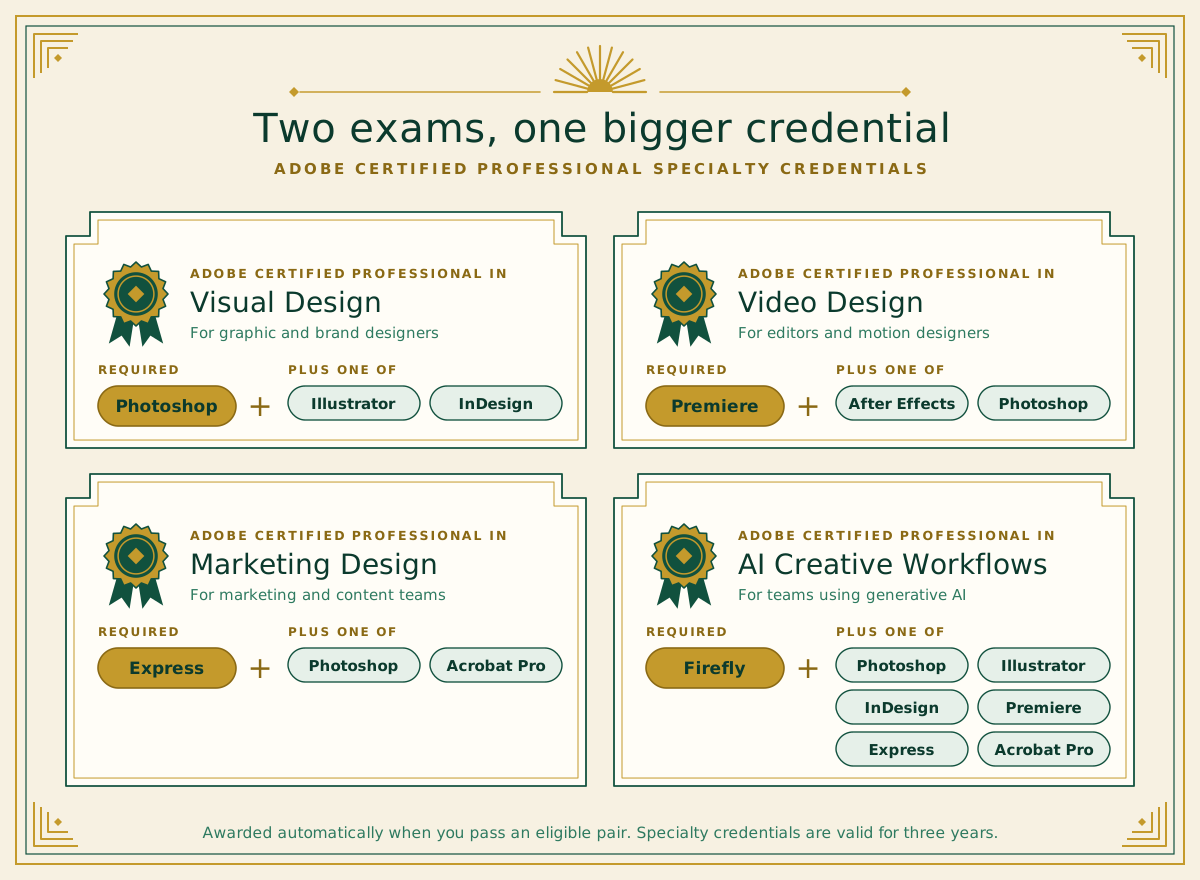
Pass two related exams and Adobe automatically adds a specialty credential on top. The four that matter for creative and marketing work:
Visual Design: Photoshop, plus Illustrator or InDesign.
Video Design: Premiere, plus After Effects or Photoshop.
Marketing Design: Express, plus Photoshop or Acrobat Pro.
AI Creative Workflows: Firefly, plus one of Photoshop, Illustrator, InDesign, Premiere, Express or Acrobat Pro.
Here’s our take. Very few junior design jobs are single-app jobs, and the ads we read for this article nearly always asked for “Adobe Creative Suite” as a whole. A specialty credential answers that better than a single badge, because it proves two apps normally used together: Photoshop and Illustrator for graphic design, Photoshop and InDesign for publishing, Premiere and After Effects for video.
One detail is easy to miss: Photoshop counts towards all four specialties, which makes it the most flexible first exam if you’re not sure where your career is heading. Specialty credentials are valid for three years, like the exams behind them.
What does the badge tell an employer that a portfolio doesn’t?
Let’s be honest about how creative hiring works. When we looked through junior graphic designer listings on Totaljobs, the same two phrases kept coming up: “proficiency in Adobe Creative Suite” and “a strong portfolio”. None of the listings on the first page of results mentioned a certification, and a search for “Adobe Certified Professional” found no exact matches. Working designers on Reddit say the same: agencies hire on portfolio, personality and experience.
That doesn’t make the badge pointless. It just does a different job, filling gaps a portfolio leaves open.
Evidence | What it shows | What it can’t show |
|---|---|---|
Portfolio | Taste, ideas and finished work for real briefs | How long it took, how much help you had, or how fast you work in the app |
Adobe Certified Professional | You passed a timed, proctored exam with live tasks in the app, plus industry knowledge | Your creative eye, or how you work with clients and colleagues |
Certificate of completion | You finished structured training at a set level | That your skills were tested independently |
In our view, ACP counts most in three situations: in-house and corporate roles, where the person hiring often isn’t a designer and wants an objective check; junior applications, where portfolios look alike and a verified skill can tip the balance; and career changes, where you need evidence that new skills are real. Adobe makes a similar point itself: portfolios and demo reels are critical to hiring, but they don’t always tell the full story.
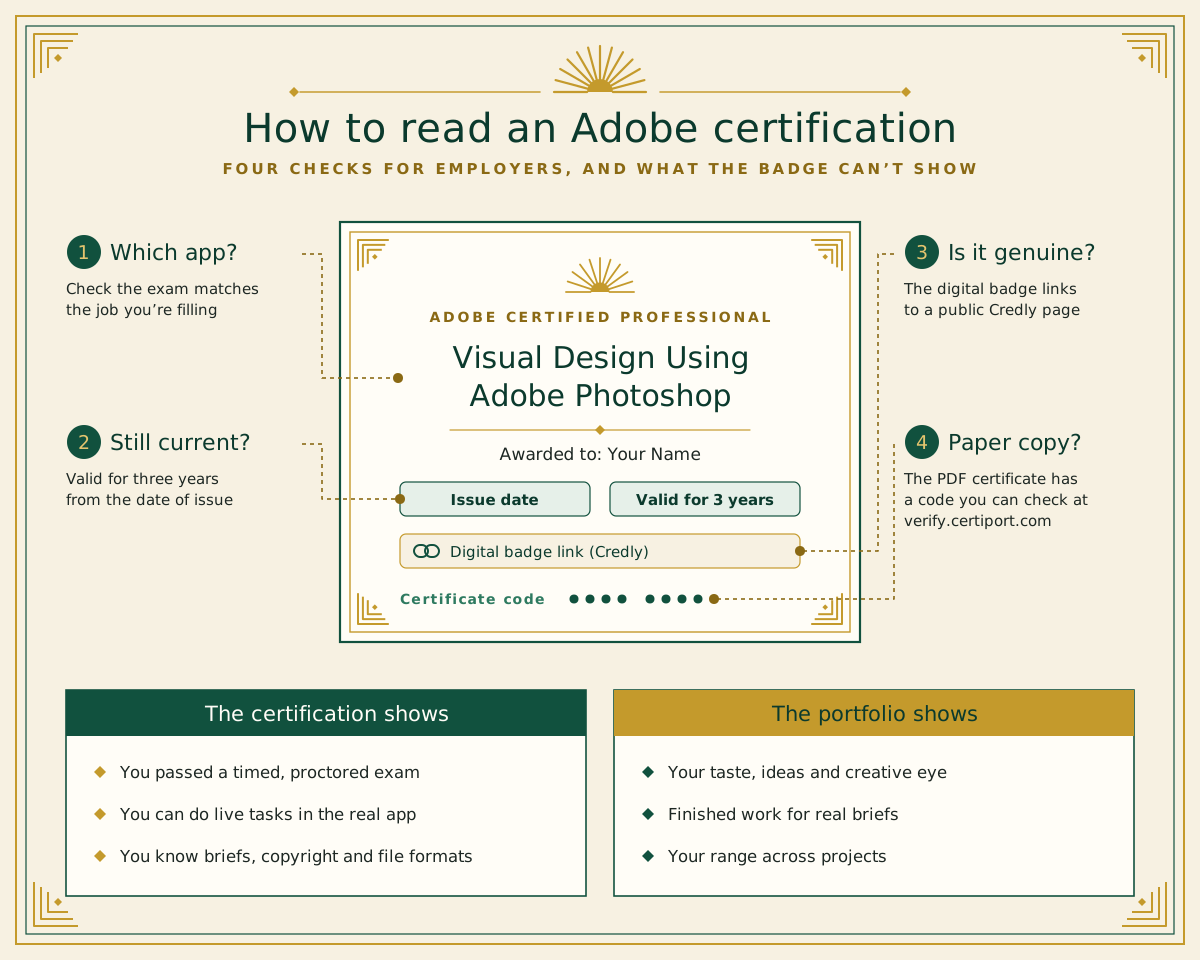
If you’re hiring, three quick checks tell you what a badge is worth:
Click the Credly link. Every digital badge has a public page showing what was earned.
Check the certificate code. If you’ve been sent a PDF certificate, its unique code can be checked at verify.certiport.com.
Look at the issue date. Certifications are valid for three years, then become non-current.
What does the exam really test?
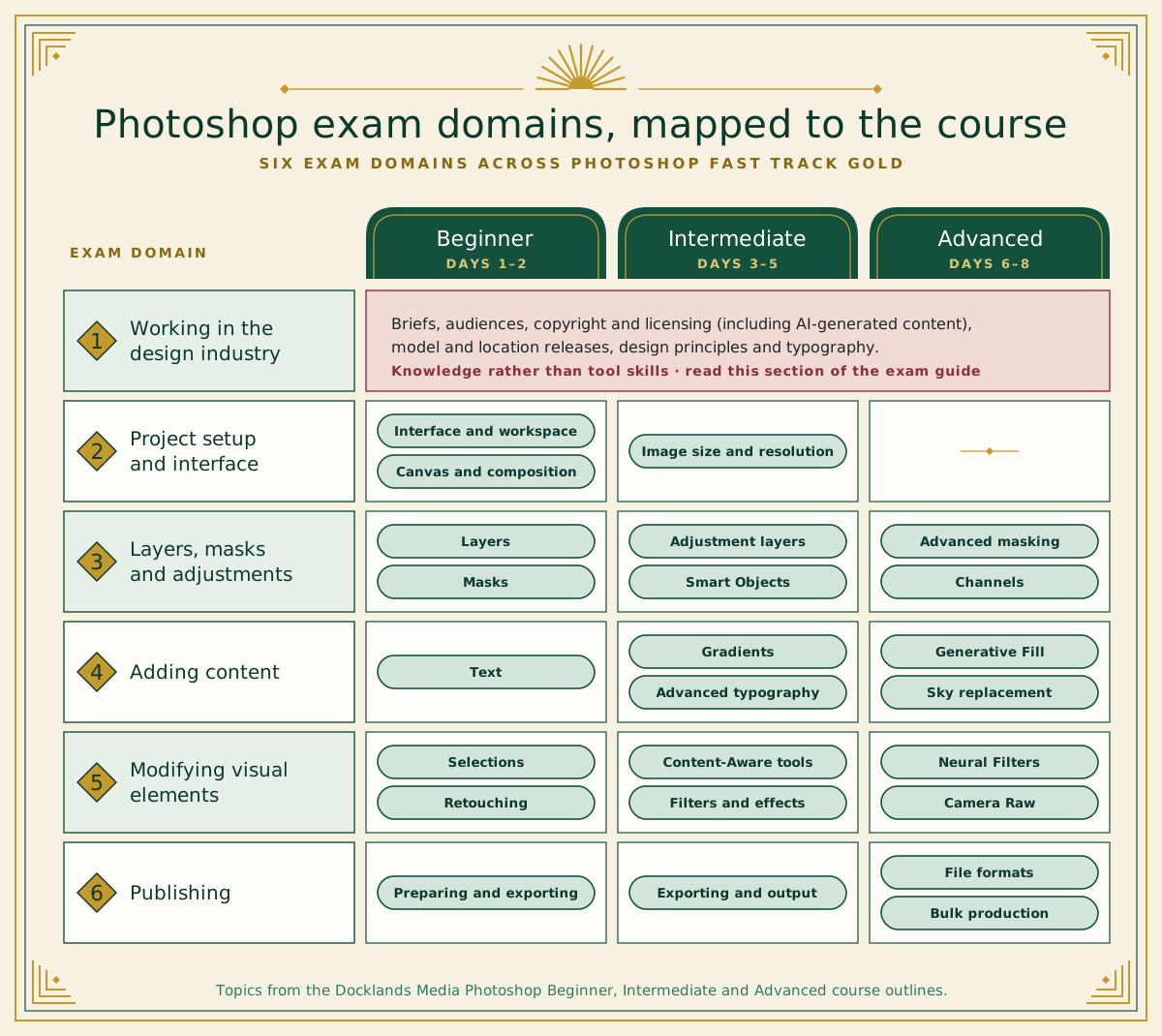
Read the official exam guides side by side and a pattern jumps out. Every creative-app exam opens with the same kind of domain, Working in the Design Industry (or the Video Industry, for Premiere), and ends with publishing and exporting. The software skills sit in the middle.
For Photoshop, that first domain covers things tutorials rarely mention: briefs and audiences, project management, copyright and licensing (including for AI-generated content), model and location releases, design principles and typography. InDesign and Premiere add accessibility, from alt text and colour contrast to captions and audio description.
Our inference is that self-taught candidates are most likely to be caught out at the two ends of the exam, not in the middle. They know their way round layers and masks, but may never have had to think about usage rights or export settings for print versus screen. If that’s you, the industry domain is the easiest marks you’ll ever earn, so read that section of the exam guide carefully.
Here’s how the six Photoshop domains line up with the eight days of Photoshop Fast Track Gold, which combines Photoshop Beginner, Photoshop Intermediate and Photoshop Advanced. For a closer look at the Photoshop exam alongside learning time, see how long it takes to learn Photoshop.
Adobe Certified Professional myths, and what’s actually true
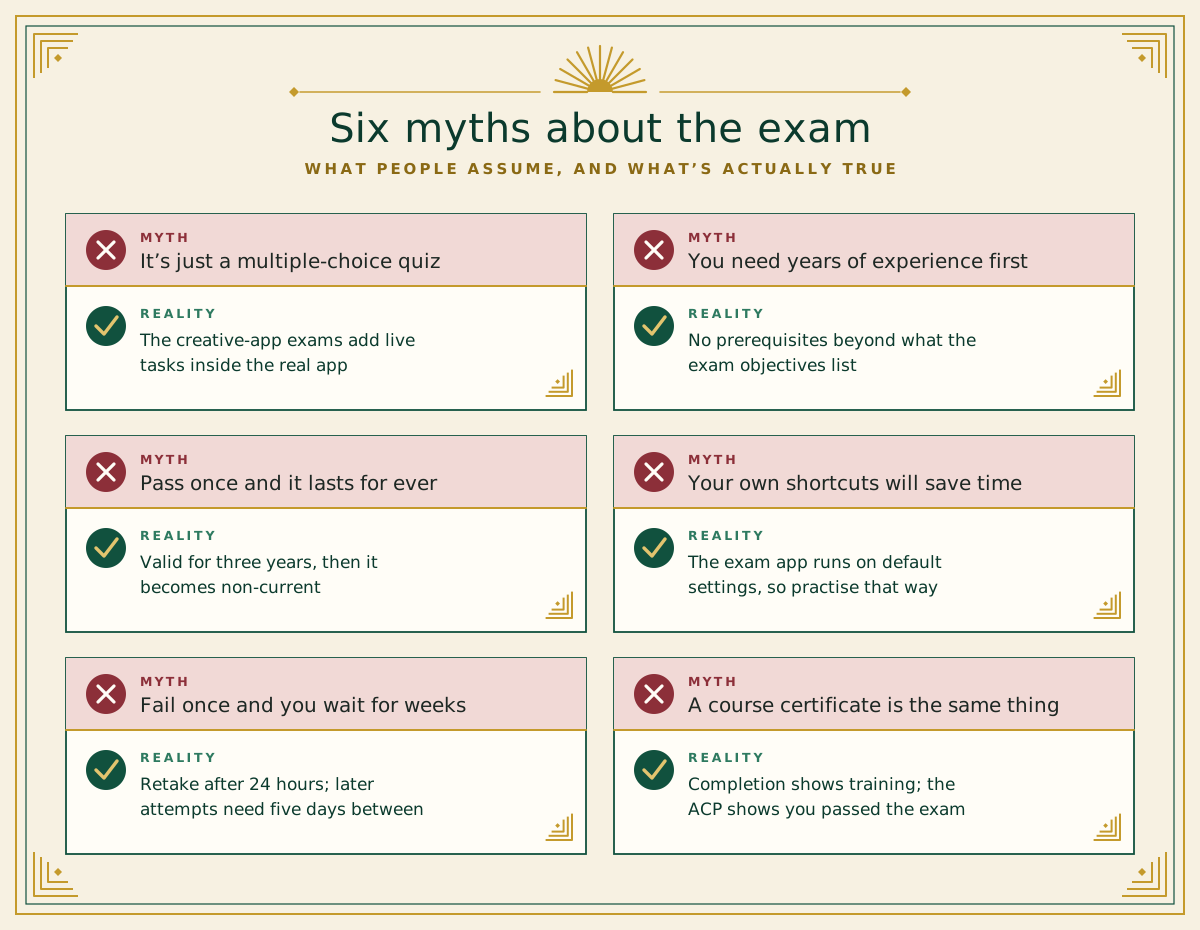
Myth: it’s a multiple-choice quiz. In the creative-app exams, part of the test is live tasks in the app. You can’t guess your way through those.
Myth: you need years of experience first. Certiport says there are no prerequisites beyond what’s in the exam objectives. What you need is solid coverage of those objectives, and that’s exactly what a Fast Track is built around.
Myth: once you pass, it lasts for ever. It’s valid for three years from the issue date, then becomes non-current.
Myth: your own shortcuts will save you time. The exam app runs on default settings and isn’t linked to your Adobe account, so your custom shortcuts and workspaces won’t be there.
Myth: fail once and you’ll wait weeks to try again. Under Certiport’s retake policy, you wait 24 hours before a second attempt and at least five days before any after that.
Myth: a course certificate and ACP are the same thing. Not quite. A certificate of completion shows you’ve done the training; ACP shows you’ve passed Adobe’s exam. You can have both.
How to prepare for the Adobe Certified Professional exam
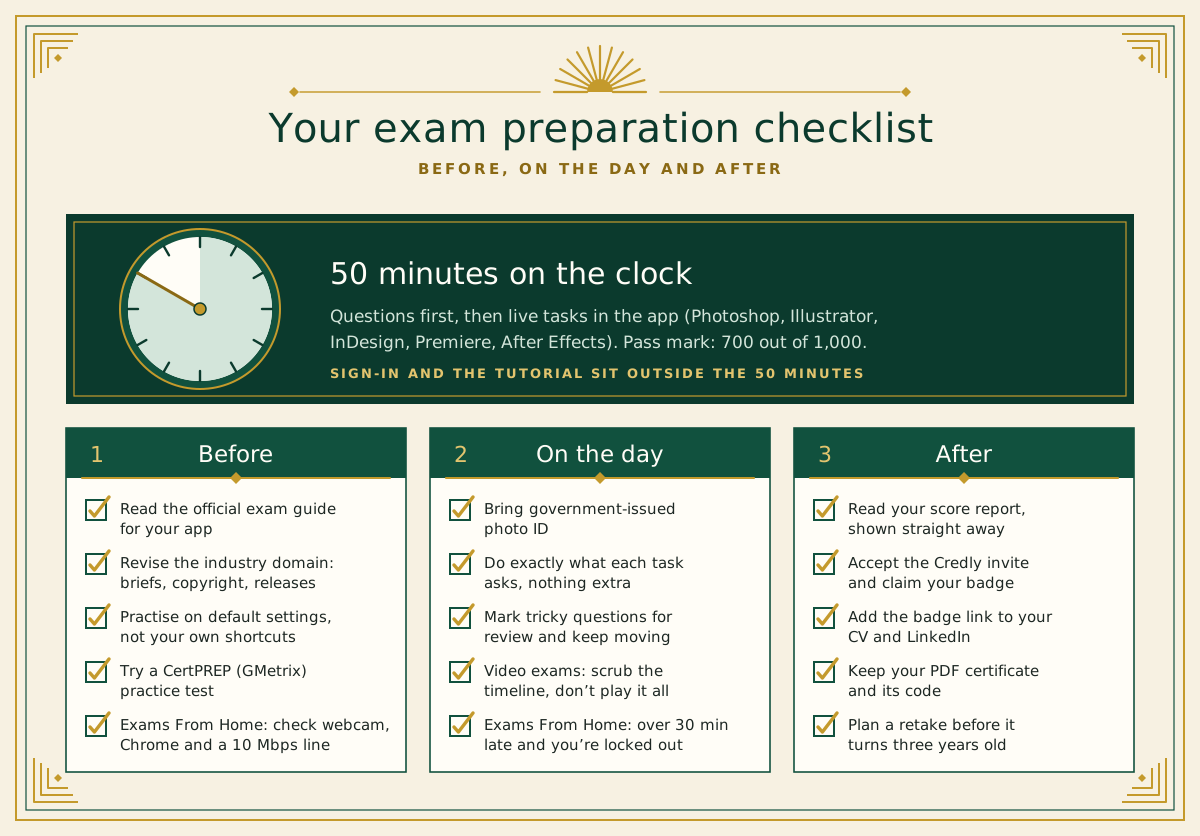
Here’s a practical checklist, in the order you’ll need it:
Download the official exam guide for your app and tick off each objective you can do without looking it up.
Revise the industry domain: briefs, audiences, copyright, licensing and releases.
Practise in the default workspace and shortcuts, and try a CertPREP practice test (powered by GMetrix), which Adobe recommends.
On tasks, do exactly what’s asked and nothing more. Experienced trainers warn that extra edits only cost you time.
Mark tricky questions for review and come back to them.
In the Premiere and After Effects exams, scrub the timeline or play just the part you changed, rather than playing the whole video.
Taking it from home? Check your webcam, use Chrome, make sure you have at least 10 Mbps download speed, and clear your desk of phones, paper and pens. Be on time: more than 30 minutes late and you’re locked out.
Once you’ve passed, accept the Credly invitation and add the badge link to your CV, LinkedIn profile and portfolio site.
Taking the exam with Docklands Media
Docklands Media is an Adobe authorised training partner and a Certiport Authorised Testing Centre, so you can train and certify in the same place. You can sit the exam at our London premises or remotely as an Exams From Home session.
The quickest route is a Fast Track. Each comes in two sizes: Silver (5 days, covering the Beginner and Intermediate levels) and Gold (8 days, covering all three levels). They’re designed to prepare you to take and pass the ACP exam at the end of the course, while everything’s still fresh. If you can’t take several days off in a row, a Fast Track can be split across non-consecutive dates.
Choose from Photoshop Silver or Photoshop Gold, Illustrator Silver or Illustrator Gold, InDesign Silver or InDesign Gold, Premiere Silver or Premiere Gold, and After Effects Silver or After Effects Gold, in London or live online. Every course includes a certificate of completion, whether or not you take the exam. If motion is where you’re heading, see what you can make after an After Effects beginner course, or browse all our Photoshop courses.