Open Photoshop’s Export As menu and look for SVG, the format websites use for crisp, scalable logos. You won’t find it. Adobe discontinued the option, saying the feature had always been experimental. That one missing menu item says a lot about which app to use for a logo.
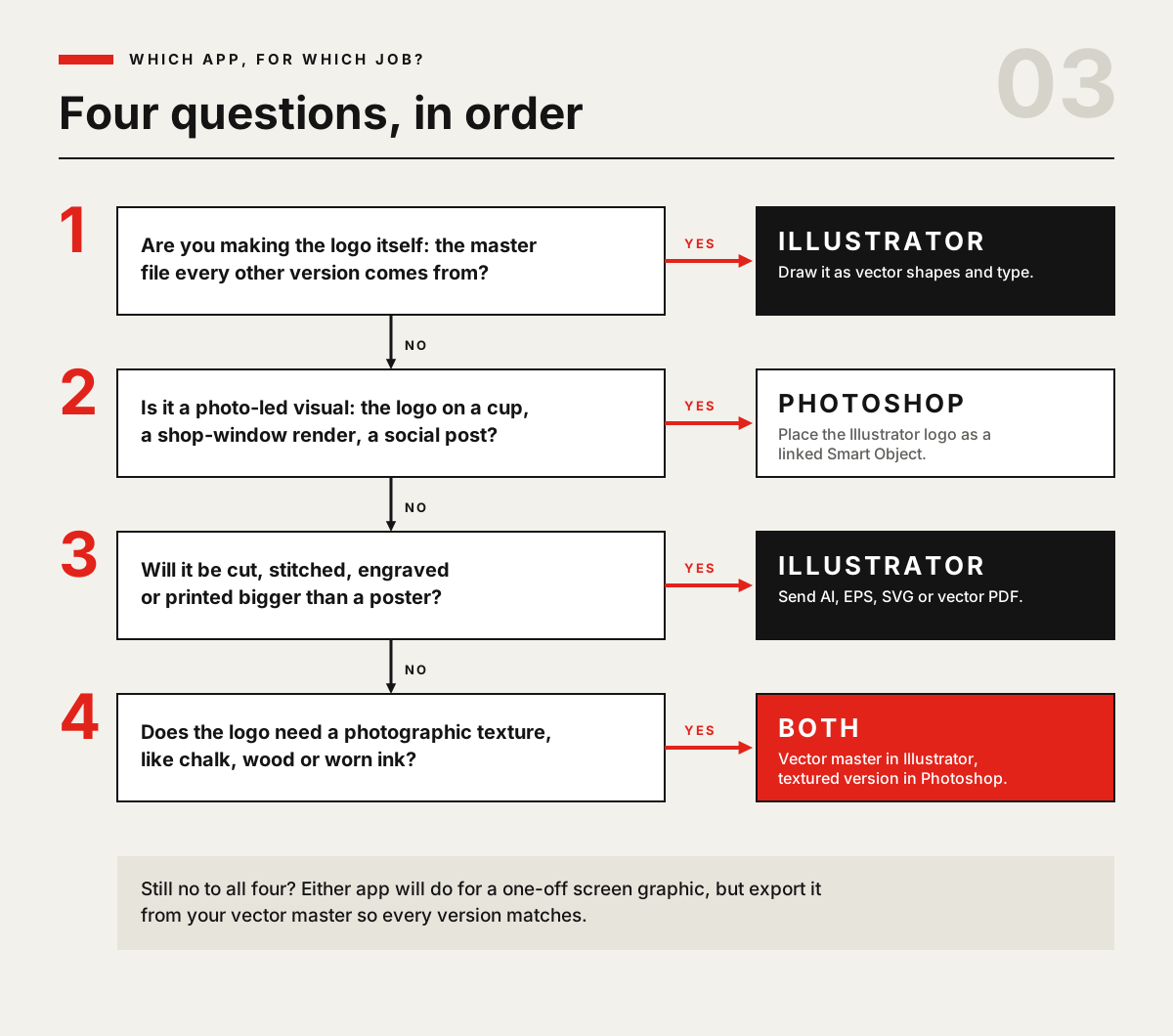
Use Illustrator to design the logo itself. It draws in vectors, shapes defined by points and curves, so the same file prints sharply on a business card or a shop sign, and sign makers and embroiderers can work from it. Use Photoshop for what happens around the logo: mockups on cups and shopfronts, social posts and photo-based versions. Most small businesses end up needing both, in that order.
This guide follows one logo through the places it will actually end up, and shows what goes wrong if it starts life in the wrong app.
Vector vs pixel: what changes when your logo gets bigger?
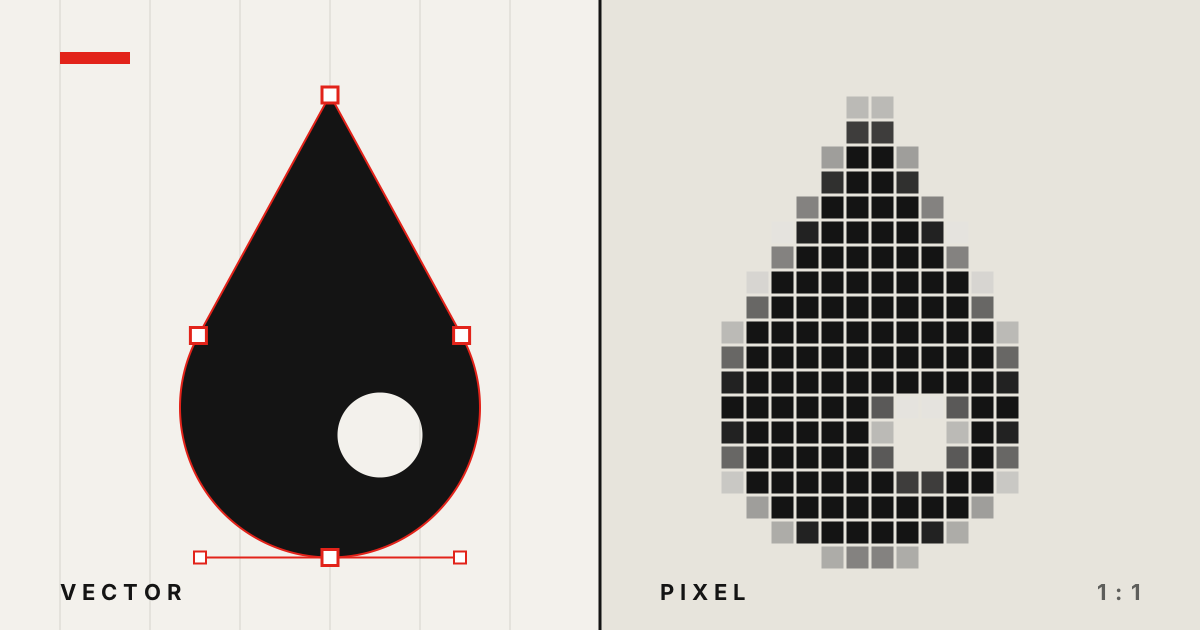
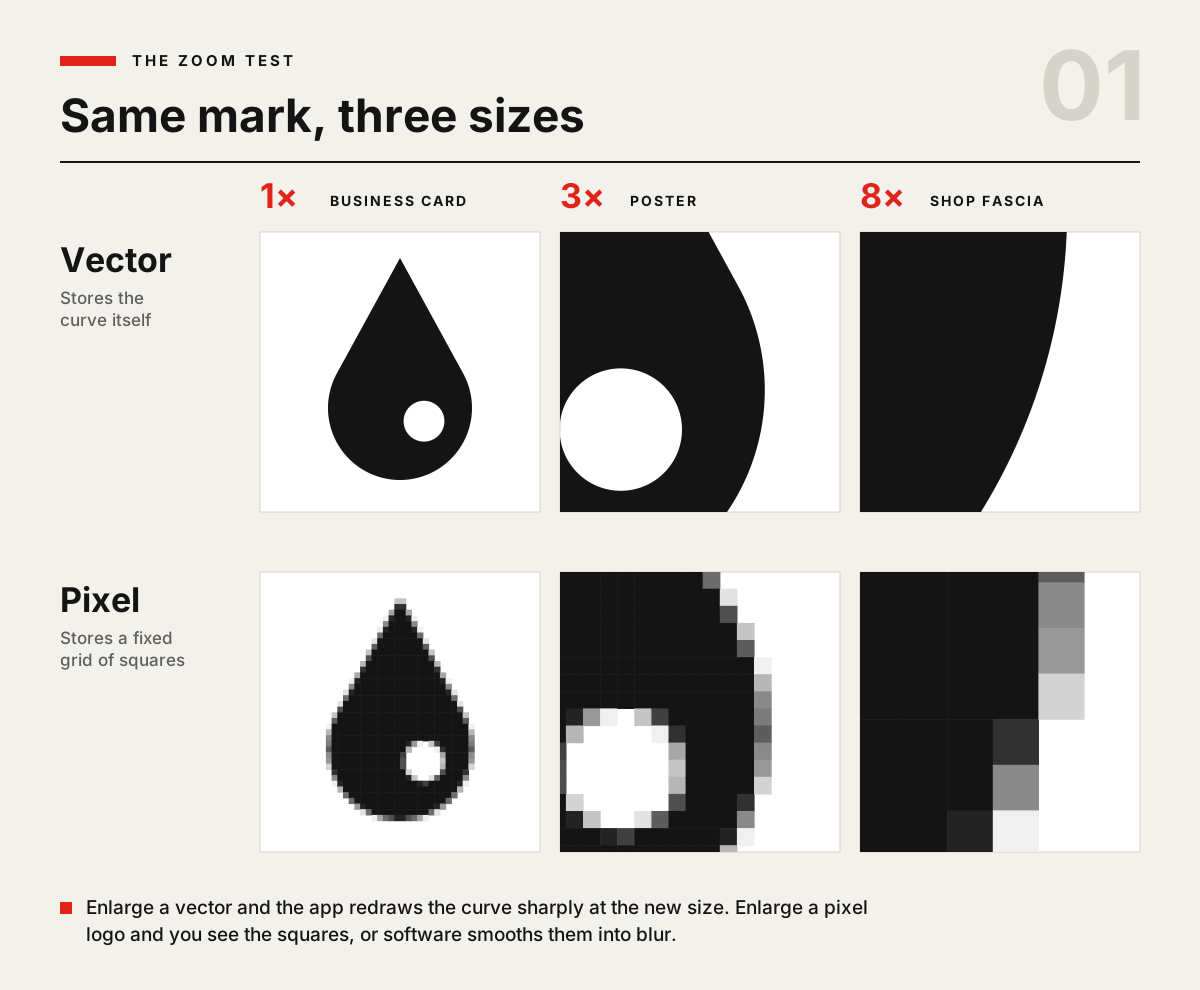
A Photoshop image is a fixed grid of coloured squares. A 500-pixel logo has 500 squares across, and enlarging it doesn’t add detail. The software either shows bigger squares or smooths them into blur. An Illustrator file stores the shape itself: an anchor point here, a curve there. Scale it up and the app simply redraws the curve at the new size.
On screen at its original size, you often can’t tell the difference. It shows up the first time someone needs the logo bigger, smaller or in a different colour. Recolouring a vector logo is a click in Illustrator’s Recolour panel. Recolouring a flattened pixel logo means reselecting every edge.
Follow one logo through a small business
Most comparisons stop at “vectors scale”. It’s more useful to list where a small-business logo really goes and check what each supplier asks for.
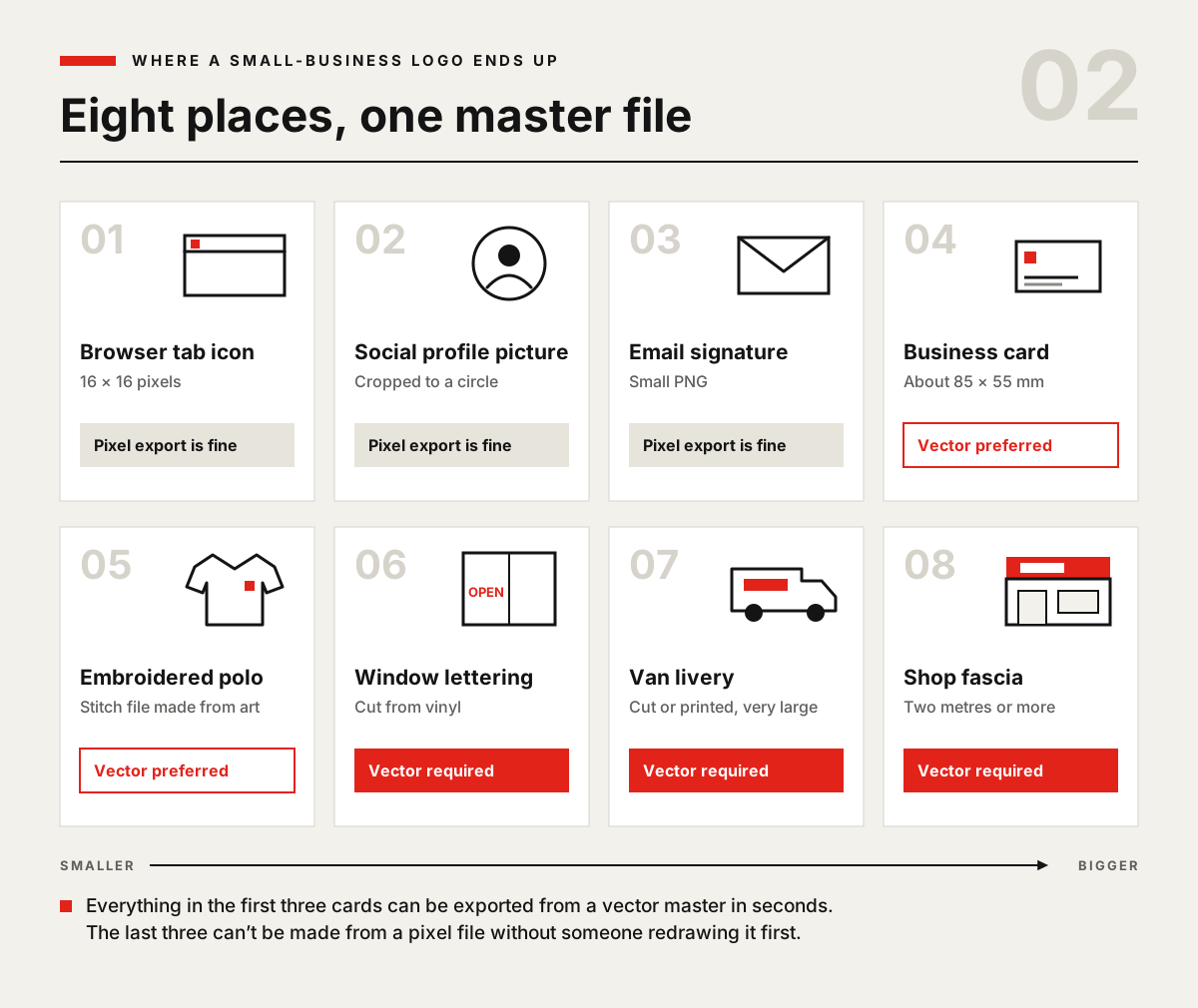
Browser tab icon. Favicons are commonly supplied at 16 × 16 and 32 × 32 pixels. At the smallest size that’s 256 pixels in total, so fine detail disappears. You export these as pixels, but you’ll get a cleaner result from a simple vector master than by shrinking a detailed image.
Social profile picture and email signature. Pixel exports are fine. Just remember social platforms crop to a circle, so the mark needs to sit comfortably inside one.
Business cards and printed leaflets. Printers will often accept a high-resolution image, but a vector logo keeps type and edges crisp at any size.
Embroidered polos and caps. Embroiderers prefer vector artwork (AI, EPS, SVG or PDF). Even then, the design has to be “digitised” into a stitch file. Thin lines and very small text often won’t survive in thread, so a simpler mark costs less to adapt.
Window lettering, van graphics and shop signs. Cut vinyl is made by a blade following vector paths, so sign makers ask for AI, EPS, SVG or vector PDF. Several sign suppliers say plainly that they can’t cut from a JPG or PNG and will need to redraw it first.
Here’s the pattern we see: everything a small business does on screens can survive a pixel logo. The physical jobs, which are usually the expensive ones, are where a pixel logo stops you. And you tend to discover that late, when the sign maker emails asking for “the vector file”.
The one-way street: why fixing it later costs more
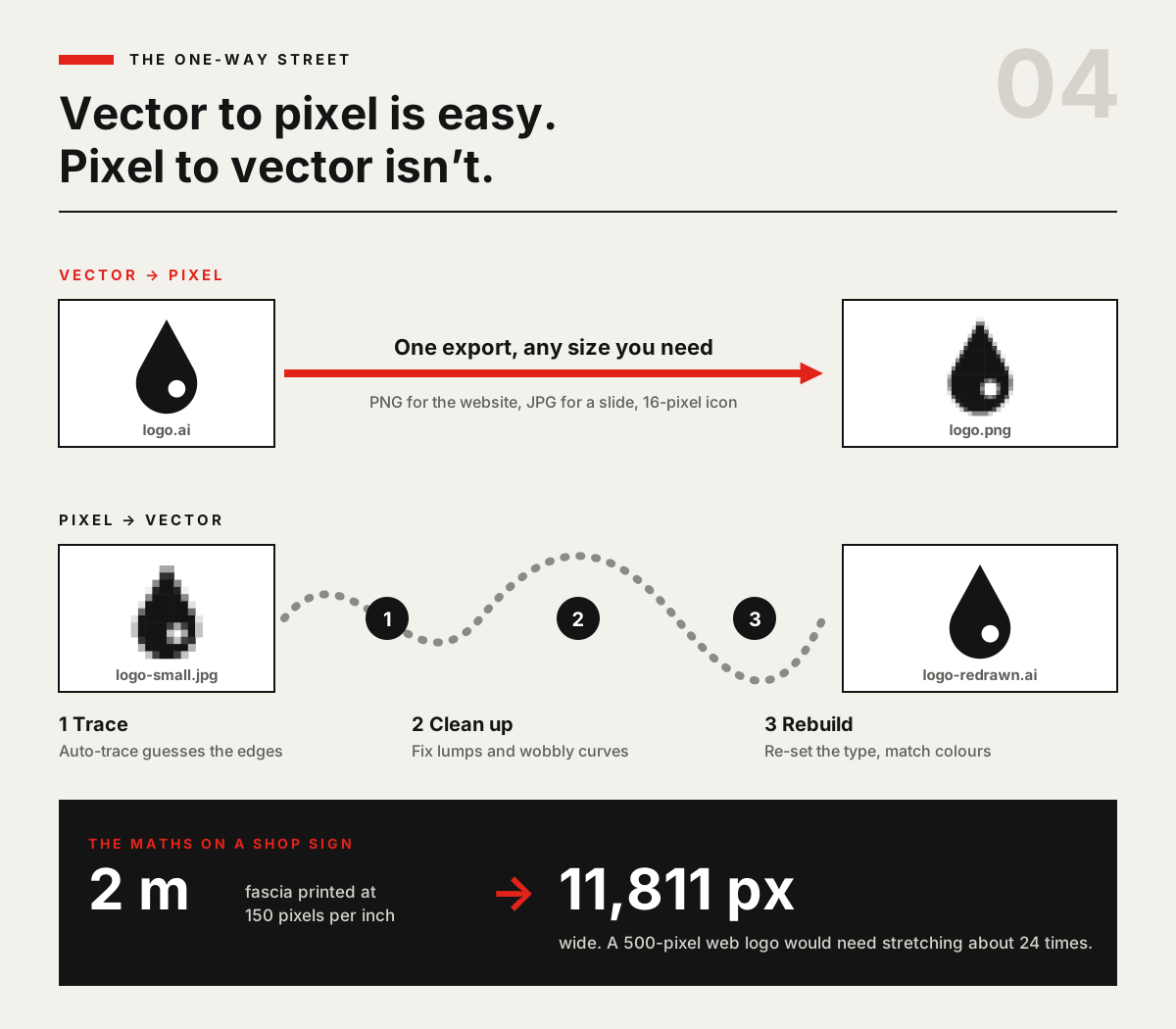
Going from vector to pixel is one export. Going from pixel to vector means someone has to trace the shapes, clean up the lumpy curves and rebuild the type. Sign suppliers that offer this usually charge a redesign fee, and those that try an automatic trace warn that they can’t guarantee the quality.
The numbers show why stretching doesn’t work. One US sign supplier suggests printing large signs at full size at 150 pixels per inch. A 2-metre fascia at that resolution is about 11,800 pixels wide. A typical 500-pixel website logo would need stretching about 24 times to fill it. No upscaling tool can invent edges that were never stored.
Our view (and it is an opinion): the master logo should always be a vector, even if your first use is only Instagram. The extra effort comes once, at the start. Skipping it costs you every time the logo goes somewhere new.
Already made your logo in Photoshop?
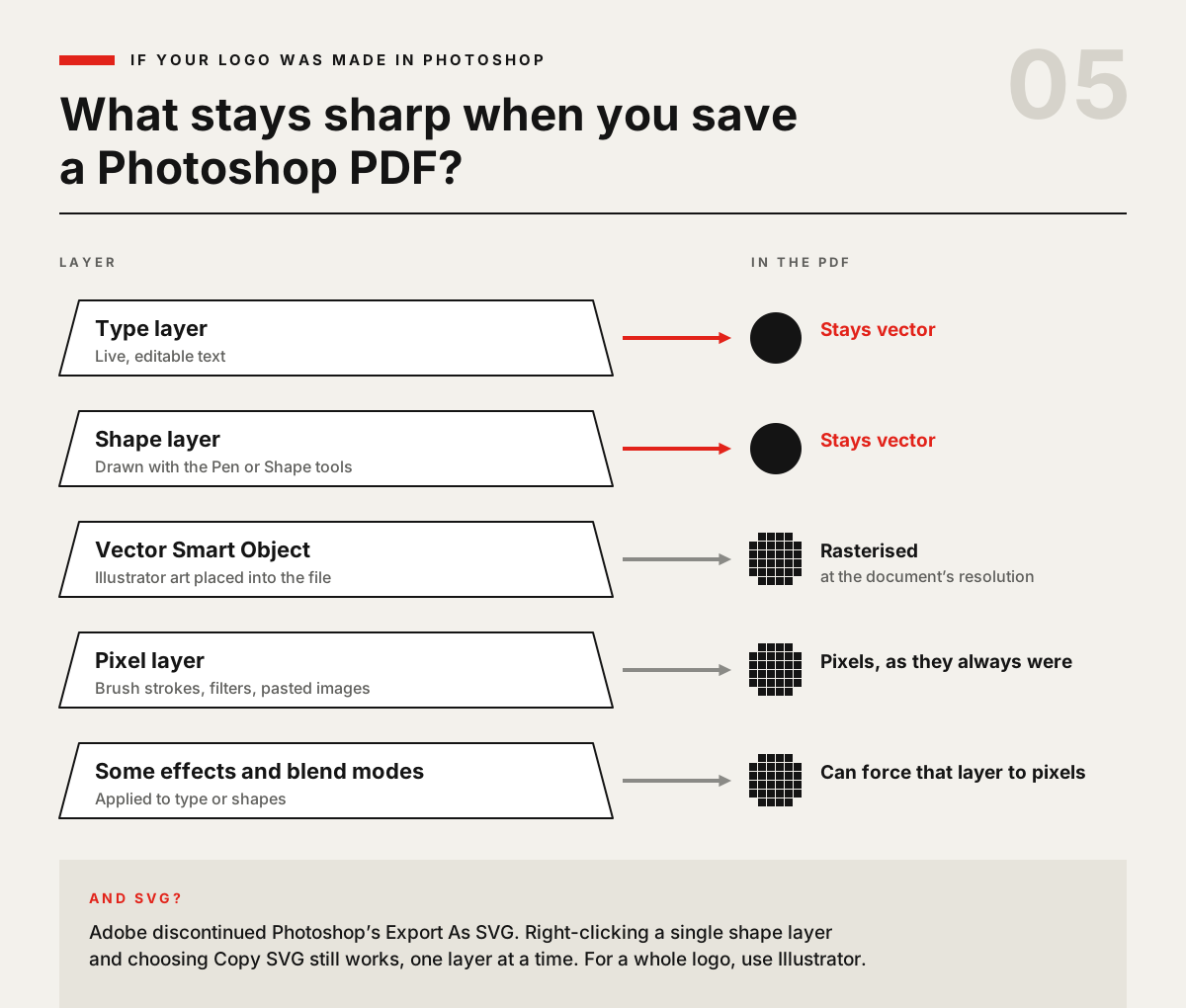
Don’t panic. Photoshop isn’t purely a pixel editor. It has a Pen tool, Shape tools and live type, and those layers are vectors. Save the file as a Photoshop PDF with layers kept, and Adobe’s community experts confirm that type and shape layers come out as vectors. Everything else, including Illustrator artwork placed as a Smart Object, is rasterised at the document’s resolution. Adobe’s printing help also notes that some blend modes and layer effects force vector layers into pixels.
So check how your logo was built:
Built from shape and type layers? Open the Photoshop PDF in Illustrator, check the edges stay sharp when you zoom right in, and save a proper AI master from there.
Painted, filtered or pasted in as an image? It’s pixels. Illustrator’s Image Trace can turn a clean, high-contrast version back into paths, but expect to tidy the curves and reset the lettering by hand.
Need an SVG? Right-click a single shape layer and choose Copy SVG, which still works one layer at a time. For a full logo, Illustrator is the straightforward route.
Image Trace and clean-up are covered on our Illustrator Intermediate course, if rescuing an old logo is your starting point.
Where Photoshop is the better tool
None of this makes Photoshop a bad choice for branding work. It’s the right app for the jobs that involve photos.
Logo-related job | Better app | Why |
|---|---|---|
Designing the mark and wordmark | Illustrator | Vector paths, editable type, easy recolouring |
Supplying files to sign makers and embroiderers | Illustrator | They ask for AI, EPS, SVG or vector PDF |
Mockups on cups, bags and shopfronts | Photoshop | Perspective, lighting and blending with photos |
Social posts and adverts with photography | Photoshop | Retouching, masking and photo compositing |
A distressed or textured version for screens | Both | Keep a flat vector master, add texture in Photoshop |
Browser and app icons | Illustrator, then export | A simple vector exported to small pixel sizes |
The two apps work best together. Adobe’s own advice is to keep the logo in Illustrator and place it into Photoshop as a linked file. Update the Illustrator logo and every Photoshop mockup that links to it updates too. Smart Objects, the feature behind this kind of mockup, are taught on our Photoshop Intermediate course, and building full mockups is part of Photoshop Advanced. If you’re new to Photoshop, start with Photoshop Beginner, and our guide to how long it takes to learn Photoshop sets realistic expectations.
Briefing a designer instead? Ask for the file pack
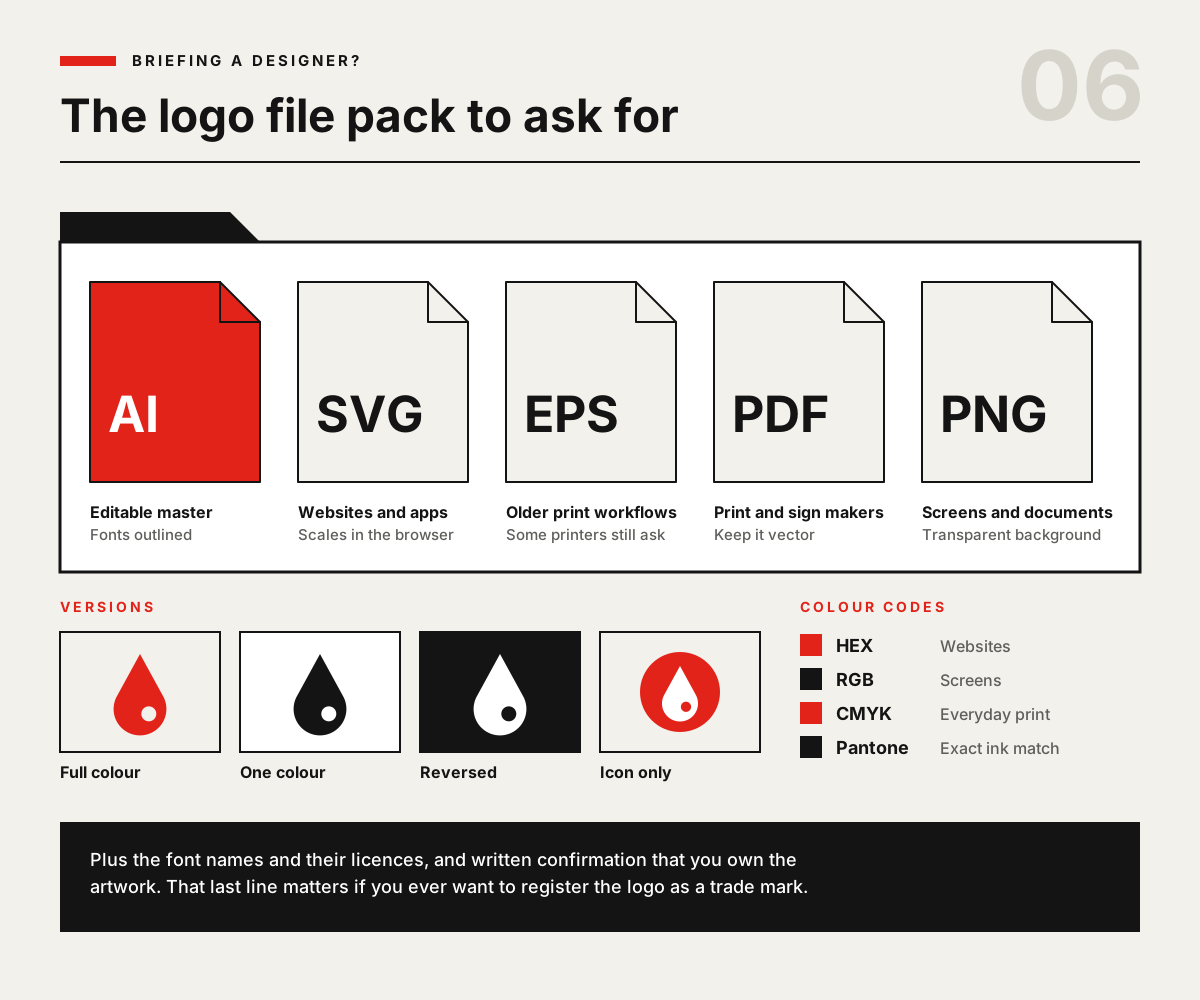
Many small businesses don’t design their own logo, and that’s fine. The risk is ending up with only a PNG. When you commission a logo, ask for these in writing at the start:
Formats: AI (editable master, with fonts converted to outlines), SVG, EPS, vector PDF and transparent PNGs.
Versions: full colour, one colour, reversed (white) and icon only. Horizontal and stacked layouts are useful too.
Colour codes: HEX and RGB for screens, CMYK for print, and a Pantone reference if you’ll ever need an exact ink match.
Fonts and ownership: the typeface names, their licences, and confirmation that you own the artwork.
One related trap for DIY logos: Canva’s own help pages say logos built from its stock graphics or templates can’t be registered as trade marks. If you might want to protect your logo one day, it needs to be original artwork, and a vector master in Illustrator gives you that.
Learning to make logos yourself
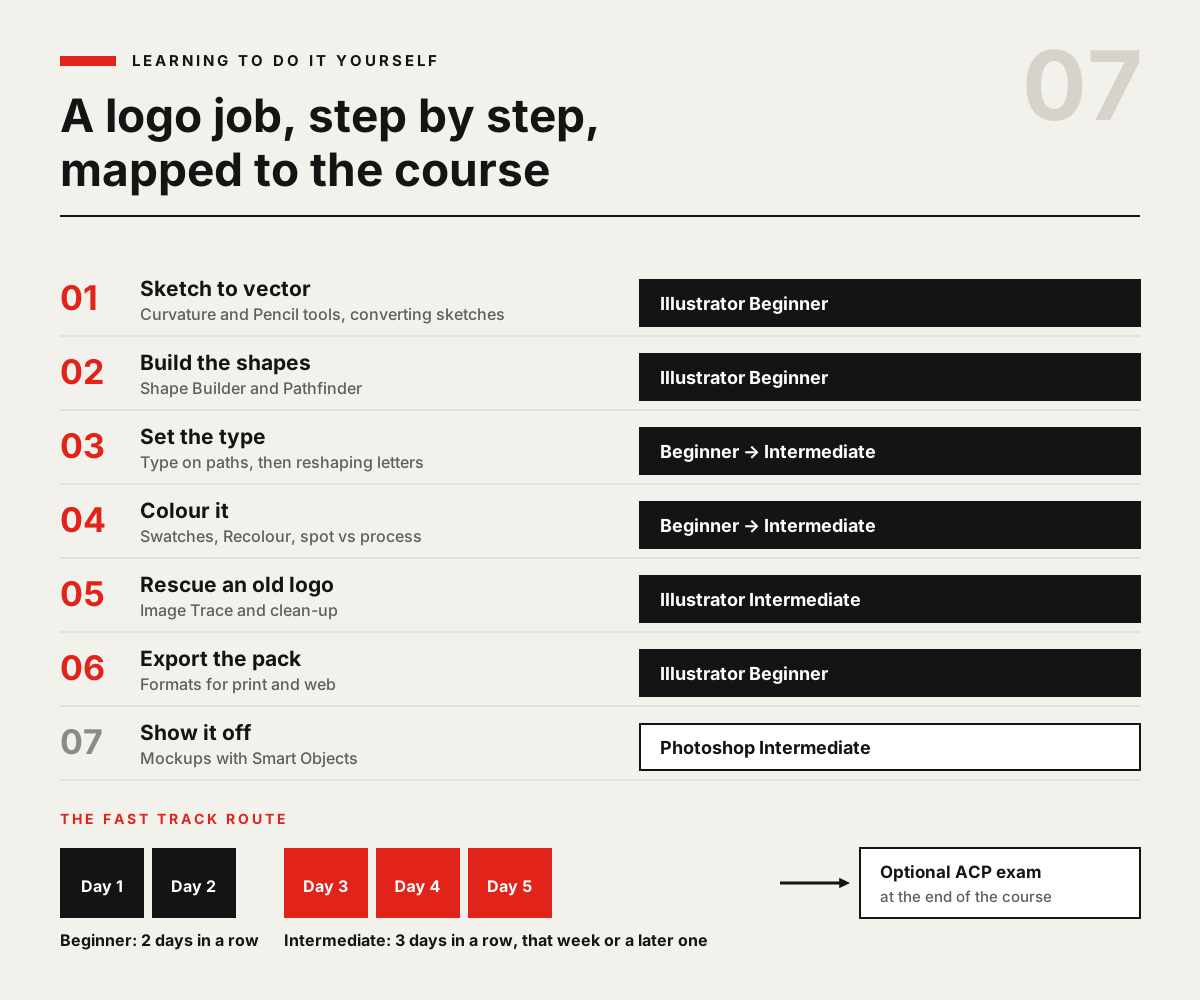
If you’d rather build the skill in-house, the logo workflow maps neatly onto the course levels. Our two-day Illustrator Beginner course covers what a first logo needs: the Curvature and Pencil tools, turning sketches into vector artwork, Shape Builder and Pathfinder, type, swatches and recolouring, and exporting for print and web. The three-day Illustrator Intermediate course adds the Pen tool in depth, reshaping letterforms, spot vs process colour and Image Trace. And the Advanced course covers print output in detail. Every course comes with a certificate of completion.
If you want to go further, Illustrator Fast Track Silver (five days) and Illustrator Fast Track Gold (eight days) prepare you to sit and pass the Adobe Certified Professional exam, Graphic Design & Illustration Using Adobe Illustrator, at the end of the course. You don’t need to book a solid block of days. The Beginner level runs on two consecutive days, and the Intermediate level can follow in the same week or a later one. Our guide to the Adobe Certified Professional exam explains what it involves. Docklands Media is authorised by Adobe, Autodesk, Maxon, Blackmagic Design and Certiport, and you can take the exam with us in London or online.
Want all the core design apps at once? The Design Bundle Beginner covers the Beginner levels of Photoshop, Illustrator and InDesign together. For a wider look at how the apps divide up the work, see the key differences between Photoshop, Illustrator and InDesign.