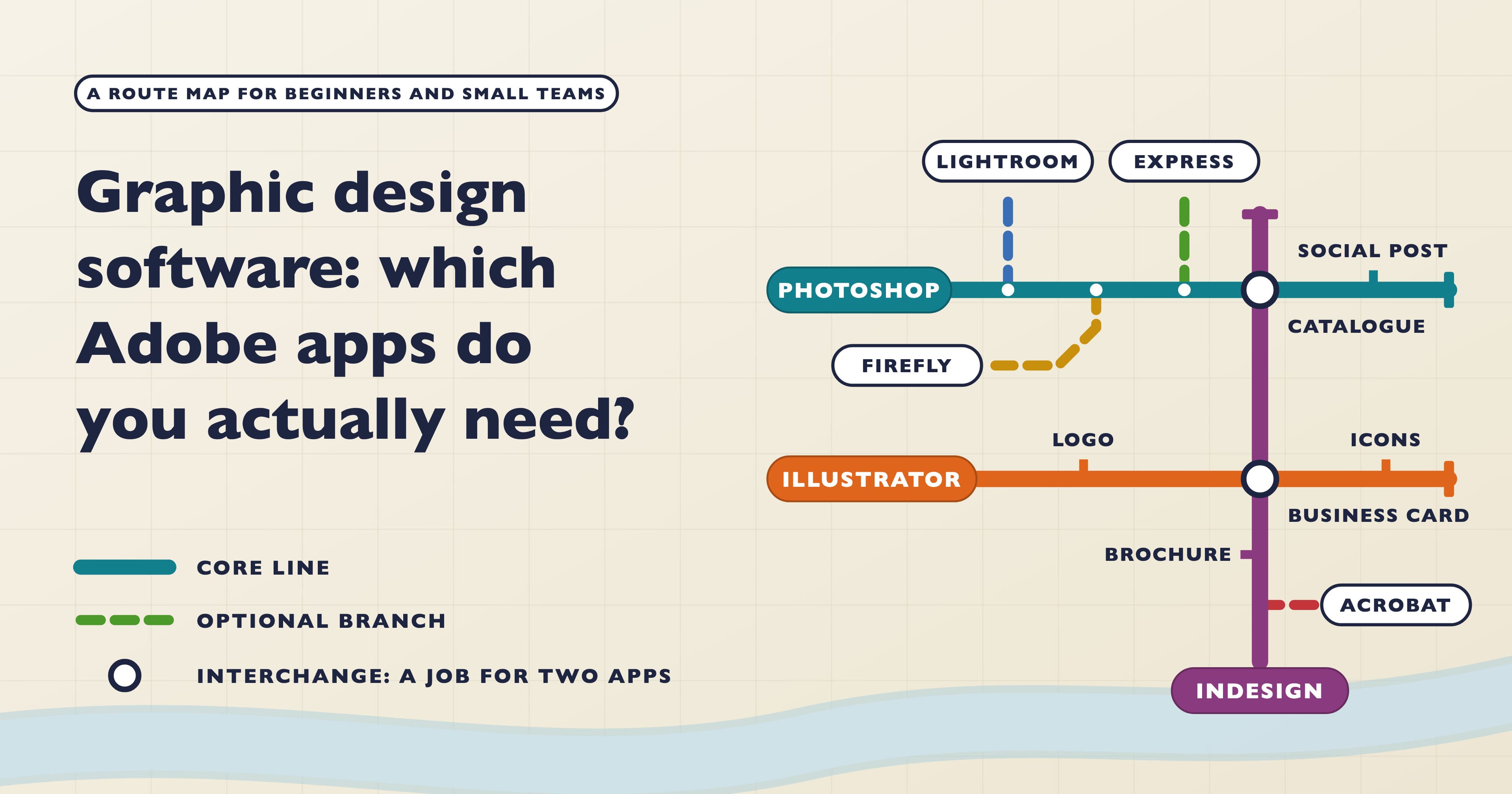
Do you really need all twenty-plus apps in Creative Cloud to do graphic design? No. Almost all print, brand and social work comes down to three of them: Photoshop for images, Illustrator for logos and graphics, and InDesign for anything with pages. Plenty of people only need one or two of those three, and everything else is optional.
Which one or two depends on what you send out most. Below you’ll find the seven apps worth knowing about, a job-by-app matrix, what you can safely skip, what UK employers ask for, four ready-made kits and the order we’d learn them in.
Seven Adobe apps for graphic design, from essential to optional
Photoshop: pixels. Photos, retouching, cut-outs, composites, social graphics and web banners. Generative Fill is built in, so you can extend a background or remove a stray object without leaving the app. Our Photoshop Beginner course covers layers, selections, masks, retouching and export.
Illustrator: paths. Logos, icons, illustrations, infographics and packaging. Vector artwork scales to any size without going soft, which is why a logo should never start life in Photoshop. Start with Illustrator Beginner.
InDesign: pages. Brochures, reports, catalogues, menus and multi-page PDFs. Paragraph styles, parent pages and automatic page numbers turn a long document from days of fiddling into a manageable job. InDesign Beginner covers all of that plus exporting for print and screen.
Adobe Express: quick content. Templated social posts, flyers and short videos in a browser or on your phone, with a free plan. Express can also turn PSD, AI and INDD files into editable Express files, which matters more than it sounds (more on that below).
Firefly: generating. Images, vectors and video from text prompts. Most designers meet it inside Photoshop and Illustrator first. Our one-day Firefly Beginner course covers prompts, generative fill and expand and bringing results into the other apps, and our post on Firefly and commercial use covers the rights side.
Acrobat Pro: finishing PDFs. Review comments, small text fixes, combining files and fillable forms.
Lightroom: photo libraries. Sorting, rating and batch-editing hundreds of photos. It comes paired with Photoshop in Adobe’s Photography plan.
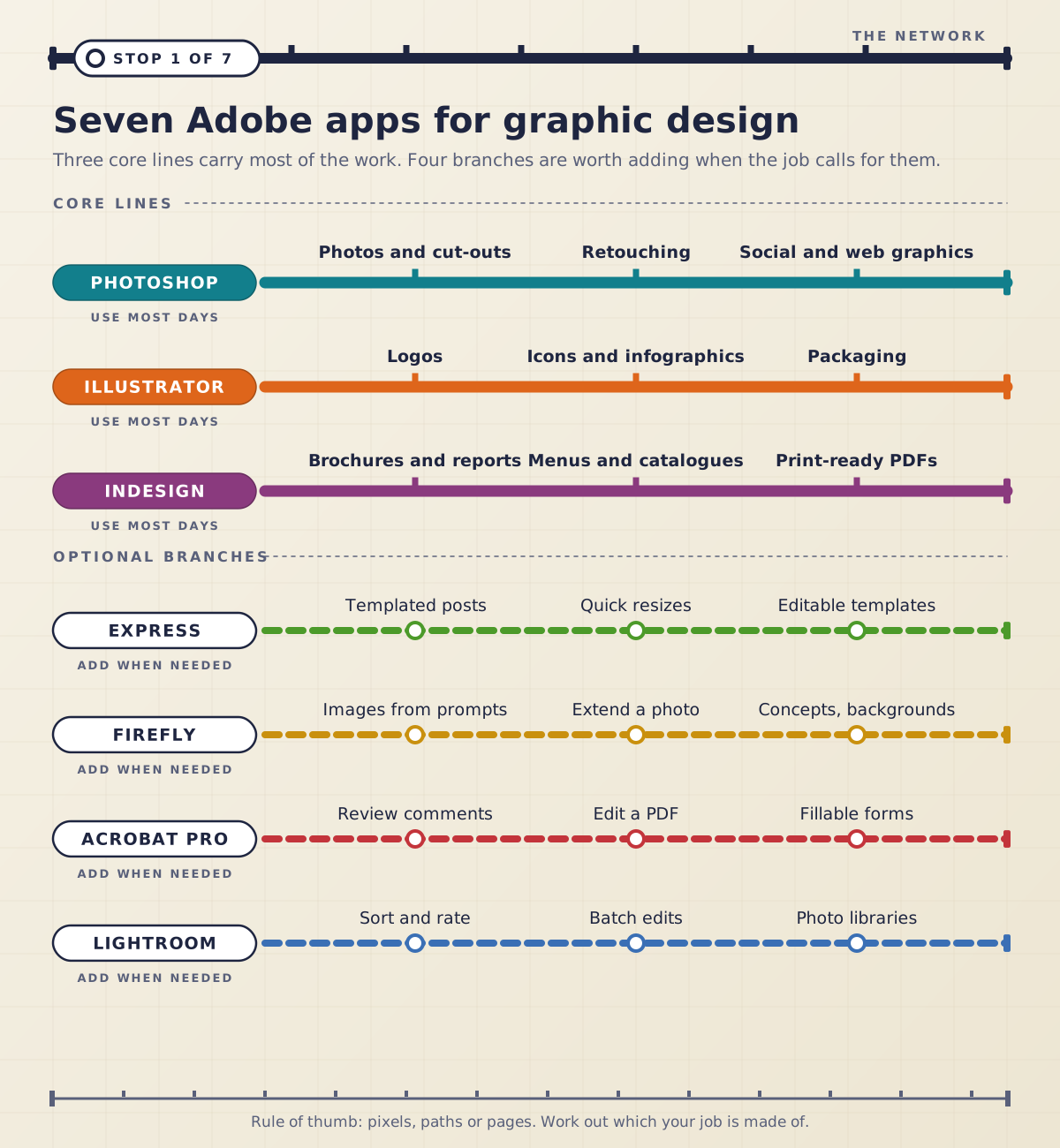
If you only remember one thing, make it this rule of thumb: pixels, paths or pages. Work out which of the three your job is mostly made of and you know which app it belongs in. For a longer look at how the three apps differ in general, see our guide to the key differences between Photoshop, Illustrator and InDesign.
Which app for which job?
Here are thirteen everyday design jobs and where we’d make each one. “Can do it” means the app copes but you’ll fight it a little.
Job | Photoshop | Illustrator | InDesign | Express |
|---|---|---|---|---|
Retouch or cut out a product photo | First choice | – | – | Can do it |
Social media post | First choice | Can do it | – | First choice |
Web banners in several sizes | First choice | Can do it | – | Can do it |
Photo composite or product mock-up | First choice | – | – | – |
Logo or brand mark | – | First choice | – | – |
Icons and infographics | – | First choice | – | – |
Packaging artwork | Can do it | First choice | – | – |
Business card or letterhead | – | First choice | First choice | – |
One-page poster or flyer | Can do it | First choice | Can do it | Can do it |
Brochure, report or catalogue | – | – | First choice | – |
Restaurant menu | – | Can do it | First choice | – |
Interactive PDF or form | – | – | First choice | – |
Template colleagues can edit | – | – | Can do it | First choice |
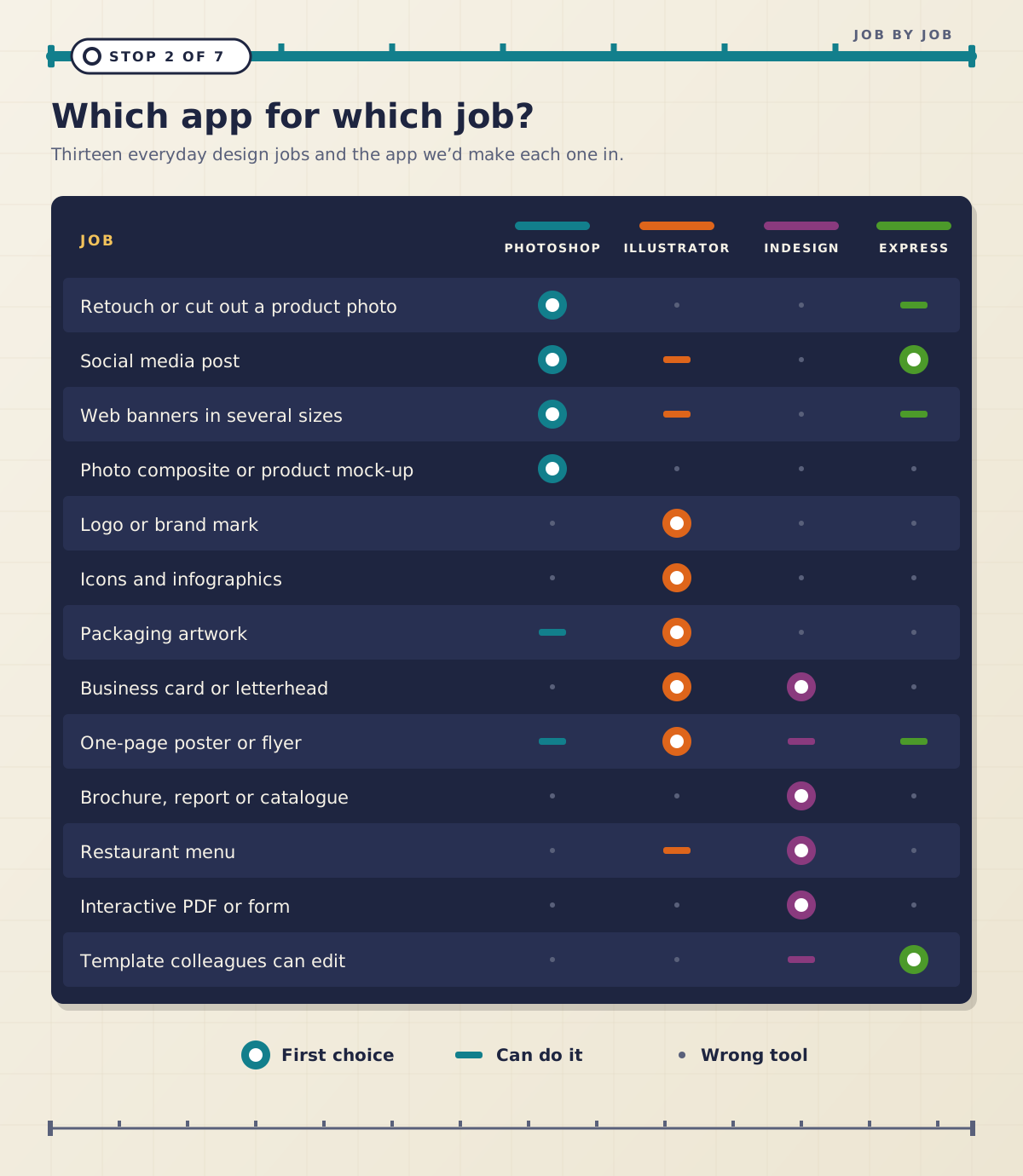
Notice how few rows have two first choices. Business cards and letterheads sit happily in Illustrator or InDesign, and social posts in Photoshop or Express. Everywhere else, one app is clearly the right home. The most common mistake we see is a logo drawn in Photoshop. It looks fine on screen, then turns blurry on a van or a pull-up banner. Our Illustrator vs Photoshop for logo design post explains why.
What can you skip?
The extra apps are useful, but each one earns its place only in certain situations.
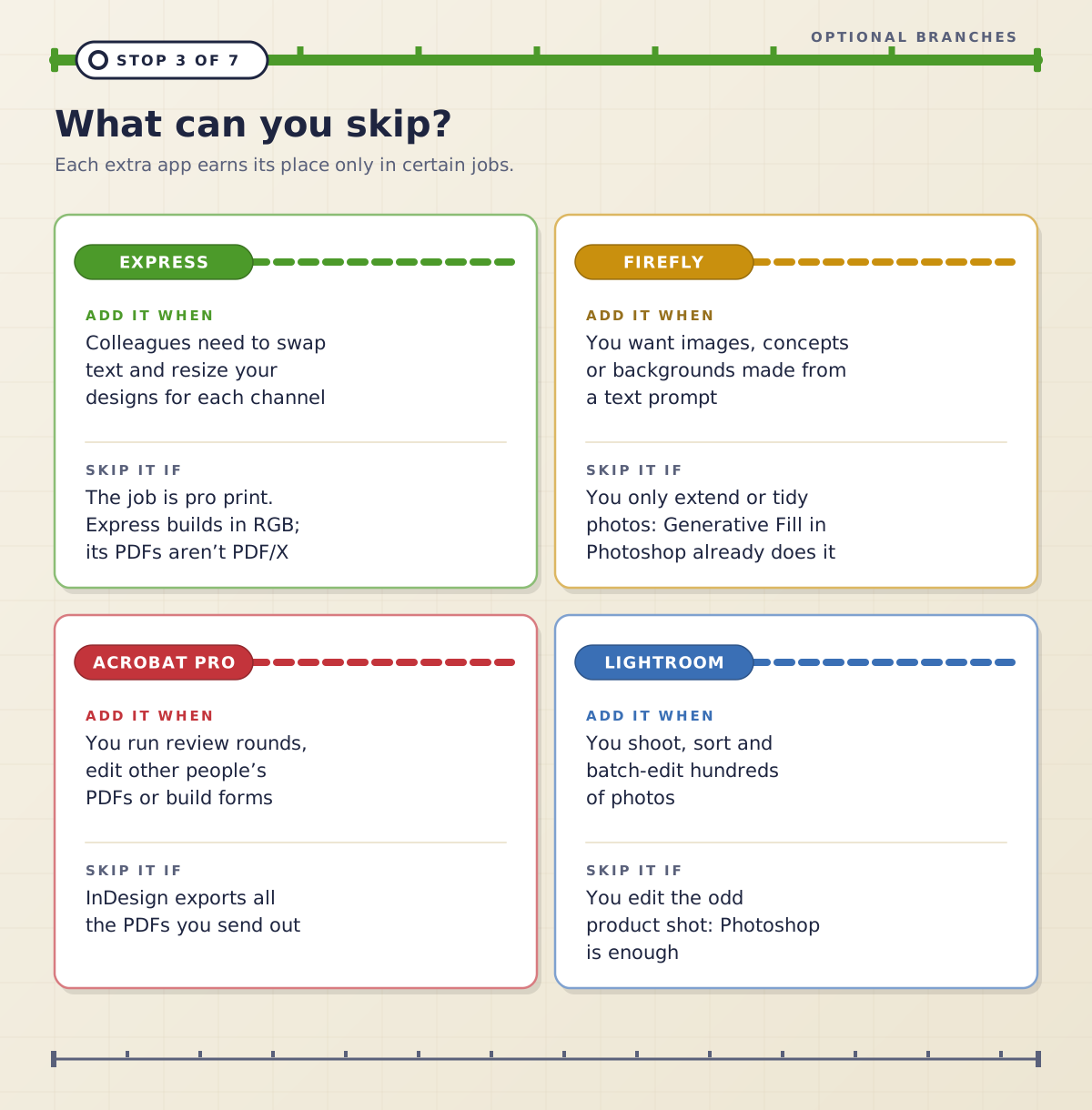
Express is worth adding when other people need to change your designs. A designer builds the master in Photoshop, Illustrator or InDesign, and the marketing team converts it to an Express file to swap text and resize it for each channel. Skip it for professional print work: Express designs are built in RGB, and although it can export a CMYK PDF, that file doesn’t fully meet the PDF/X standard most commercial printers ask for.
Firefly as a separate app is for generating images, concepts and backgrounds from scratch. If all you need is to extend or tidy a photo, Generative Fill in Photoshop does it.
Acrobat Pro is for review rounds, editing PDFs that someone else made and building forms. InDesign exports print-ready PDFs on its own, so a lot of designers rarely open Acrobat.
Lightroom pays off if you shoot and sort hundreds of photos. For the odd product shot, Photoshop is enough.
What do UK job ads actually ask for?
We read 57 unique UK job ads on Reed, from searches for graphic designer, marketing designer, marketing executive and social media designer roles. We left out UX and product design posts, because they are a different job. Two things stood out.
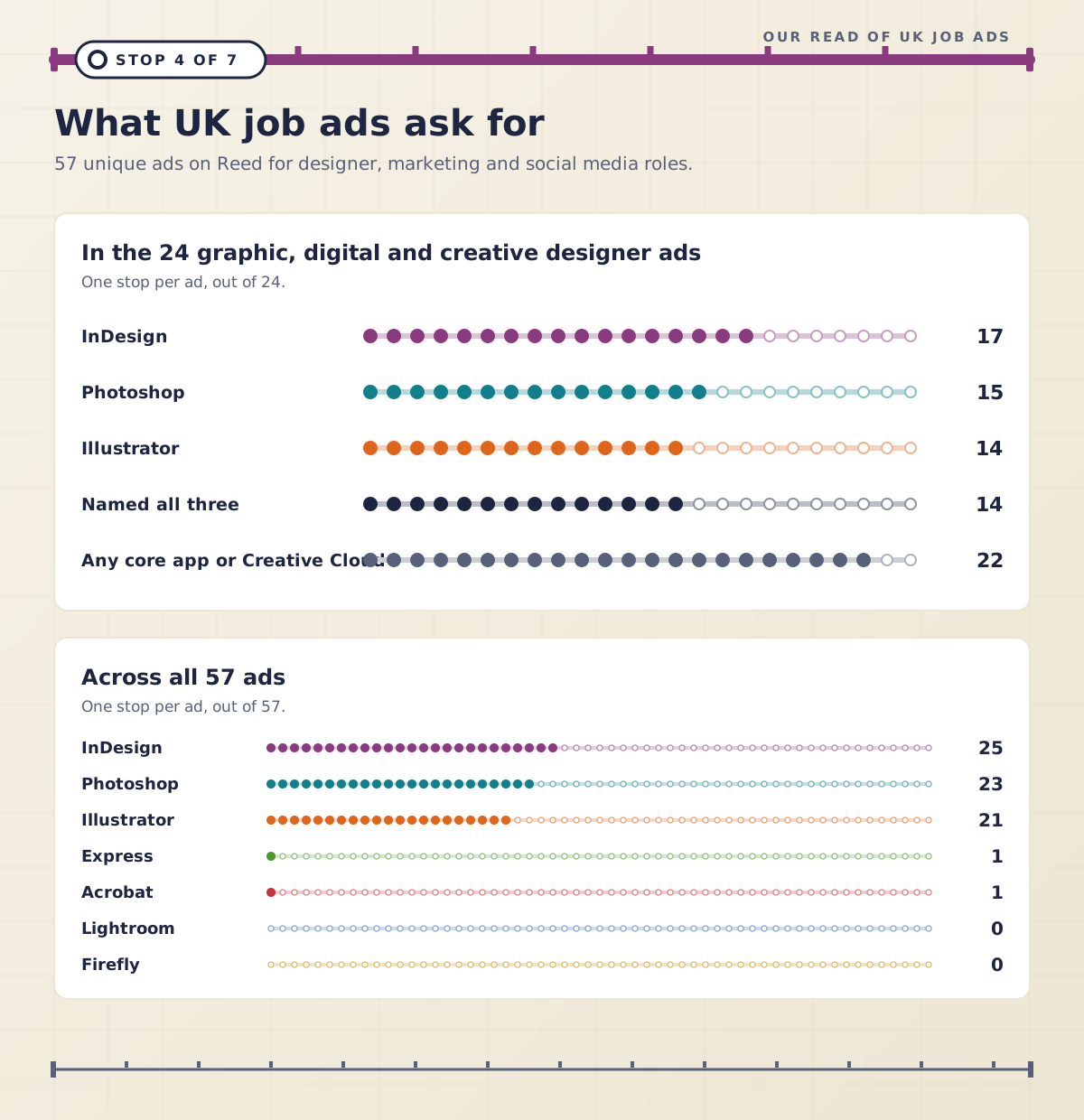
First, designers are hired on the trio, not on one app. Of the 24 graphic, digital and creative designer ads, 22 named Photoshop, Illustrator, InDesign or Adobe Creative Cloud. Of the 17 that listed apps by name, 14 listed all three. InDesign was the most named of all, in 17 of the 24. Second, the extras barely came up. Across all 57 ads, Express and Acrobat were named once each, and Lightroom and Firefly not at all. In the 33 marketing, social and content ads, 12 named an Adobe design app or Creative Cloud, which is more than any other design tool.
Our reading: if design is the whole job, plan on all three core apps. If design is one part of a marketing job, one or two of them will carry you, and they are still what employers write on the ad.
Four people, four kits
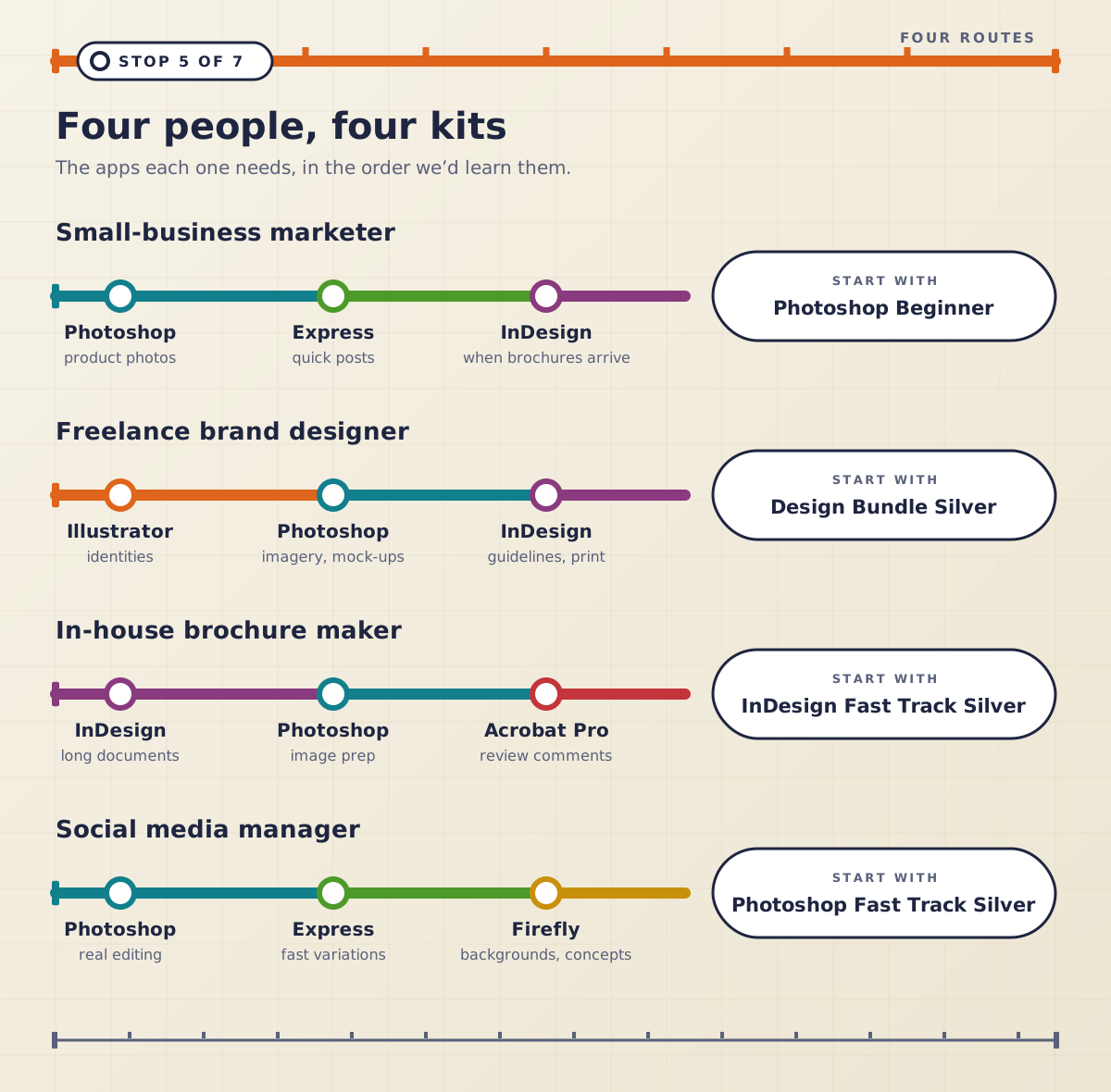
Here’s what we’d put in the toolkit for four people we meet all the time, in the order we’d learn the apps.
Small-business marketer. Photoshop for product photos and social graphics, the free version of Express for quick posts, then InDesign when the first brochure or product sheet comes along. Start with Photoshop Beginner.
Freelance brand designer. All three. Illustrator for identities, Photoshop for imagery and mock-ups, InDesign for brand guidelines and print. The Design Bundle Silver takes all three from beginner to intermediate.
In-house brochure maker. InDesign first, Photoshop to prepare images, and Acrobat Pro for review comments from colleagues. The InDesign Fast Track Silver covers layouts, styles, long documents, interactive PDFs and preflight.
Social media manager. Photoshop for anything that needs real editing, Express for fast variations and Firefly for backgrounds and concepts. Start with Photoshop Fast Track Silver.
Which should you learn first?
Learn the app that makes the thing you send out most. That gives you something useful at work within days, and those early wins keep you practising.
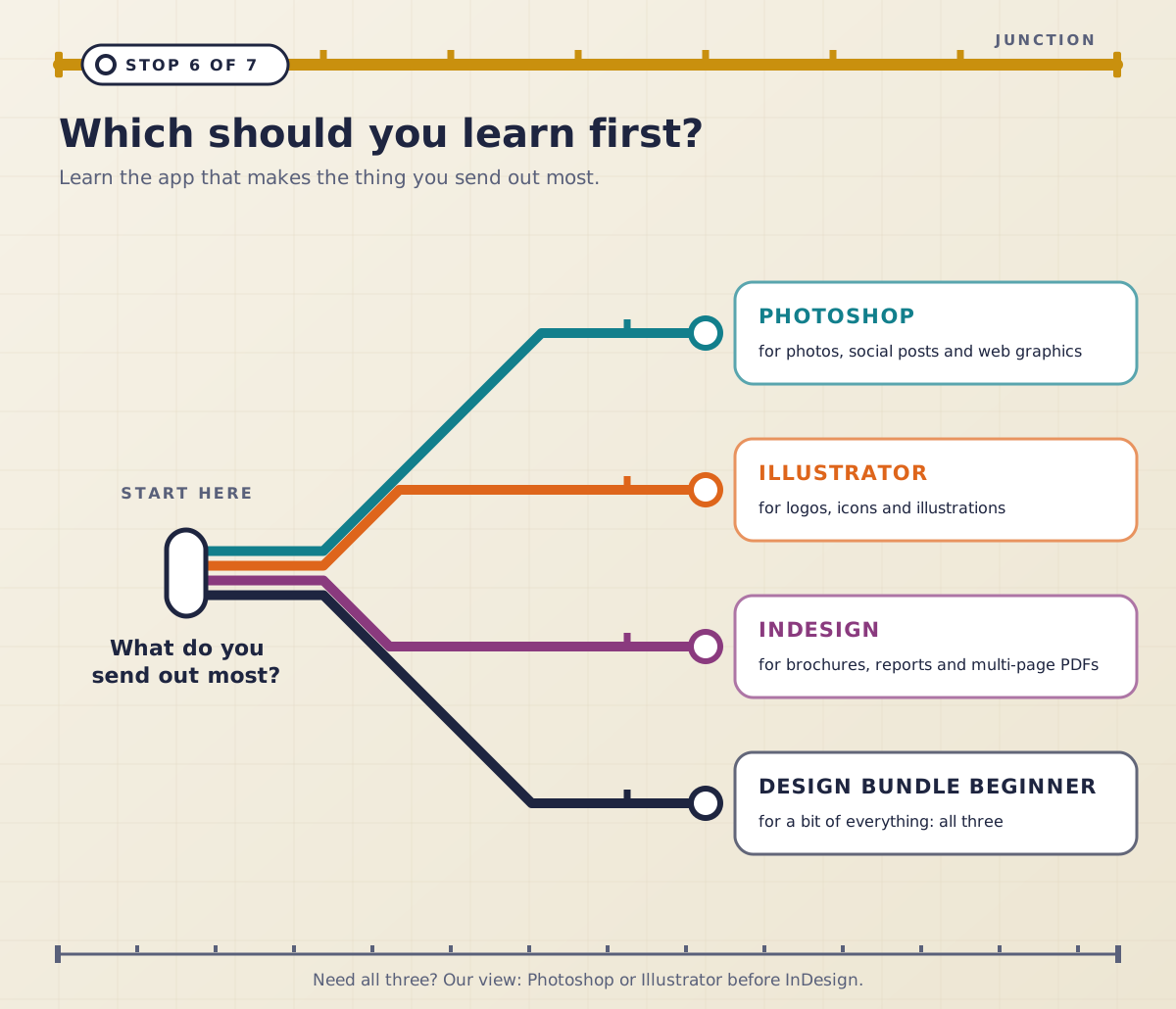
If you know you’ll need all three, our view is Photoshop or Illustrator before InDesign. An InDesign page is mostly built from images and graphics made in the other two, so it helps to know how to prepare them before you lay them out. The exception is anyone whose job is mostly documents: start with InDesign and learn just enough Photoshop to crop and resize. Our post on how long it takes to learn InDesign has a realistic timeline.
One app or Creative Cloud Pro?
Adobe sells single-app plans, a Photography plan with Photoshop and Lightroom, and Creative Cloud Pro, which bundles the full set, including Photoshop, Illustrator, InDesign, Acrobat Pro, Express and Firefly. A Creative Cloud Standard plan has the same desktop apps with far fewer generative AI credits. Before you subscribe, run through this checklist:
Count the core apps you’ll open every week. One means a single-app plan.
Mostly photos? The Photography plan gives you Photoshop and Lightroom together.
Two or more core apps? Add up two single-app plans on Adobe’s UK site and compare that with Creative Cloud Pro.
Do colleagues need to edit your designs? Check they have Express, which is free to start.
Is print part of the job? Then you need InDesign or Illustrator, not Express alone.
Will you rely on generative tools every day? That points to Pro rather than Standard.
Courses, certificates and the ACP exam
Each of our Beginner courses in Photoshop, Illustrator and InDesign runs over 2 consecutive days. The Fast Track Silver courses in Photoshop, Illustrator and InDesign add the Intermediate level, five days in all, and prepare you to take and pass the Adobe Certified Professional exam at the end of the course. You can split a Fast Track: the Beginner days run on consecutive days and can’t be spread over weeks, and the Intermediate days can follow in the same week or a later one. InDesign Fast Track Gold adds the Advanced level.
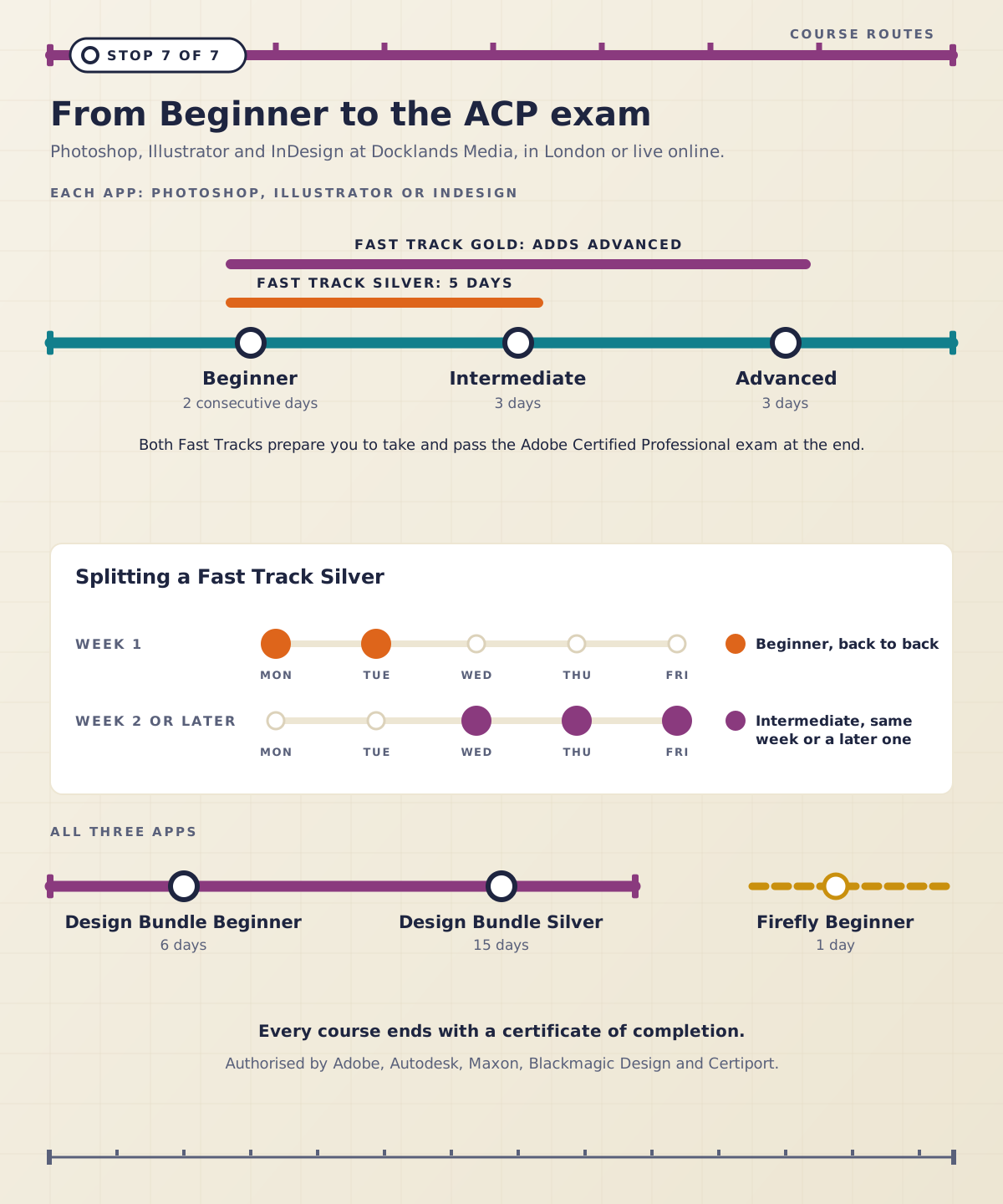
If you need the whole trio, the Design Bundle Beginner covers all three Beginner courses in six days, and the Design Bundle Silver takes all three through Intermediate over fifteen days. Courses run in London or live online, and every course ends with a certificate of completion. Docklands Media is authorised by Adobe, Autodesk, Maxon, Blackmagic Design and Certiport, and Ozgur, who runs it, is an Adobe Certified Instructor. Pick the app your work is made of, get good at it, and add the others as the jobs arrive.