
The short answer: Adobe Firefly is Adobe’s family of generative AI models and the Firefly app, and it powers tools such as Generative Fill in Photoshop, Generative Recolor in Illustrator and Generative Extend in Premiere. Adobe says you can use output from its own Firefly models in commercial projects, because those models were trained on licensed content such as Adobe Stock and on public domain content. The catch is that Firefly now also offers partner models from companies such as Google and OpenAI, which Adobe didn’t train and which come with their own terms, and Adobe’s IP indemnity only comes with certain business plans.
So for marketers, designers and managers, “commercially safe” depends on which model you pick, which plan you’re on and how you use the result.
What is Adobe Firefly?
The name covers two things: Adobe’s family of generative AI models for images, vectors, video and audio, and a standalone app on the web (firefly.adobe.com) and mobile. In the app you can generate images, short video clips, sound effects, speech and music, and plan ideas on Firefly Boards, a shared mood-board canvas. Most people meet Firefly without opening the app, though, because the same models sit inside the Creative Cloud tools they already use.
Where does Firefly appear in Photoshop, Illustrator and Premiere?
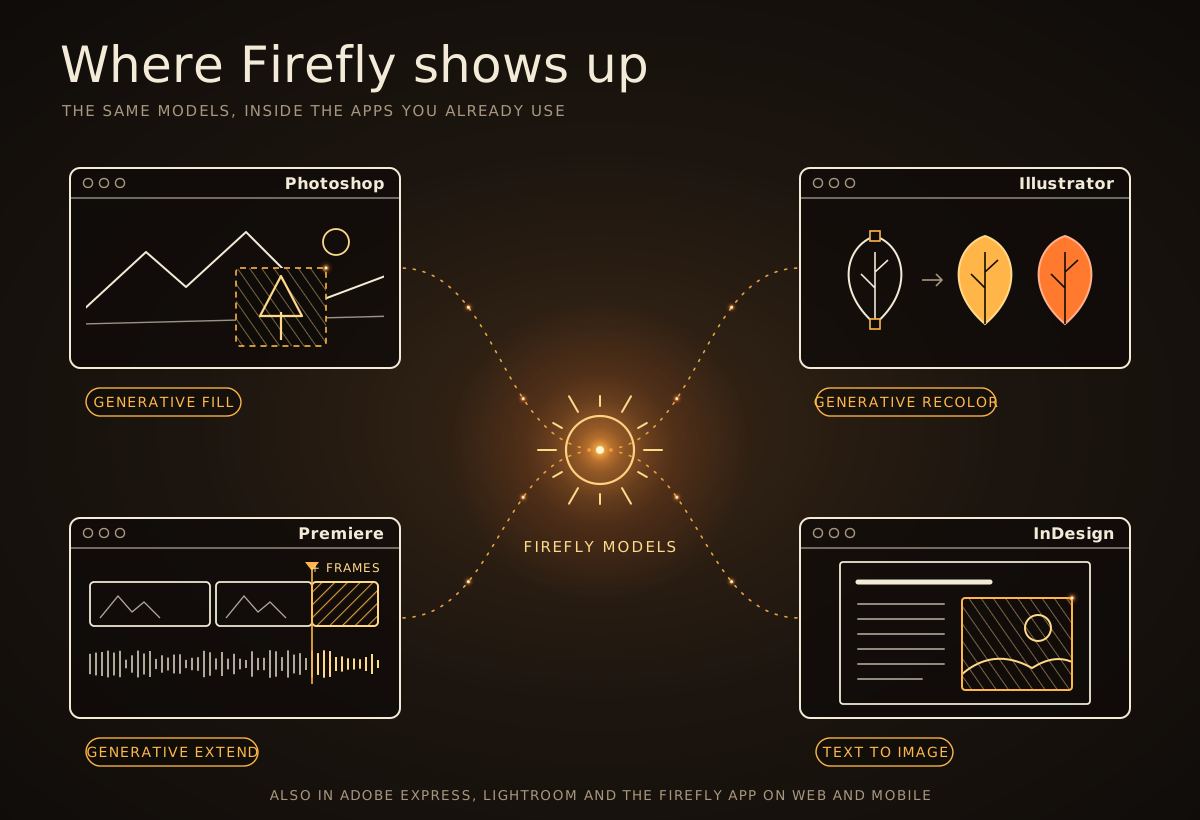
App | Firefly-powered features | Typical use |
|---|---|---|
Photoshop | Generative Fill, Generative Expand, Generate Image, Generate Background, Harmonize, Generative Upscale | Removing or adding objects, extending backgrounds, blending composites |
Illustrator | Text to Vector Graphic, Generative Recolor, Generative Shape Fill, Text to Pattern | Icons, scenes, colour variations and repeat patterns |
Premiere | Generative Extend | Adding a few frames or ambient sound to the start or end of a clip |
InDesign | Text to Image, Generative Expand | Placeholder visuals and fitting images to frames |
Adobe Express | Generate Image, Generate Template, text effects | Quick social posts and marketing assets |
Firefly app | Text to Image, Text to Video, sound effects, speech, music, Boards | Ideas, concept art, short clips and audio |
Adobe’s list of generative AI features by app changes often, so treat the table as a snapshot. For more on the AI tools in each app, see our posts on how to use Photoshop AI and Illustrator’s generative AI tools.
How was Firefly trained, and why does it matter?
Adobe says its current Firefly models were trained on licensed content, such as Adobe Stock, along with public domain content where copyright has expired. Adobe Stock contributors’ work is part of that dataset under their contributor agreements, and Adobe says it doesn’t train Firefly on Creative Cloud subscribers’ own content.
That’s the heart of Adobe’s “commercially safe” claim. Many image generators were trained on pictures collected from across the web, which raises questions about whose work went in. Adobe says it only trains on content it has permission or rights to use, which is why it’s prepared to back its own models contractually for some business customers.
Can you use Firefly content commercially?
Yes. According to Adobe’s Firefly FAQ, you can use output from features without a beta label in commercial projects. Output from beta features can be used commercially too, unless the product explicitly says otherwise, so it’s worth checking for a beta label and any note beside it.
The usual rules still apply. Adobe’s Generative AI User Guidelines prohibit prompts designed to create copyrighted or trademarked content, and uploading reference images that contain other people’s copyrighted work. Adobe’s terms add three points worth knowing:
Results may not be unique. Someone else could generate something very similar.
You may not own them outright. Whether AI output can be protected by copyright depends on local law, so take legal advice if ownership matters.
You can’t use them to train AI. Firefly output must not be used to build or improve other AI models.
What about the partner models from Google, OpenAI and others?
This is the part many people miss. The Firefly app and features in Photoshop, Illustrator and Adobe Express now also offer models from other companies, including Google (Gemini and Veo), OpenAI (GPT Image), Black Forest Labs (FLUX), Runway, Luma AI, Topaz Labs and ElevenLabs. In Photoshop, for example, Generative Fill has a model picker that lists Adobe’s Firefly models and partner models side by side.
Adobe’s partner models page is clear: “Partner models are not developed by Adobe. You are responsible for determining whether a model is appropriate for your project.” In practice, that means:
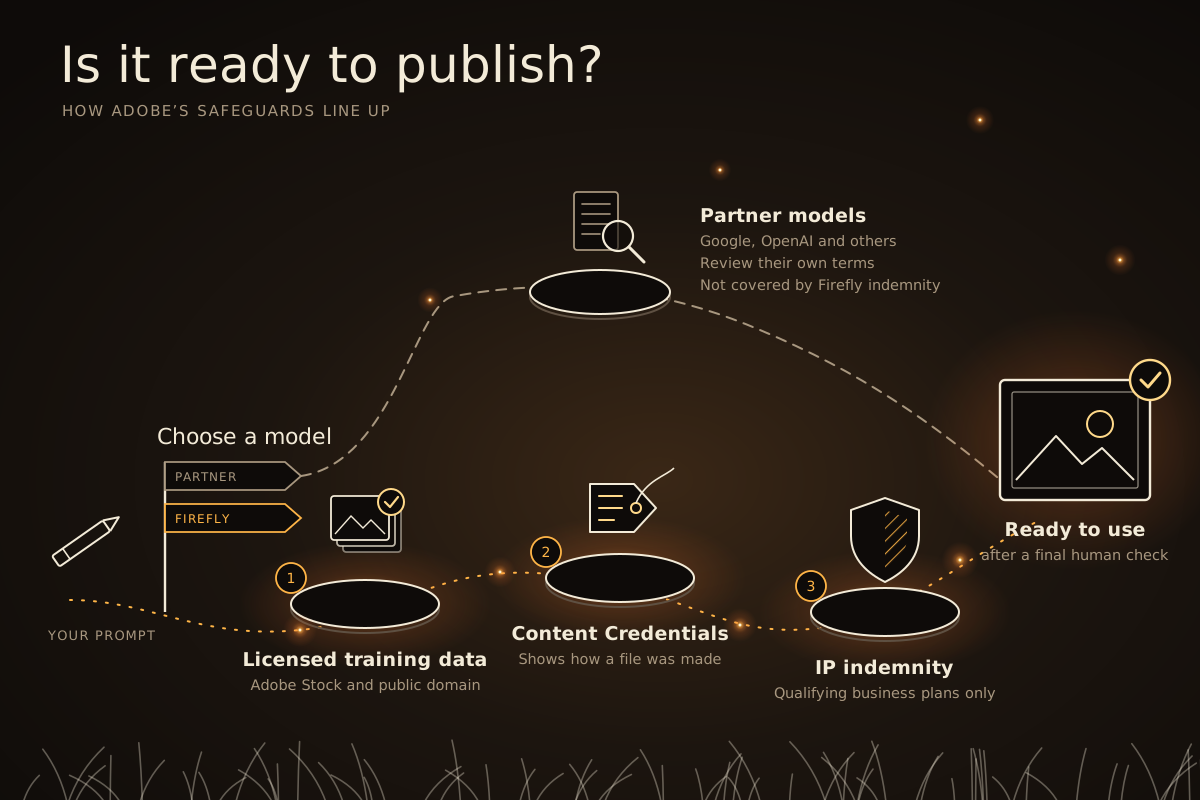
Adobe’s training-data promise covers Firefly models only. Adobe can’t verify what a partner model was trained on, and its Adobe Stock guidance says to review a partner model’s terms before using its output commercially.
Adobe’s Firefly indemnity excludes them. Some business agreements add separate cover for selected Google and OpenAI image and video models, but it depends on your contract.
Your content stays yours. Adobe says it only offers partner models whose providers agree not to train on your prompts and uploads.
They cost more credits. Partner models count as premium features.
Adobe asks you to confirm before you first use a partner model, and the model name shows in the picker, so a quick glance tells you which rules apply. On some enterprise plans, IT teams can also choose which models staff can use.
What is Firefly IP indemnification, and who gets it?
IP indemnification is a contractual promise: if a third party claims that a covered Firefly output infringes their copyright, trademark, publicity or privacy rights, Adobe will defend the claim and pay damages awarded or agreed in a settlement, within the limits of the contract. It isn’t part of individual plans; it comes with qualifying business plans, such as Creative Cloud Pro Plus for teams, certain Creative Cloud for enterprise plans and the Adobe Express and Firefly site licence.
The cover has conditions. It applies to listed Firefly features, such as Text to Image, Generative Fill, Text to Vector Graphic and Generative Extend, exported by someone on the qualifying plan. It excludes beta features, partner models, claims caused by your own edits or by combining the output with other material, and use that breaks Adobe’s terms. Liability caps apply too, so check your agreement.
What are Content Credentials?
Content Credentials are tamper-evident metadata, based on the open C2PA standard, that record how a file was made, like a nutrition label. Adobe automatically adds them to assets that are fully generated with Firefly, such as Text to Image results, and they show the issuer, the app, the AI tool used and the type of edit. Content Credentials can also show when a partner model was involved.
You can check a file with the Inspect tool in Adobe Content Authenticity. Adobe’s guidelines say you must not remove, alter or disable Content Credentials. They’re a simple way to be open about AI use with clients and audiences.
How do generative credits work?
Most Firefly features use generative credits. Standard features, such as Generative Fill with Adobe’s Firefly models, usually use one credit per generation. Premium features, such as video, audio and partner models, use more, depending on the model, resolution and length. Creative Cloud Pro and Firefly plans include unlimited standard generations. Credits reset monthly and don’t roll over.
How can you use Firefly safely at work?
Pick an Adobe Firefly model for client and brand work, unless you’ve checked a partner model’s terms.
Look for beta labels and read any note about commercial use.
Keep prompts original. Avoid brand names, famous characters and real people, and only upload images you have rights to.
Leave Content Credentials in place when you export and share.
Check your plan if you need indemnity, and agree a team policy on partner models.
Review every result for odd details, stray text or anything resembling an existing logo or artwork.
How can you learn Firefly and Adobe’s AI tools?
Docklands Media is an authorised training partner of Adobe, Autodesk, Maxon, Blackmagic Design and Certiport, and our courses run at our London training centre or live online.
Our one-day Adobe Firefly Beginner course covers the Firefly app, Boards, and Firefly in Photoshop, Illustrator and InDesign, plus working with commercially safe content and managing credits. To combine AI with core image-editing skills, start with Photoshop Beginner (2 days), then move on to Photoshop Intermediate (3 days) for Smart Objects, Content-Aware tools and compositing. Photoshop Advanced (3 days) covers AI features such as Generative Fill, Harmonize and Generative Upscale, plus bulk production with Firefly. For vector work, Illustrator Beginner (2 days) gives you the foundations, and editors can start with Premiere Beginner (2 days).
To cover more in one go, Photoshop Fast Track Silver (5 days) combines Beginner and Intermediate, and Photoshop Fast Track Gold (8 days) covers all three levels. Fast Track courses prepare you to take and pass the Adobe Certified Professional exam at the end of the course, and can be split across non-consecutive dates. The Photoshop exam’s objectives even include using AI tools and understanding licensing for AI-generated content.
Every course includes a certificate of completion, and you can add the Adobe Certified Professional exam when you book Photoshop Intermediate, Advanced or a Fast Track. Browse all our Firefly courses and Photoshop courses.



