Most people who ask how long InDesign takes to learn have a particular document in mind. It might be the company brochure that keeps going out to an agency, a half-finished annual report, or a newsletter still sitting in Microsoft Publisher. So it helps to measure the learning in documents rather than hours.
With two days of structured training, most people can build a clean, on-brand flyer, menu or short brochure and export it properly for print. Add three more days and you’re into longer documents, templates your colleagues can reuse and interactive PDFs. Speed comes after that, from doing real work. Here’s how that plays out, what UK employers actually expect, and how to tell when you’ve got there.
Measure it in documents, not hours
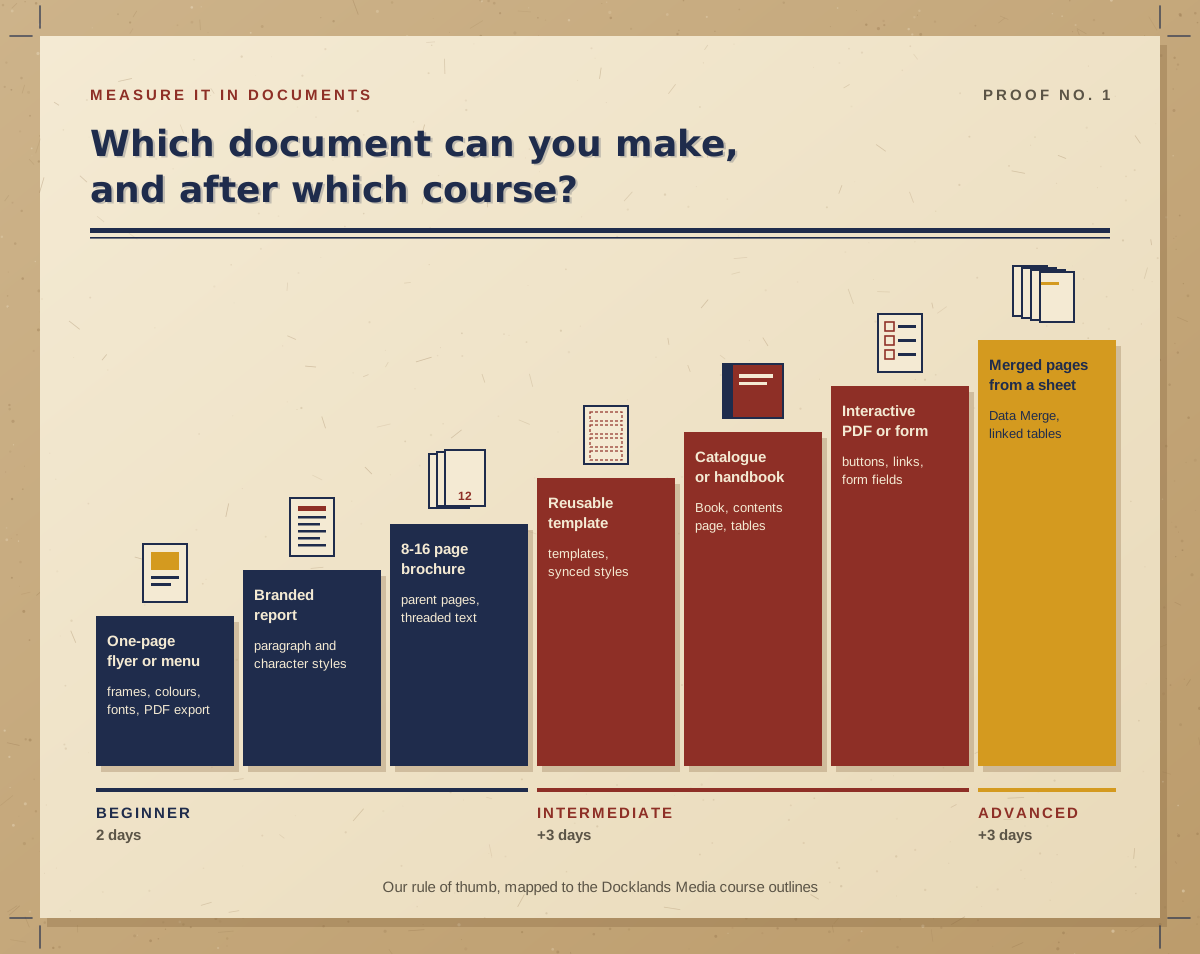
InDesign is a page layout app. You don’t learn it the way you learn Photoshop, by getting better at one picture. You learn it by taking on longer and more organised documents. We’ve mapped seven common jobs against our course outlines, and the steps look roughly like this:
After InDesign Beginner (two days): one-page flyers and menus, a branded report and an 8–16 page brochure with parent pages, threaded text and paragraph and character styles.
After InDesign Intermediate (three more days): templates the whole team can use, catalogues and handbooks built as an InDesign Book with a contents page, plus interactive PDFs with buttons, hyperlinks and form fields.
After InDesign Advanced (three more days): pages generated from a spreadsheet with Data Merge, linked tables, scripting and EPUB output.
Our rule of thumb: the biggest jump isn’t between making a flyer and making a brochure. It’s between making a brochure yourself and making a template someone else can fill in without breaking it. That’s the step from Beginner to Intermediate, and it’s the skill most marketing teams are really after.
What UK job ads actually ask for
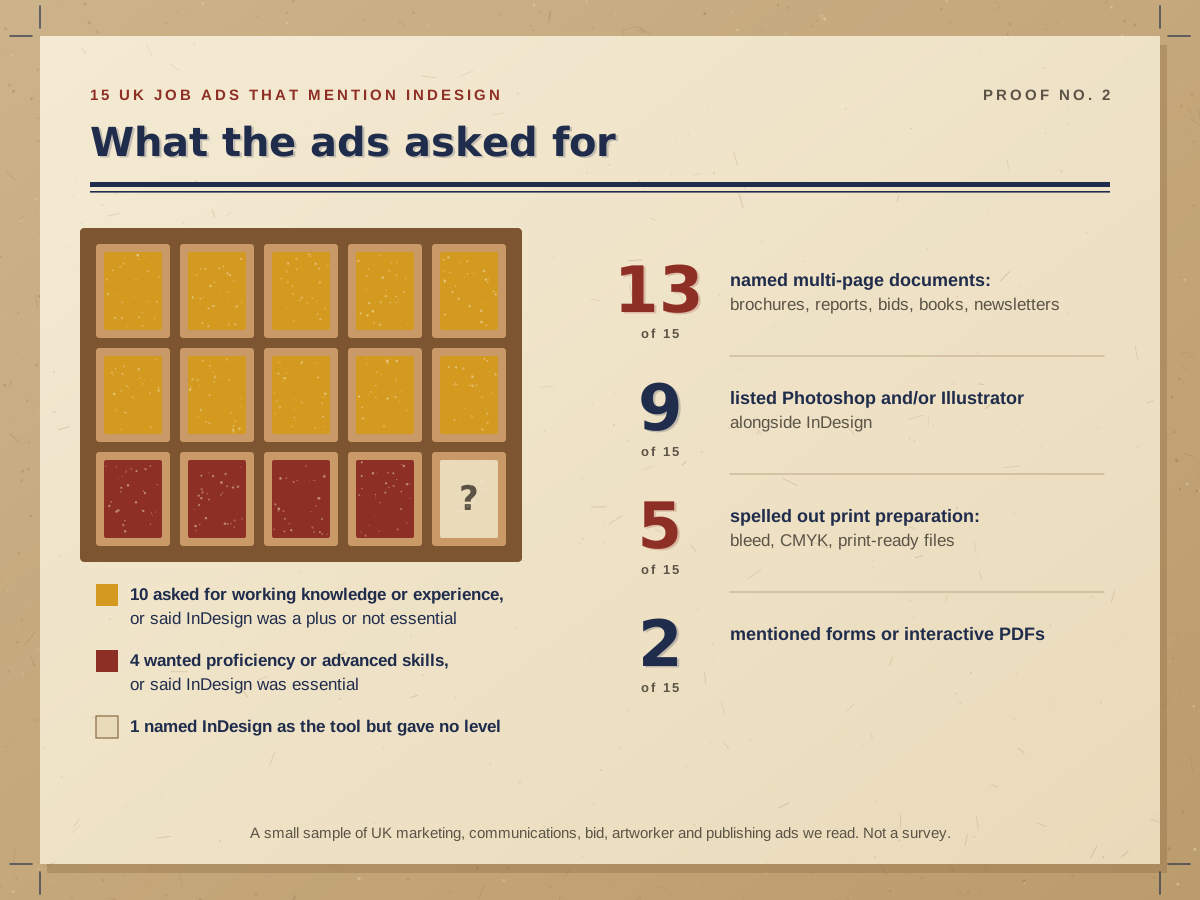
To see what “knowing InDesign” means to an employer, we read 15 UK job ads that mention it. They covered marketing and communications roles, bid coordinators, artworkers and publishing jobs. It’s a small sample, not a survey, but the pattern was clear:
10 of the 15 asked for working knowledge or experience, or said InDesign was a plus. One bid team said it was “not essential, if you have an eye for detail and are open to learning!”
4 wanted proficiency or advanced skills, or listed InDesign as essential. Two were agency artworker jobs, and the other two were a bid role and a senior communications role.
13 named multi-page documents: brochures, reports, bids, books and newsletters.
9 listed Photoshop or Illustrator alongside InDesign.
5 spelled out print preparation, such as bleed, CMYK and print-ready files, and 2 mentioned forms or interactive PDFs.
Our reading: for most office roles, the bar is being able to produce and update a branded multi-page document without help. That’s the Beginner course plus a bit of practice. The roles asking for proficiency want the template, long-document and preflight skills from Intermediate. And because so many ads list the three apps together, the Design Bundle: Beginner is worth a look. It covers Photoshop, Illustrator and InDesign over six days.
Already use Photoshop or Illustrator?
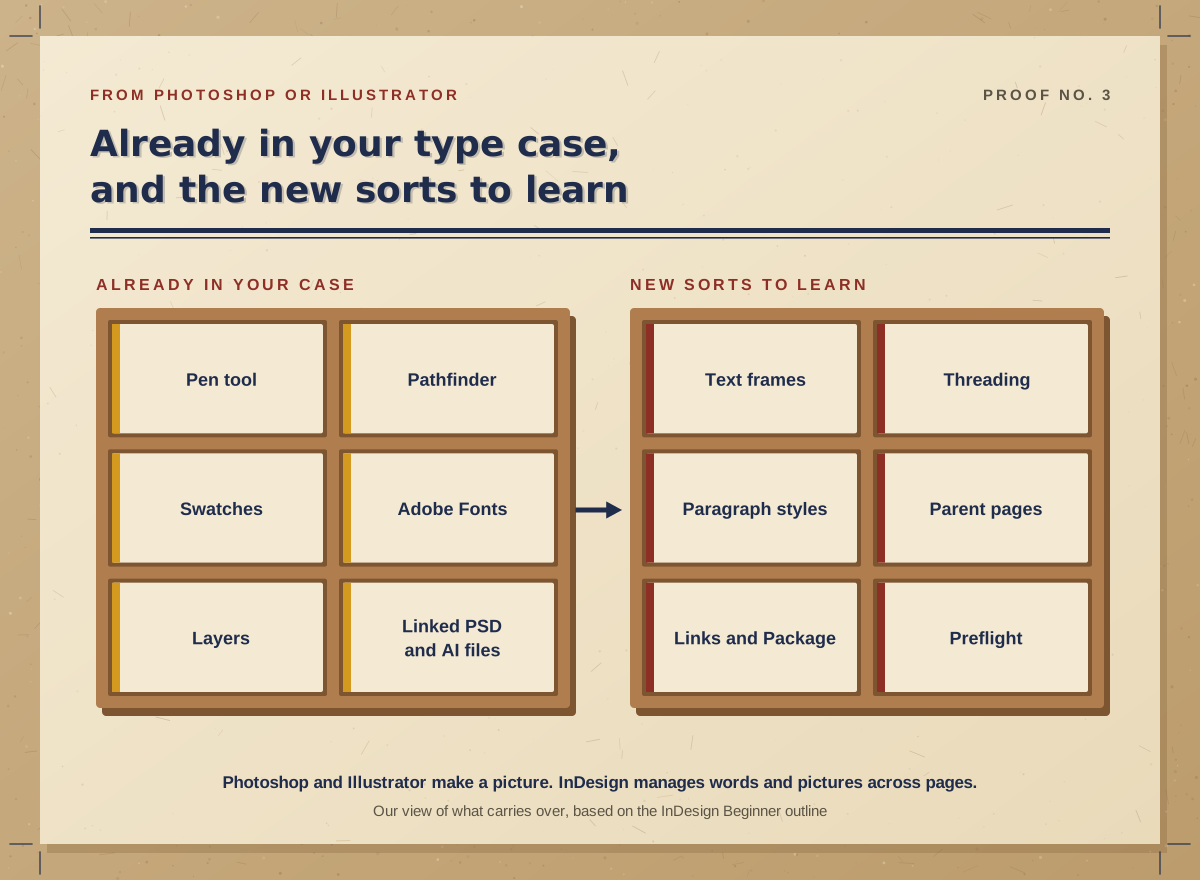
Then you’re further along than you think. The Pen tool, Pathfinder, swatches, layers and Adobe Fonts all work in much the same way in InDesign. PSD and AI files you place stay linked, so you can edit them in their own app and the layout updates.
What’s new is the thinking. Photoshop and Illustrator make a picture, while InDesign manages words and pictures across many pages. So expect to spend most of your learning time on text frames, threading, styles and parent pages, rather than on the drawing tools. Our rule of thumb: if you already know one Adobe app, the first morning will feel familiar, and styles will be where you slow down, just like everyone else. If you’re not sure which app a job needs, our guide to the key differences between Photoshop, Illustrator and InDesign sets them side by side.
Coming from Word or Publisher
A lot of people are asking this question right now because Microsoft has retired Publisher. It’s been taken out of Microsoft 365, subscribers can no longer open or edit .pub files in it, and the way to keep old files is to save them as PDF or Word documents.
InDesign can’t open .pub files directly. If you can still get to your old files, keep PDFs of the ones you plan to remake. InDesign can convert a PDF into an InDesign document, which can give you a head start. For anything you’ll reuse, though, our view is that it’s better to rebuild it with proper styles and a parent page, because you’ll only rebuild it once.
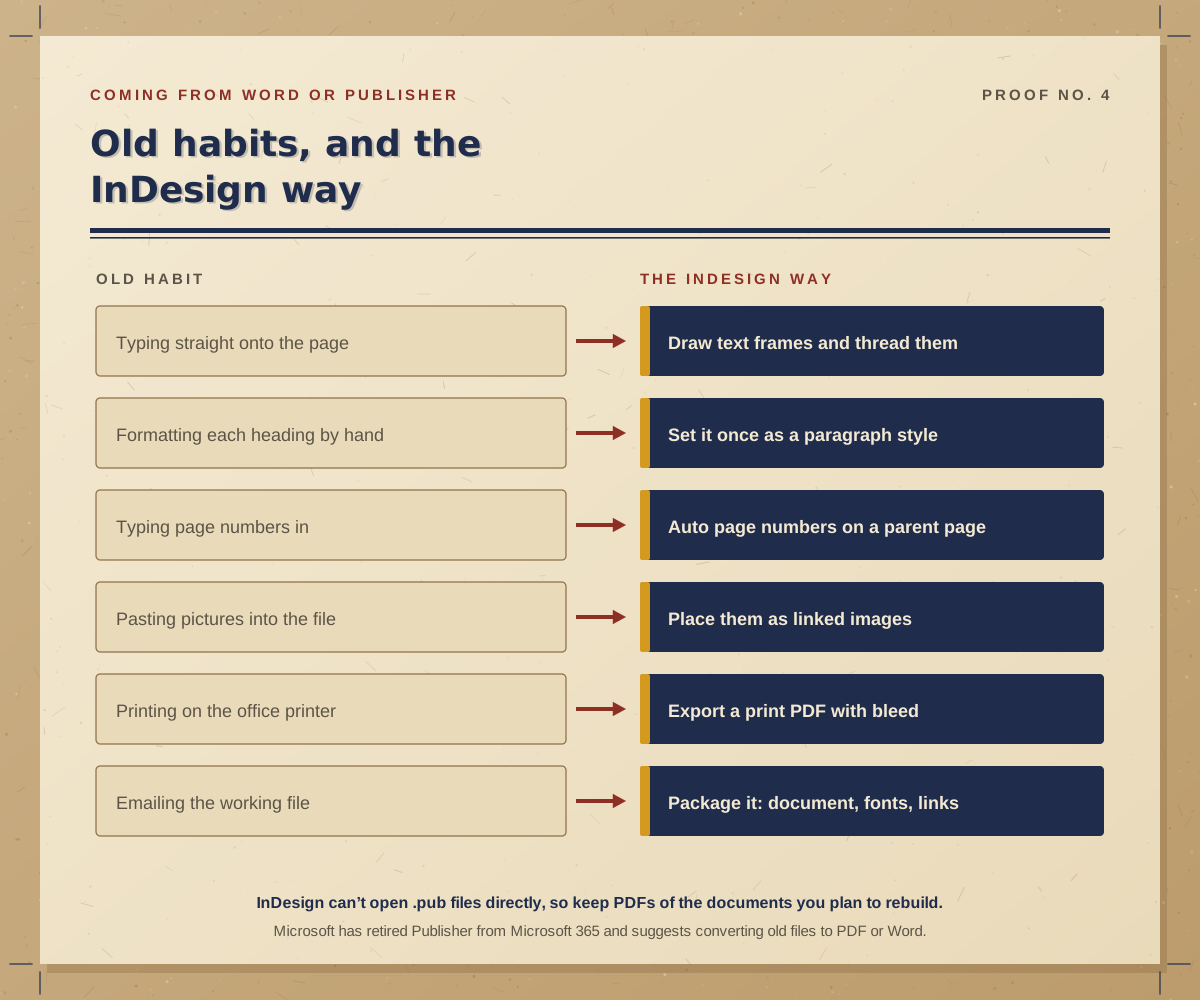
Word users have a head start of their own. When you place a Word file, InDesign can map Word’s styles to its own paragraph and character styles, so a tidy Word document comes in well. The hard part is unlearning habits that work in a word processor but cause trouble in a layout:
A worked plan: the marketing executive who inherits the brochure
Say you’ve just taken over a 12-page product brochure from a colleague who has left. Here’s the route we’d suggest:
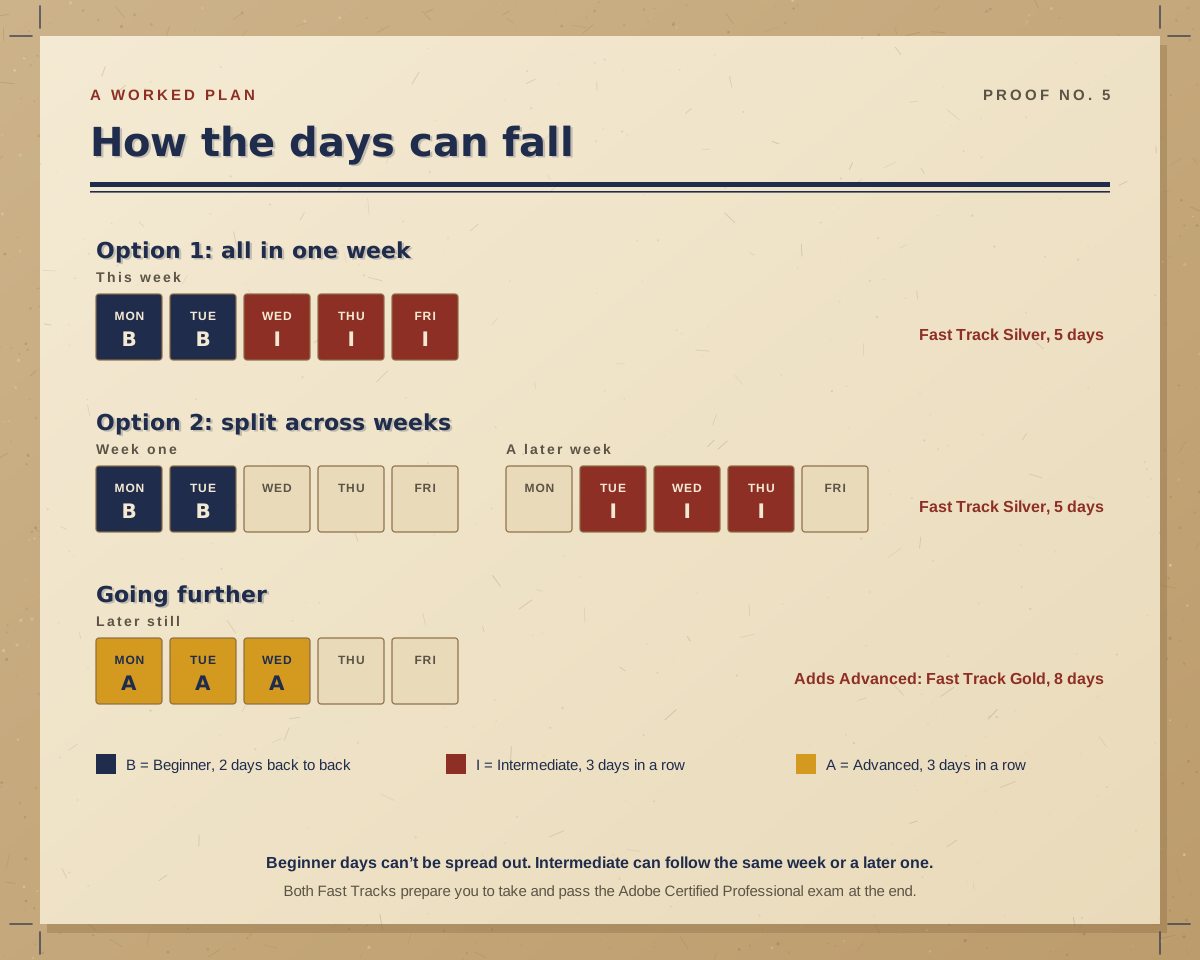
Days one and two: InDesign Beginner, back to back. You’ll set up pages, styles, colours and images and export a print-ready PDF.
Back at your desk: rebuild one spread of the brochure using styles and a parent page. That’s where the course turns into your own way of working.
Three more days: InDesign Intermediate, in the same week or a later one. You’ll turn the brochure into a template, add a contents page and learn to preflight it before it goes to the printer.
Booked together, that’s InDesign Fast Track Silver, five days in all. The two Beginner days must run consecutively and can’t be spread over different weeks, but the Intermediate days can follow straight away or in a later week. InDesign Fast Track Gold adds Advanced for eight days in total.
Every course comes with a certificate of completion. Both Fast Tracks are built to prepare you to take and pass the Adobe Certified Professional exam in InDesign at the end of the course. Our guide to the Adobe Certified Professional exam explains how it works.
Myth versus reality
What people assume | What we see |
|---|---|
InDesign is only for designers. | 9 of the 15 job ads we read were for marketing, communications, bid and publishing roles, not designer or artworker jobs. |
If you know Photoshop, you know InDesign. | The drawing tools carry over, but text frames, styles and parent pages are new to almost everyone. |
Free videos will get you there just as fast. | Our view: videos are great for one technique at a time, but it’s easy to miss the order that makes styles and templates click. |
You need months before you can make anything useful. | The two-day Beginner course runs from setting up a new document to exporting a print-ready PDF. |
How will you know you’ve got there?
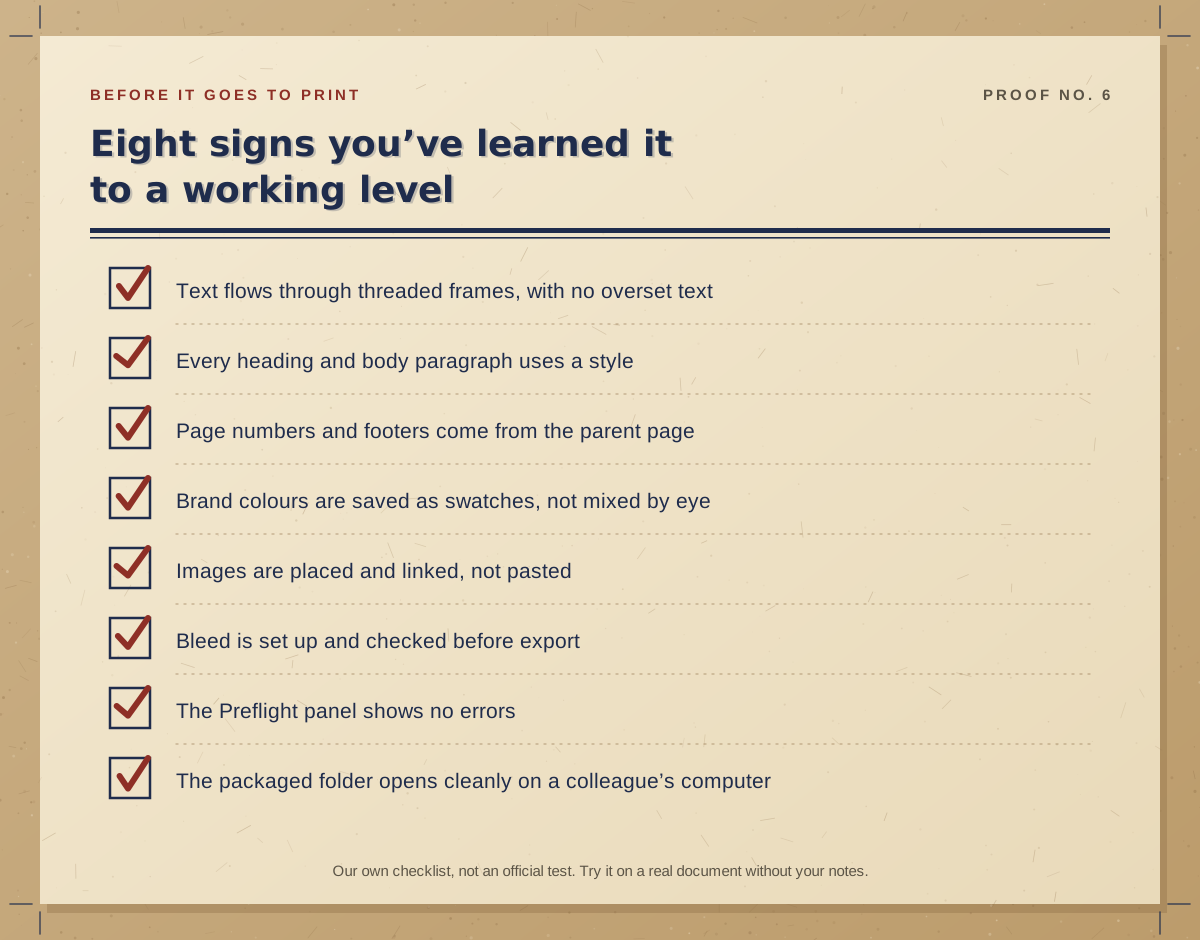
A certificate tells an employer you’ve done the training. This checklist tells you whether the skills have stuck. Pick a real document, close your notes and see how many you can do:
Text flows through threaded frames, with no overset text.
Every heading and body paragraph uses a style.
Page numbers and footers come from the parent page.
Brand colours are saved as swatches, not mixed by eye.
Images are placed and linked, not pasted.
Bleed is set up and checked before export.
The Preflight panel shows no errors.
The packaged folder opens cleanly on a colleague’s computer.
If you can tick all eight, you know InDesign to a working level, whatever the calendar says.
Docklands Media is an Adobe authorised training partner and is authorised by Certiport, so you can train with us in London or live online and take the Adobe Certified Professional exam too. If you’re ready to start, the InDesign Beginner course needs no previous experience.