The short answer: learn Premiere if you make marketing, social or agency content, or already use other Adobe apps. It runs on a subscription and works smoothly with After Effects and Photoshop. Learn DaVinci Resolve if you want a professional editor you can start using for free, or if colour grading matters to you. Both are serious professional tools, and the core editing skills transfer from one to the other.
What's the difference between Premiere and DaVinci Resolve?
Both are non-linear editors (NLEs), so you cut footage on a timeline, add titles, transitions and audio, and then export. The difference is in how they're built and sold.
Adobe Premiere (formerly Premiere Pro) is part of Adobe Creative Cloud. It runs on Windows and macOS, and the plan includes Premiere on mobile too. Its biggest strength is the Adobe ecosystem: you can send shots to After Effects for motion graphics, bring in Photoshop and Illustrator files, and share Creative Cloud Libraries across a team.
DaVinci Resolve comes from Blackmagic Design. It's one application with dedicated "pages" for editing (Cut and Edit), colour (Color), visual effects and motion graphics (Fusion) and audio post-production (Fairlight). It runs on Windows, macOS and Linux. Resolve started life as a colour-grading system, and that heritage still shows: its colour tools are the main reason many editors choose it.
In short: Premiere connects to a family of specialist apps; Resolve puts editing, colour, VFX and audio in one.
How much do Premiere and DaVinci Resolve cost?
Current UK prices:
Premiere (Adobe UK pricing) - Premiere single-app plan: £21.98/month incl. VAT on an annual plan billed monthly. There's a 7-day free trial. - Creative Cloud Pro (20+ apps, including Premiere, After Effects and Photoshop): £66.49/month incl. VAT at the regular annual, billed-monthly price. Adobe often runs introductory offers, so check the current price. - Students and teachers who qualify can get Creative Cloud Pro for £16.24/month incl. VAT in the first year. - Premiere for teams: £27.99/month per licence excl. VAT (annual, billed monthly).
DaVinci Resolve (Blackmagic Design pricing) - DaVinci Resolve: free. It isn't a trial, and it edits and finishes at up to Ultra HD 3840 x 2160 at 60fps. - DaVinci Resolve Studio: a one-off £225 excl. VAT (Blackmagic's UK list price), which is about £270 once 20% VAT is added. It's a perpetual licence rather than a subscription.
Over a year, the Premiere single-app plan works out at about £264. The free version of Resolve costs nothing, and Studio is a single payment.
Which is easier to learn for beginners?
Premiere feels familiar if you've used any Adobe software, because panels, shortcuts and workspaces follow similar conventions.
DaVinci Resolve can look busier at first because it holds several applications in one. The Cut page is designed for quick edits, though, and you can ignore Fusion and Fairlight until you need them. Beginners usually start on the Cut or Edit page and then move on to the Color page.
The honest answer is that your first editor takes the longest to learn. Once you understand timelines, trimming, audio levels and exports, switching to the other program is mostly a matter of learning where things are.
What's new in Premiere and DaVinci Resolve?
Both applications have added a lot of AI-assisted tools recently.
Premiere (versions 26.0 to 26.5) - Object Mask: AI selects a person or object with one click and tracks it through the shot. - Media Intelligence search, which finds clips by what's in them, including visuals and audio, as well as by metadata. - Generative Extend, powered by Adobe Firefly, adds a few extra frames to the start or end of a clip. In version 26.5 it now supports sources from 360p up to 4K UHD. - Generative Media Tool creates video and sound effects from text prompts directly in the timeline, using Adobe Firefly or partner models.
DaVinci Resolve 21 (current release 21.1.1) - A new Photo page that brings Resolve's colour tools to still images. - More than 100 new motion graphics effects, plus new AI tools including IntelliSearch for content searching and CineFocus for adjusting focal points. - Better keyframing on the Cut and Edit pages, and new Fusion graphics tools.
One point worth knowing: most of Resolve's AI features, which use the DaVinci Neural Engine (including Magic Mask, text-based editing and AI noise reduction), are Studio-only. Premiere's generative features also run online and use Adobe's generative credits, so check what your plan includes.
Premiere vs DaVinci Resolve at a glance
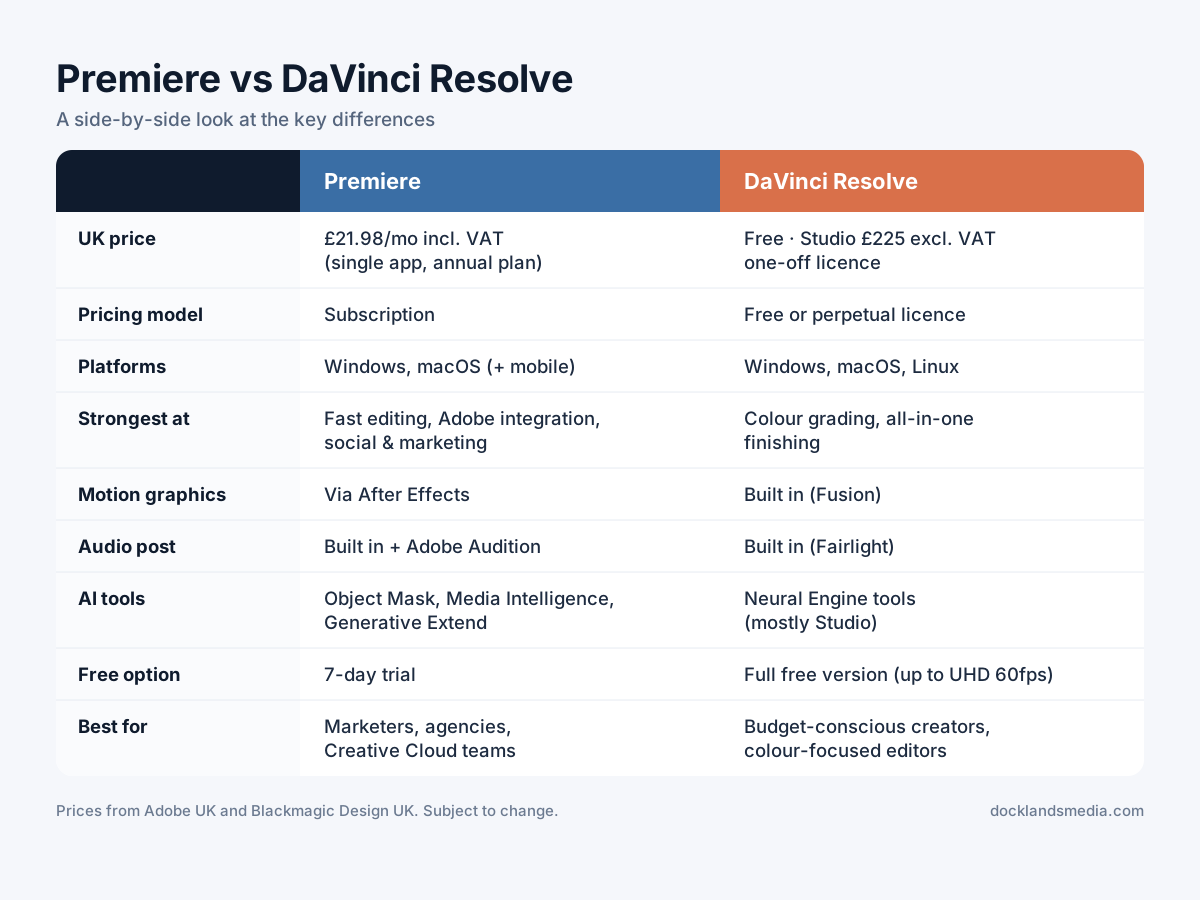
Premiere vs DaVinci Resolve comparison.
Feature | Premiere | DaVinci Resolve |
|---|---|---|
Price (UK) | £21.98/mo incl. VAT (single app, annual plan) | Free; Studio £225 excl. VAT one-off |
Pricing model | Subscription | Free or perpetual licence |
Platforms | Windows, macOS (plus mobile) | Windows, macOS, Linux |
Strongest at | Fast editing, Adobe integration, social and marketing workflows | Colour grading, all-in-one finishing |
Motion graphics | Via After Effects (separate app) | Built in (Fusion page) |
Audio post | Built in, plus Adobe Audition | Built in (Fairlight page) |
AI tools | Object Mask, Media Intelligence, Generative Extend, Generative Media Tool | Neural Engine tools, mostly in Studio |
Free option | 7-day trial | Full free version (up to UHD 60fps) |
Best for | Marketers, agencies, teams on Creative Cloud | Budget-conscious creators, colour-focused editors |
Which one suits you?
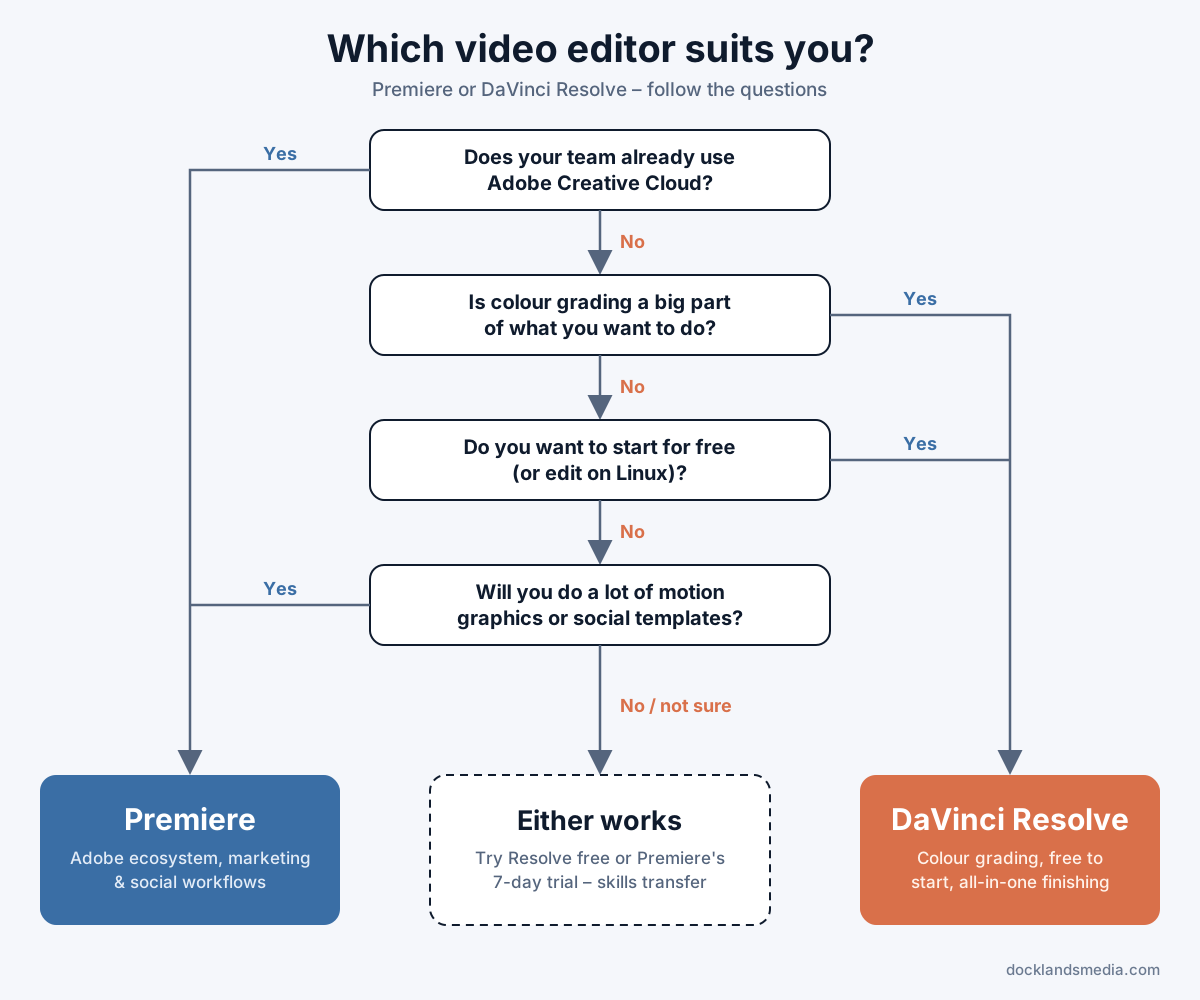
You're a marketer or in-house content team. Go with Premiere. If your designers already use Photoshop, Illustrator or After Effects, sharing assets, templates and branded motion graphics is simpler, and your team will be working in the same ecosystem.
You're a YouTuber or solo creator. Either works. DaVinci Resolve is hard to beat if budget matters, because the free version is a complete editor. Premiere makes sense if you want Adobe's templates and generative tools, or you plan to do a lot of motion graphics in After Effects.
You're a new editor choosing your first software. Think about where you want to work. Many agencies, marketing teams and corporate video departments use Creative Cloud, which points to Premiere. If you're drawn to film, music videos or colour work, DaVinci Resolve is a great foundation, and you can learn it without paying anything.
You care most about colour. Choose DaVinci Resolve. Its Color page is the reason many professionals use it, even when they edit in another program.
You're on Linux or prefer not to subscribe. Choose DaVinci Resolve. Premiere doesn't run on Linux, and Resolve's free version or one-off Studio licence avoids a monthly fee.
Learning Premiere or DaVinci Resolve with Docklands Media
If you'd like a structured start, we can help. As an authorised training partner for both Adobe and Blackmagic Design, we run two-day beginner courses in both applications. You can join us at our Canary Wharf training centre in London or live online:
Beginner Premiere training covers importing and organising media, timeline editing, transitions, audio, titles and exporting. It runs over 2 days, 10am–4pm, and costs £395 + VAT in person or £335 + VAT online.
DaVinci Resolve Training: Beginner covers the Media Pool, the Edit page and timeline, audio basics, colour correction, titles and delivery. It runs over 2 days, 10am–4pm, and costs £395 + VAT in person or £335 + VAT online.
Both courses include a certificate of completion, course notes and project files, lifetime email and phone support, and a free retake within 24 months. If the scheduled dates don't suit you, we can also arrange tailored training for your team. And if you're still not sure which one to pick, just ask us. We're happy to talk it through.