A drummer who sits down at a piano already knows tempo, bars and exactly where a fill should land. What’s new is the hands. Editors moving into After Effects are in the same spot. You can already feel timing, pacing and where a moment wants to breathe, but in After Effects every movement has to be built by hand, one keyframe at a time.
So how long does it take? With structured training, about two days to start making useful things: our After Effects Beginner course covers compositions, keyframes, masks, animated text, basic tracking and export in that time. Getting motion to feel smooth rather than mechanical takes a few more weeks of regular practice. Working at motion designer level, where your timing and design hold up on a client brief, takes months of real projects. Our rule of thumb: days for the tools, weeks for timing, months for style.
Where is your finish line?
Ask on forums such as Reddit and the answers run from “a weekend” to “a lifetime”. Both are true, because people are aiming at different things. Learning After Effects the software and learning motion design are two different projects. Pick the finish line that matches your work and the estimate gets much sharper.
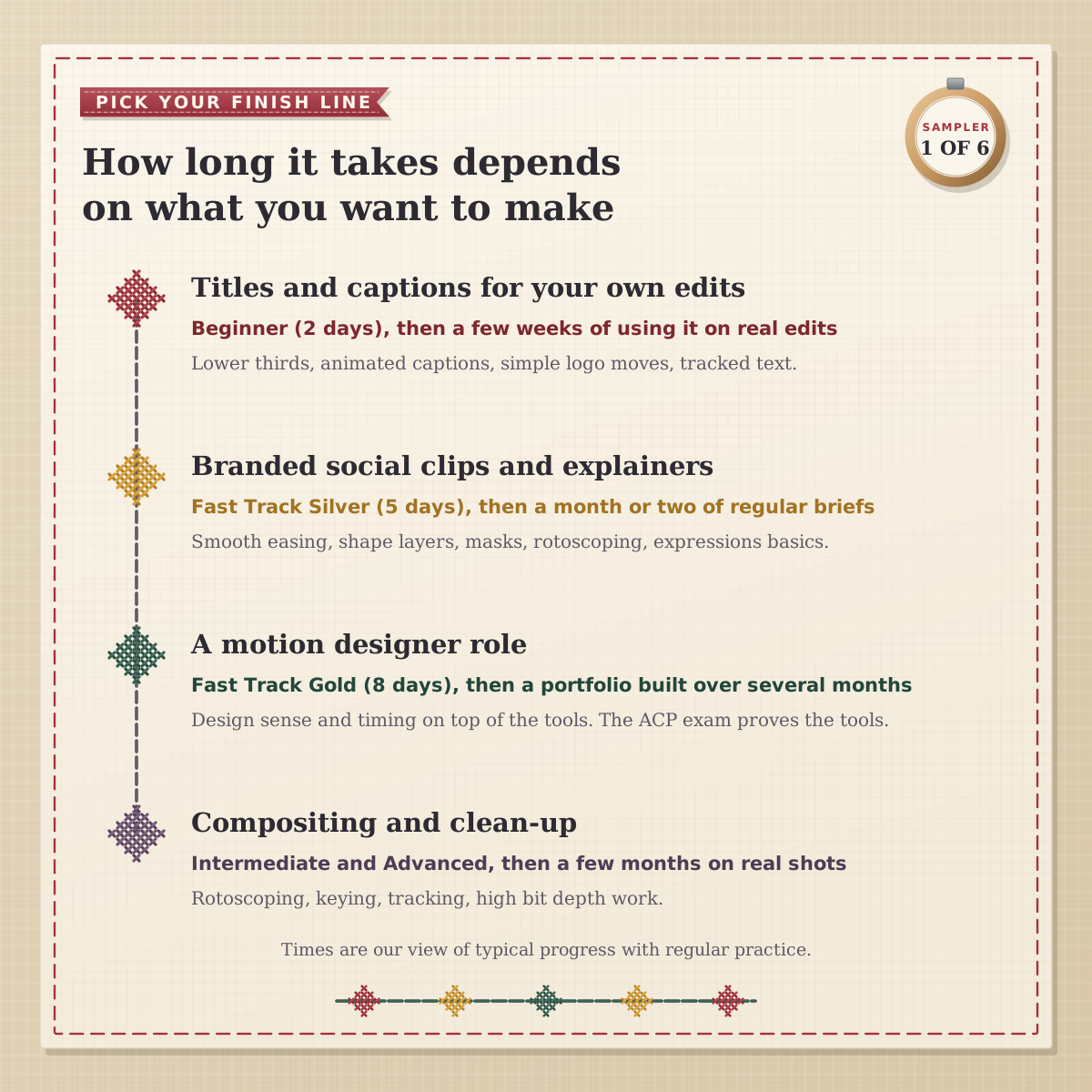
Most editors and marketers we teach are aiming at one of the first two. For captions, lower thirds and a moving logo in your own edits, the Beginner course plus a few weeks of using it on real jobs is enough. Branded social clips and explainers need smoother easing, shape layers, rotoscoping and a first taste of expressions, which is where Intermediate comes in. If you’re weighing up motion design as a career, our guide to what motion design is maps out the roles.
What a Premiere editor already knows
Editors usually pick up After Effects faster than complete beginners, because about half the vocabulary is already familiar. The trick is knowing which habits carry straight over and which need rewiring.
In Premiere | In After Effects | What changes |
|---|---|---|
Sequence | Composition | You set its length, frame size and frame rate up front |
Clip on a track | Layer | One item per layer, so a busy composition can have dozens |
Nested sequence | Pre-comp | Used all the time to group, reuse and tidy animation |
Keyframes in Effect Controls | Keyframes in the Timeline | Easing in the Graph Editor decides how motion feels |
Motion Graphics templates you drop in | Templates you build | You can make your own for the rest of the team to use in Premiere |
Export | Render Queue or Media Encoder | Same codecs, different window |
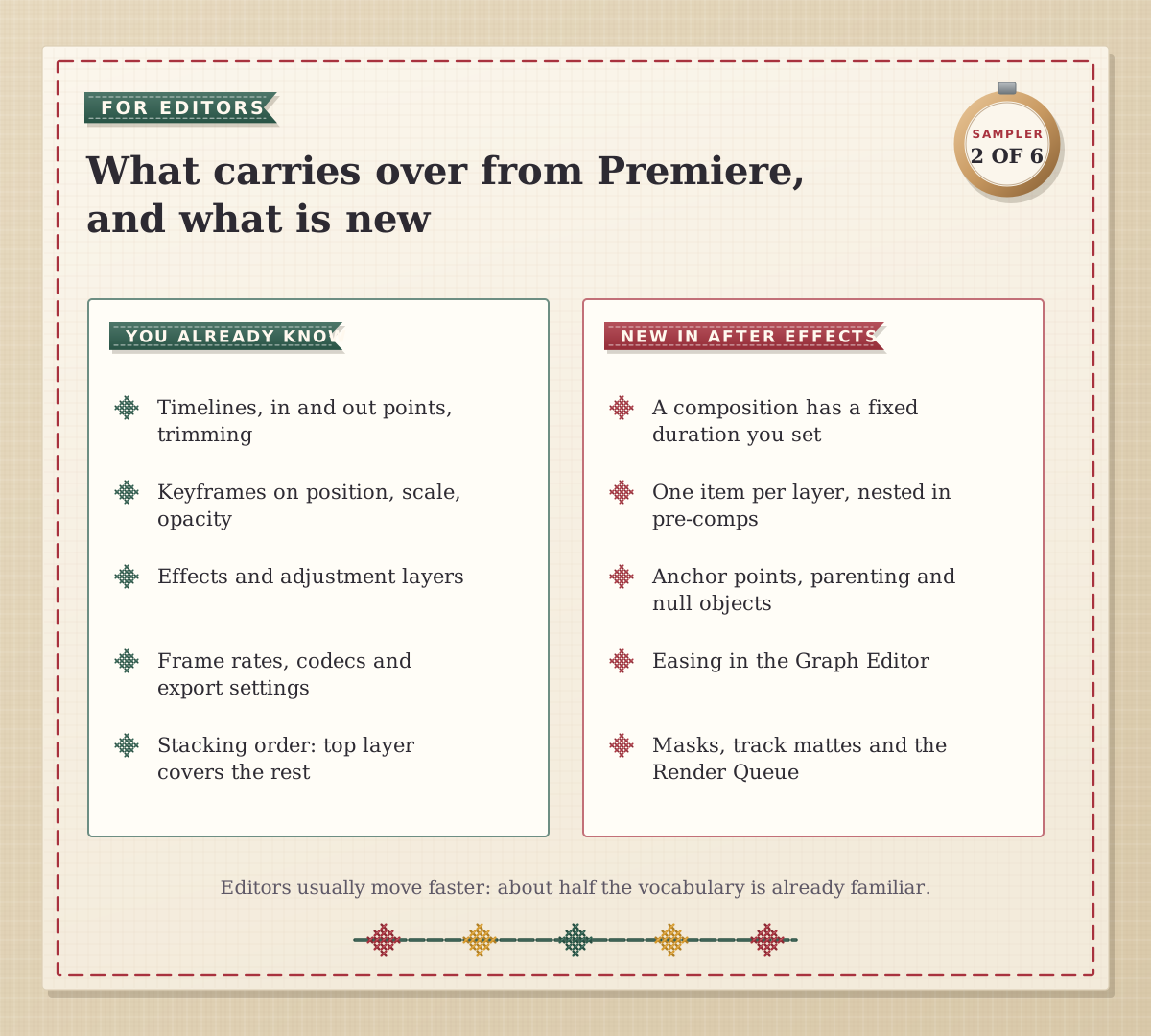
The biggest single adjustment is structure. In Premiere you can lay a whole film out on one timeline. In After Effects a ten-second logo sting might be three compositions nested inside each other. Once pre-comps make sense, most editors speed up noticeably. If you’re still deciding which app a job really needs, our Premiere vs After Effects comparison covers that question.
Why does After Effects feel slow at first?
In our classrooms, new users hit the same three walls, and usually in the same order.
The anchor point. Your text spins around the wrong spot or scales off the side of the frame. The fix is to move the anchor point before you animate, and it tends to click on the first day.
Parenting and nulls. Linking layers so one controls the others turns a fiddly animation into a simple one. Expect this to feel natural within a week or so of use.
Timing. Linear keyframes look robotic. Easy Ease (F9) softens them, and the Graph Editor lets you shape exactly how a move speeds up and settles.
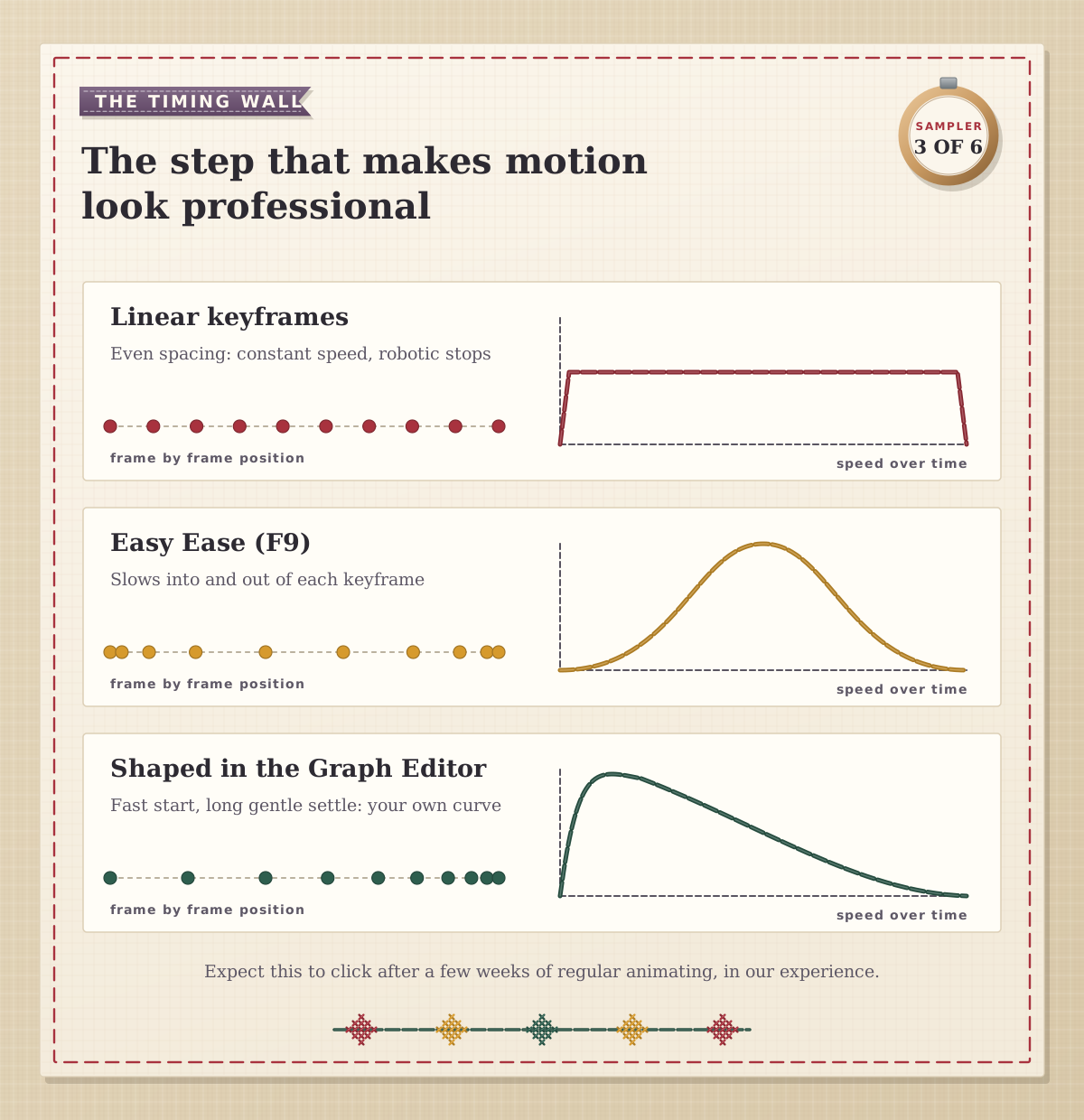
The third wall is the one that separates “I can use After Effects” from “my motion looks good”. In our experience it clicks after a few weeks of regular animating rather than after a set number of hours. A habit worth building: after every animation, open the Graph Editor and look at the speed curve before you judge the result.
How much After Effects do UK job ads ask for?
We read 50 unique UK job ads on Reed from searches for video editor, motion designer, content creator and After Effects roles, to see what employers want After Effects for. It was named in 24 of them, and 16 of those 24 asked for Premiere alongside it. Motion roles named it most often, but more than half of the ads that wanted it were for content, marketing and design jobs.
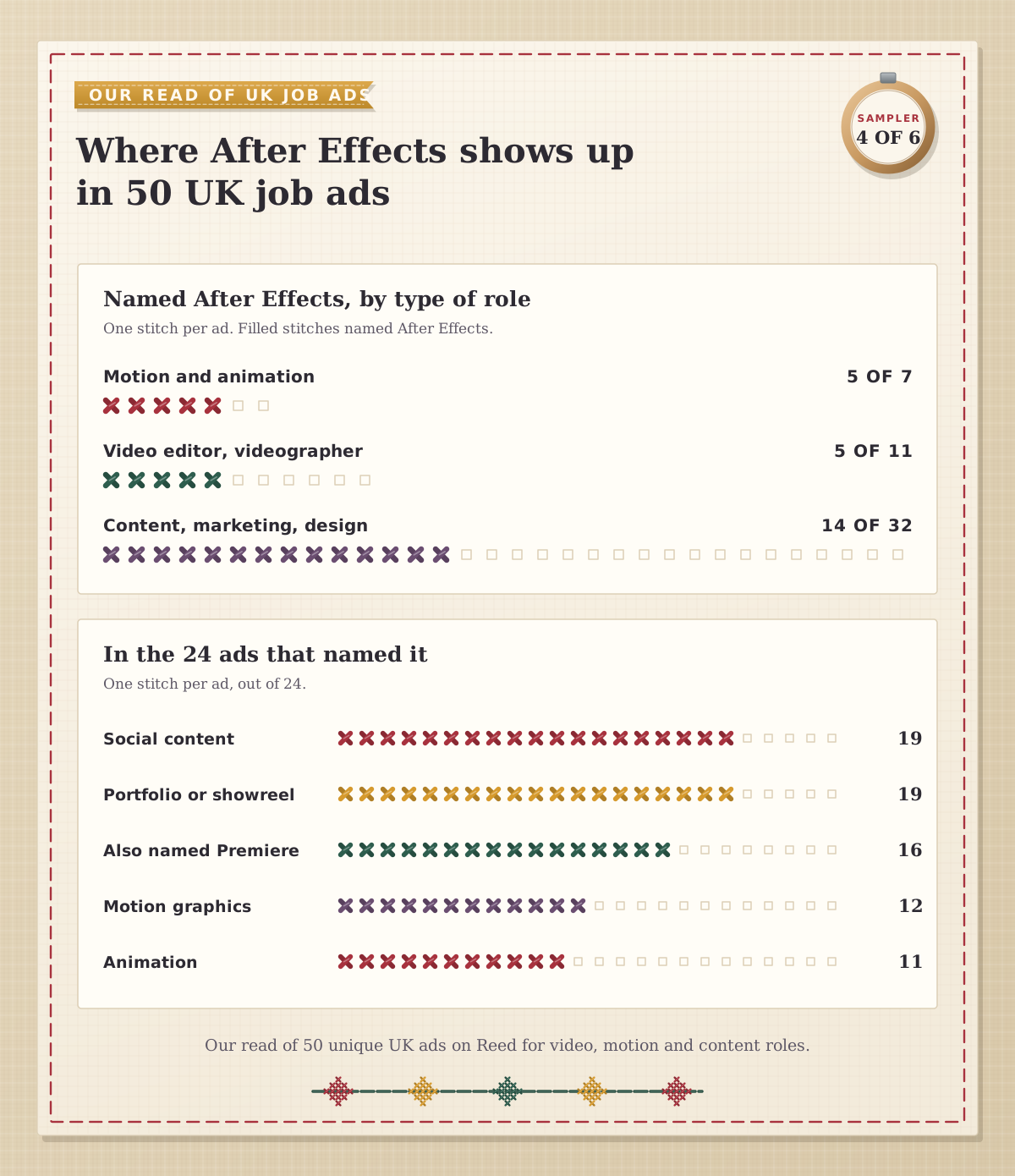
The tasks attached to it were rarely exotic. Social content came up in 19 of the 24, motion graphics in 12 and animation in 11, which is the ground our Beginner and Intermediate courses cover. The detail we’d underline is that 19 of the 24 asked for a portfolio or showreel. Employers judge After Effects by what you can show them, so our view is that the best measure of “learned” is a reel of short, finished pieces rather than a count of hours.
How do you split a Fast Track?
After Effects Fast Track Silver is our Beginner and Intermediate courses together, five days in all. You can take them back to back in one week or split them. The rule is simple: the two Beginner days run on consecutive days and can’t be spread over weeks, while the three Intermediate days can follow in the same week or a later one.
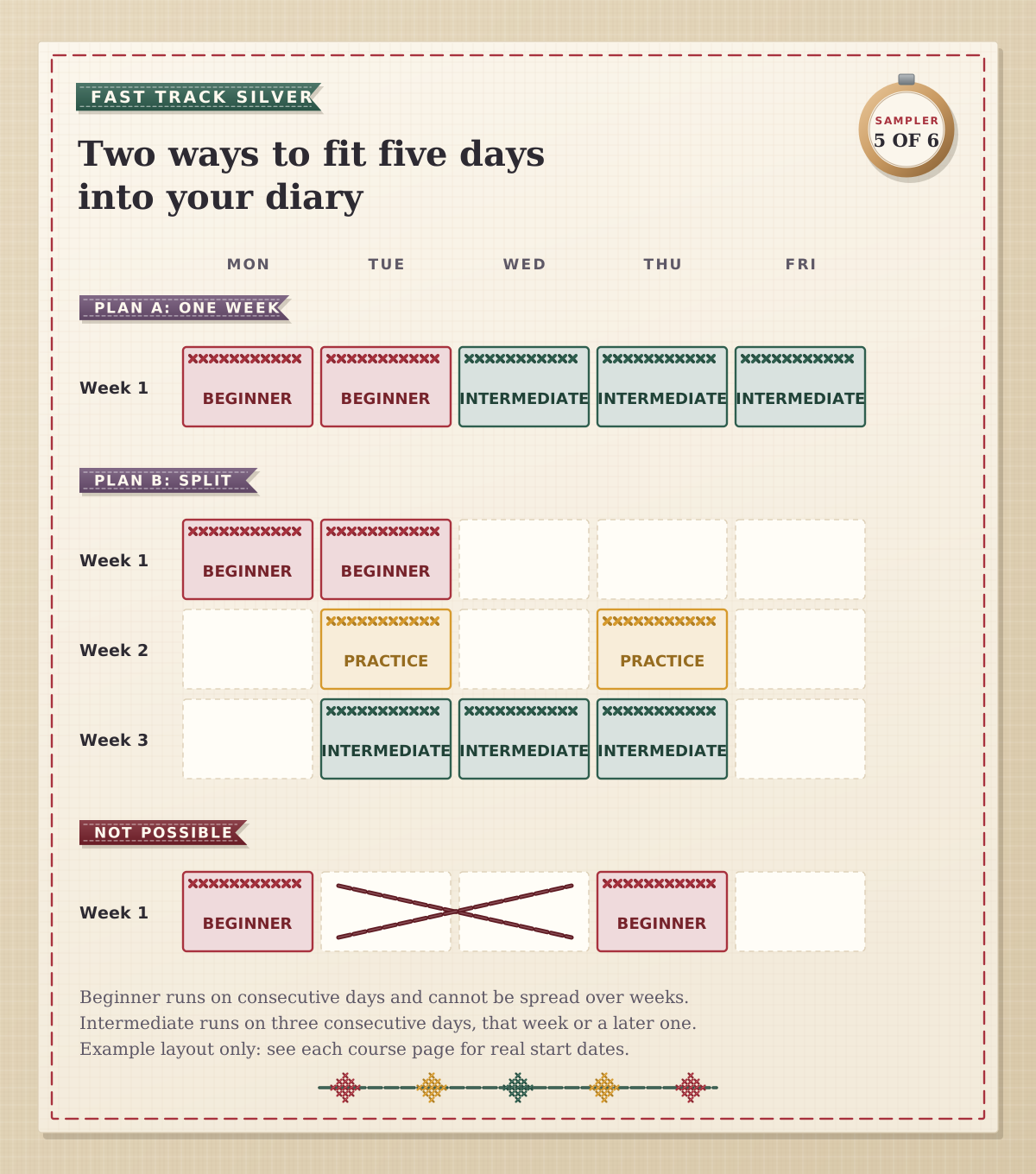
Splitting suits editors who are in the middle of a project and can’t vanish for a week. If you split, our advice is to leave a week or two between the levels rather than months, and to use the gap for a couple of short practice sessions on your own footage. You’ll arrive at Intermediate with real questions, which is the best way to start it. Fast Track Gold adds the three Advanced days on top.
A four-week practice plan for editors
Here’s the plan we’d hand an in-house editor straight after the Beginner course. Each brief uses your own footage and takes an hour or two.
Week 1: a lower third. Animate a name and job title in and out with eased keyframes, export it with an alpha channel and drop it into a Premiere edit.
Week 2: animated captions. Use text animators to bring in a short social clip’s captions word by word, then make a vertical version.
Week 3: a five-second logo sting. Build it with parenting and a null object, then reshape the timing in the Graph Editor until it settles nicely.
Week 4: tracked text. Track a moving sign or phone screen and pin a title to it, with motion blur switched on.
By the end you have four pieces you can reuse at work, and timing has started to feel like something you control.
Ready for real work? A quick self-check
You can set up a composition to match a brief’s frame size, frame rate and length.
You know when to pre-compose, and how to get back inside a pre-comp to edit it.
You move the anchor point before animating rotation or scale.
You can ease keyframes and read the speed graph.
You can reveal text with a mask or a track matte.
You can render one design for both widescreen and vertical screens.
Your project is organised well enough that a colleague could open it and find things.
Tick all seven and you’re past the part of the learning curve that most editors worry about.
Courses, certificates and the ACP exam
Our After Effects Beginner course runs over 2 consecutive days and covers compositions, keyframe animation and motion paths, motion blur, parenting and pre-composing, effects, masks, adjustment layers, animated text, motion tracking basics and export for web, social and broadcast. After Effects Intermediate (3 days) moves on to rotoscoping, puppet pins, audio, smoother animation, line animation, an introduction to expressions, 3D layers and cameras, and simple particles. After Effects Advanced (3 days) adds kinetic and 3D text, expressions for automation, advanced particles, time manipulation, colour keying and professional camera work.
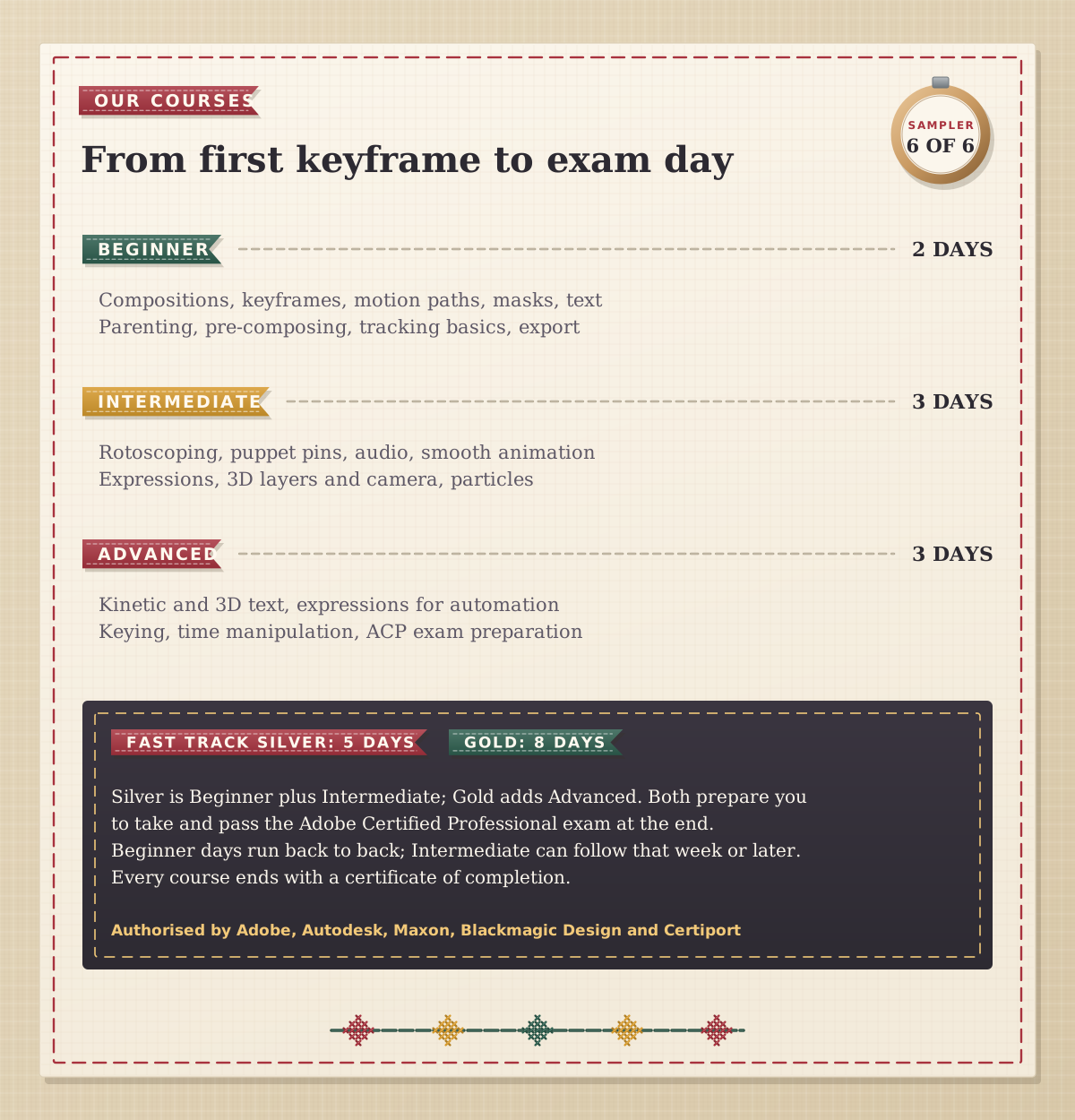
Fast Track Silver and Gold both prepare you to take and pass the Adobe Certified Professional exam in After Effects at the end of the course. The exam lasts 50 minutes and combines questions with live tasks inside After Effects, so the skills you practise in class are the ones you use on the day. If you also want design and 3D in the mix, the Motion Graphics Bundle Beginner pairs After Effects with Photoshop, Illustrator and Cinema 4D.
Courses run in London or live online, and every course ends with a certificate of completion. Docklands Media is authorised by Adobe, Autodesk, Maxon, Blackmagic Design and Certiport. Two days gets you moving; the next few weeks of real briefs are where it starts to feel like yours.