The short answer: Cinema 4D and After Effects work together in two main ways. You can bring a native Cinema 4D file straight into an After Effects composition with Cineware, Maxon’s built-in bridge between the two apps, or you can render your scene in Cinema 4D as image sequences split into separate passes and composite them in After Effects. Either way, Cinema 4D handles the 3D modelling, animation, lighting and rendering, while After Effects adds the typography, 2D graphics, effects and final polish.
It’s one of the most popular pairings in motion design, used for logo stings, title sequences, product animations and social ads. Here’s how each route works and when to use it.
Why do motion designers use Cinema 4D and After Effects together?
Each app does a different job well. Cinema 4D is a full 3D application: you model, animate with tools such as MoGraph, run simulations, set up materials, lights and cameras, and render with Redshift or Cinema 4D’s own renderers. After Effects is where you animate type and shapes, track footage, grade colour, add effects and deliver the finished piece.
Splitting the work keeps you flexible. 3D rendering is slow, but softening a shadow or nudging a title in After Effects takes seconds, so the more you can adjust in compositing, the less you re-render. Still deciding whether 3D is for you? Our 10 reasons to learn Cinema 4D is a good place to start.
What are the ways to get Cinema 4D scenes into After Effects?
There are four common routes, and most projects use one or two of them.
Route | How it works | Best for | Good to know |
|---|---|---|---|
Cineware (live .c4d file) | Import the .c4d file; the Cineware effect renders it in your composition and updates when you save in Cinema 4D | Quick 3D elements and look development | Multi-pass layers need the Standard renderer |
Render passes + .aec file | Render image sequences with passes; an After Effects compositing file loads them, plus cameras and lights | Final renders and heavy scenes | Needs Maxon’s importer plug-in in After Effects |
Redshift AOVs | Output AOVs such as reflections, depth and Cryptomatte, often as one layered EXR | Photoreal, high-end work | After Effects has a built-in Cryptomatte effect |
3D models in After Effects | Export GLB, glTF, OBJ or FBX and render it with After Effects’ Advanced 3D renderer | Simple logos and product shots | Complex animation and simulations stay in Cinema 4D |
How does Cineware work in After Effects?
Cineware is built into After Effects. Import a .c4d file, drop it into a composition, and the Cineware effect renders the scene on that layer. Save a change in Cinema 4D and After Effects picks it up. You can also create a new Cinema 4D file from After Effects (File > New > Maxon Cinema 4D File) or open one with Edit Original. The Cineware effect lets you:
Switch render quality. Use fast viewport modes while you work, then Current for full quality.
Choose a camera. Render through a Cinema 4D or After Effects camera, so 2D layers and the 3D scene share the same move.
Extract scene data. Turn cameras, lights and tagged objects into native After Effects layers.
Add passes. Split the layer into separate passes with suitable blending modes (Standard renderer only).
Use Live Link. Sync the two apps’ timelines.
After Effects also includes Cinema 4D Lite, a limited version of Cinema 4D that you add through the Creative Cloud app and use with a free Maxon account. It’s a handy way to try 3D; the full version unlocks far more tools.
Cineware is great for interactivity, but complex scenes can slow previews down. Adobe’s Cinema 4D and Cineware guide lists the Standard and Physical renderers (plus Sketch and Toon) for Cineware, so for Redshift scenes and heavy final renders, the usual approach is to render in Cinema 4D.
What are multi-pass renders and object buffers?
A multi-pass render splits each frame into separate images, or passes, that together make up the picture: colour, shadows, reflections, ambient occlusion, depth and so on. In After Effects you stack them back up with blending modes and adjust each one on its own. Too much shine? Turn the reflection pass down. Harsh shadows? Soften them. No re-render needed.
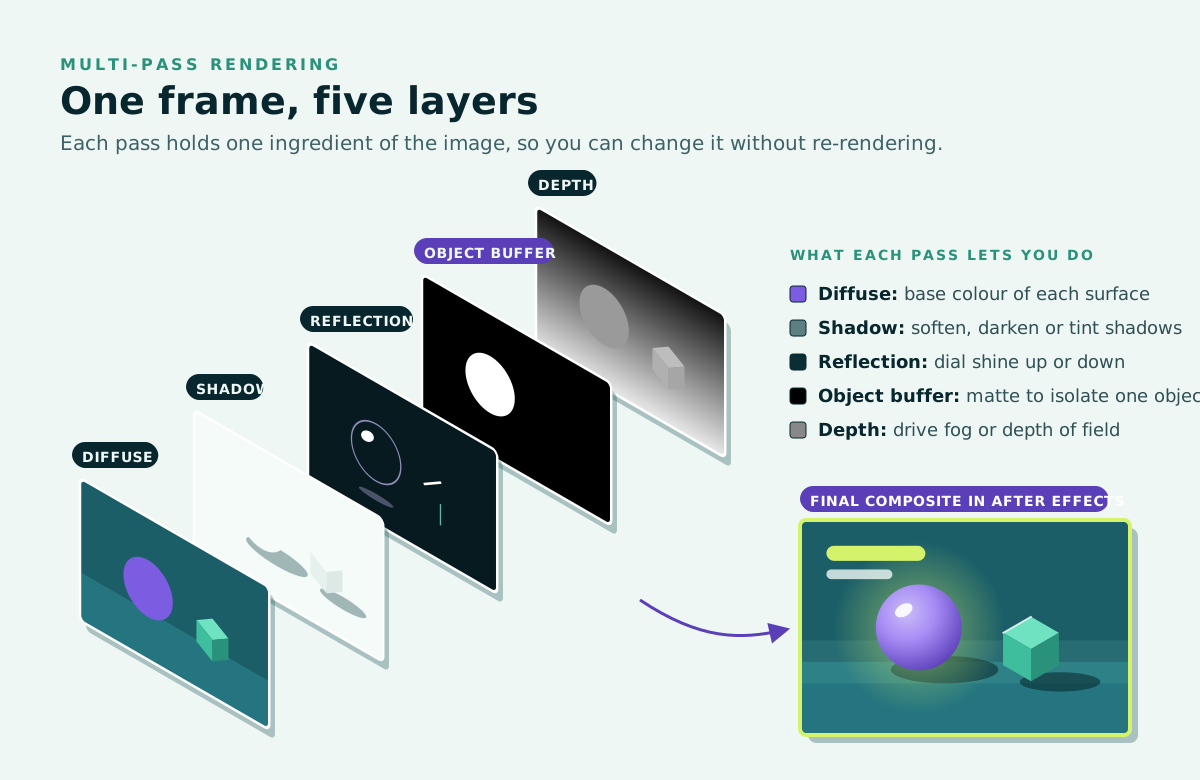
Object buffers are mattes. Add a Compositing tag to an object, give it a buffer ID, and add an Object Buffer channel with the same ID in the Multi-Pass settings. You get a black-and-white matte of just that object, so you can grade or blur one element without touching the rest of the shot.
Two habits help. Render image sequences rather than a single video file, as Maxon recommends; if a render stops, you only lose unfinished frames. And use at least 16-bit colour with Cinema 4D’s linear workflow, blending colours in linear light in After Effects so the passes recombine correctly.
Redshift works the same way with different tools. Instead of Cinema 4D’s Multi-Pass settings, you set up AOVs (arbitrary output variables) for components such as diffuse, reflections and depth, and Redshift can write them into one layered EXR file. Its Cryptomatte AOV creates mattes for every object or material automatically, and After Effects’ built-in Cryptomatte effect lets you click an object to isolate it.
How do you send cameras and lights from Cinema 4D to After Effects?
Use the .aec compositing file. In Cinema 4D’s Render Settings, under Save, enable the Compositing Project File for After Effects and turn on Include 3D Data. Cinema 4D then saves an .aec file with your render. Import it into After Effects for a ready-made composition with your passes loaded and your camera and lights recreated as native layers.
Add an External Compositing tag to any other object and it arrives as a null, so you can pin a title or a 2D graphic to a moving 3D object. One setup step: After Effects needs Maxon’s importer plug-in, found in the Exchange Plugins folder of your Cinema 4D installation, and Maxon’s guide to composition files shows where to copy it.
Can After Effects do 3D on its own?
More than it used to. After Effects imports GLB, glTF, OBJ and FBX models and renders them with its Advanced 3D renderer, alongside extruded text and shapes, environment lighting, shadow-casting lights, Substance 3D materials, simple parametric meshes and depth of field.
For a spinning logo or a simple product shot, that may be enough. But complex models, MoGraph animation, simulations, character work and photoreal Redshift rendering still happen in Cinema 4D, which is why the two apps remain such a natural pair.
What does a typical Cinema 4D and After Effects workflow look like?
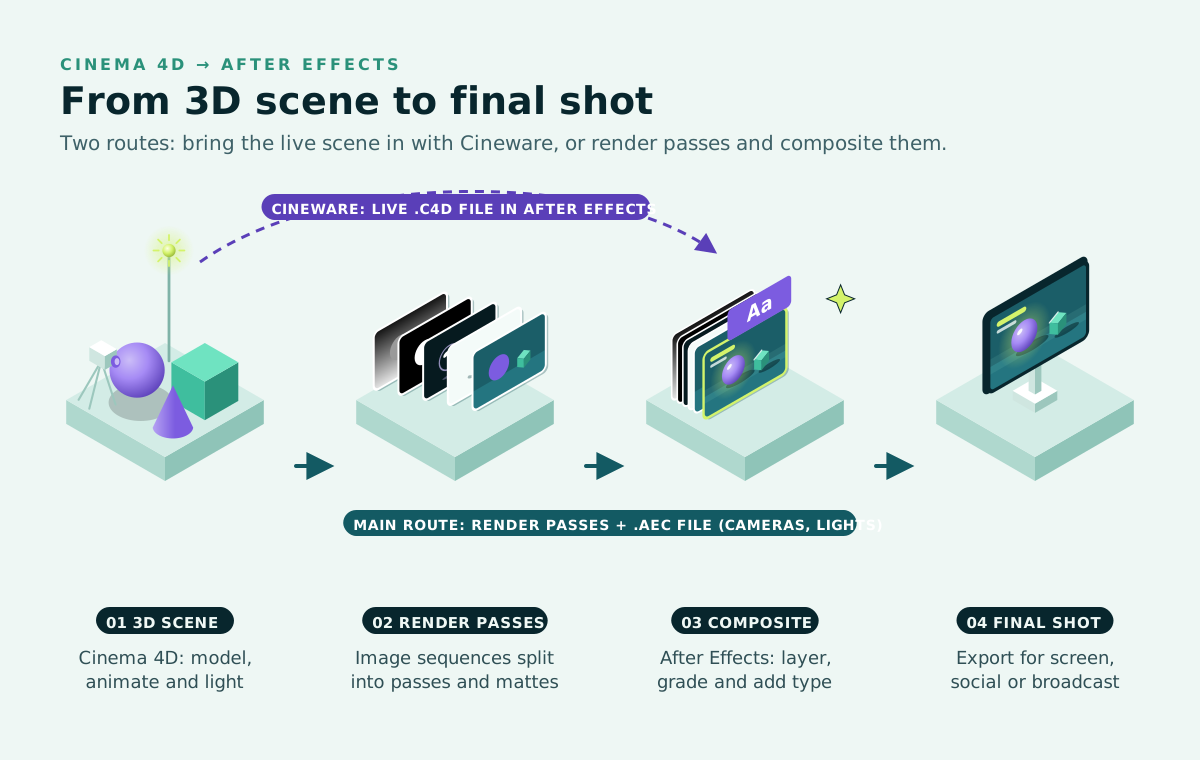
Plan the shot. Agree styleframes, resolution, frame rate and length so both apps match.
Build and animate in Cinema 4D. Model, animate, and set up materials, lights and cameras.
Prepare for compositing. Choose passes or AOVs, add object buffers and tags, and switch on the .aec file.
Test, then render. Check a few frames before the final image sequences.
Composite in After Effects. Import the .aec (or .c4d) file, rebuild the image from the passes, then add type, grading and effects.
Export from the Render Queue or Adobe Media Encoder.
For the Cinema 4D side, see our 12 tips every Cinema 4D user should know.
Do you need Maxon One to use Cinema 4D with After Effects?
No. A Cinema 4D subscription covers everything here, and Maxon says Redshift GPU rendering is included with all current Cinema 4D subscriptions. Maxon One is Maxon’s complete bundle, adding ZBrush, Red Giant, Universe and Autograph, plus the Capsules asset library and Cineversity training. It’s worth a look if you also want Red Giant’s effects or ZBrush sculpting.
How can you learn Cinema 4D and After Effects?
Docklands Media is an authorised training partner of Adobe, Autodesk, Maxon, Blackmagic Design and Certiport. Our Cinema 4D trainer, Ozgur Gorgun, is one of the very few people in the world to hold the Master Trainer title for Cinema 4D, and courses run at our London training centre or live online.
New to both apps? Start with Cinema 4D Beginner (2 days) and After Effects Beginner (2 days). To learn the whole toolkit, the Motion Graphics Bundle: Beginner covers After Effects, Photoshop, Illustrator and Cinema 4D over eight days, and the Silver and Gold bundles go further.
The compositing workflow above is taught in Cinema 4D Advanced (3 days), which covers multipass rendering, object buffers, enhancing animations in After Effects and Redshift. Cinema 4D Intermediate (3 days) covers MoGraph, fields and particles. For After Effects, After Effects Intermediate (3 days) and After Effects Advanced (3 days) add 3D layers, cameras, expressions and keying.
To cover more at once, Cinema 4D Fast Track Silver (5 days) combines Beginner and Intermediate, and Cinema 4D Fast Track Gold (8 days) covers all three levels, including Redshift and multipass compositing. After Effects Fast Track Silver (5 days) and After Effects Fast Track Gold (8 days) do the same for After Effects, with Gold ending on integration with Photoshop, Illustrator and Cinema 4D. After Effects Fast Track courses prepare you to sit and pass the Adobe Certified Professional exam at the end of the course, and any Fast Track can be split across non-consecutive dates.
Every course includes a certificate of completion, available through our student portal, and you can add the Adobe Certified Professional exam when you book an After Effects Fast Track, Intermediate or Advanced course. Browse all our Cinema 4D courses and After Effects courses.