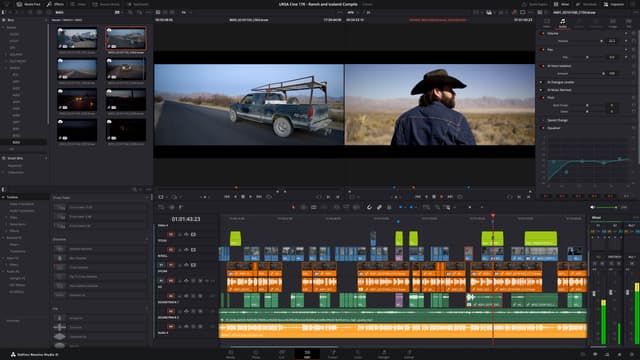
Take your editing and motion graphics skills further with this comprehensive bundle combining beginner and intermediate Premiere Pro and After Effects training. Learn advanced editing, effects, and compositing techniques used by video professionals.

The Video Bundle Silver offers a complete 10-day learning journey across Premiere Pro and After Effects, combining both beginner and intermediate levels of each software to help you develop a professional workflow for editing and motion graphics.
You’ll start by mastering the essentials in Premiere Pro — from timeline editing and sound mixing to transitions and visual polish. Then, you’ll progress to more advanced topics like colour correction, titles, animations and advanced trimming tools.
In After Effects, you’ll learn to build and animate sophisticated motion graphics, use masks and keyframes effectively, and create seamless compositions that enhance your storytelling. You’ll also explore best practices for rendering, exporting, and delivering videos in the most suitable formats for social media, professional presentations and broadcast.
Guided by our Adobe-certified trainers, you’ll complete hands-on projects that reinforce real-world techniques and prepare you for professional editing scenarios. Delivered at our London training studios or online, this bundle is perfect for anyone looking to move beyond the basics and produce professional-grade video content with confidence.
Here is what you will learn in the Video Bundle: Silver in more detail. Click the topics below to explore what is covered in each section.
This bundle includes courses that prepare you for industry-recognized certification exams.
Along with your certificate of completion, you’ll have the option to take the official Adobe Certified Professional (ACP) exam for £175 + VAT. This globally recognised certification highlights your creative expertise and proves your job-ready skills. Select the exam option when booking to include it with your course.
Hear directly from professionals and teams who’ve trained with us, sharing their experiences and the impact our training has had on their creative journeys.
Advanced enough for intermediate learners
The Intermediate Premiere Pro course helped me produce marketing videos, tutorials, and professional social media content. I can now manage complex editing workflows confidently and efficiently.
Very hands-on and structured training
This course helped me get comfortable working with complex timelines, multi-track edits, transitions, and audio mixing. It was a natural step up from the beginner level and made editing far more straightforward.
Intermediate Premiere Pro training with real-world application
I now create polished social media videos, animated intros, and promotional content with confidence. The techniques from the course are ones I use regularly on real-world projects.
Practical Premiere Pro skills for professional projects
I learned how to manage complex edits using multi-track timelines, adjustment layers, and professional audio mixing. These skills now allow me to produce high-quality videos for presentations and client projects.
Boosted my creative video editing capabilities
The intermediate Premiere Pro course helped me produce marketing videos, social media content, and tutorials to a professional standard. I’m now comfortable managing multi-layer timelines and applying effects with confidence.
Intermediate Premiere Pro course was very helpful
Working with adjustment layers, keyframed effects, advanced transitions, and audio correction now feels second nature. Building smoothly on the beginner course, the training helped me produce polished videos for social media and client work.
Clear and structured Intermediate Premiere Pro training
The training walked me through editing workflows, multi-track sequences, audio mixing, and transitions in a really clear way. My videos now have a polished finish, and I’m confident using these techniques on real projects.
Took my Premiere Pro skills to the next level
Handling multiple sequences, advanced transitions, audio mixing, and colour correction now feels straightforward. I’m able to produce cinematic, professional video content for clients efficiently.
Excellent course for progressing video editors
Working with text animation, transitions, and complex timelines now feels much more controlled. I’m able to produce polished videos for campaigns, online content, and client work with confidence.
Practical and engaging Intermediate Premiere Pro course
Editing now feels far more controlled, especially when working with multi-track timelines, transitions, and effects. I’m able to produce marketing videos and social media content efficiently and to a professional standard.
Intermediate Premiere Pro training exceeded expectations
This course strengthened my ability to manage complex timelines, work with multiple clips, and fine-tune audio and transitions. I now feel confident editing longer, more detailed projects and delivering high-quality videos for clients.
From basic edits to professional videos
This course introduced me to multi-track editing, keyframing effects, colour correction, and workflow optimisation. I can now create more complex projects, including promotional videos, intros, and animated graphics. The practical exercises were extremely valuable.
Boosted my video editing confidence
Working with advanced transitions, adjustment layers, and cleaner audio has taken my editing up a level. I’m now producing professional videos for social media, tutorials, and marketing work using techniques that apply directly to real projects.
Perfect progression from beginner to intermediate
Building on what I already knew, this training helped me get comfortable with multi-track timelines, advanced effects, text animation, and colour grading. My videos now have a much more professional finish, and handling complex edits feels far more efficient.
Intermediate Premiere Pro course took my editing skills to the next level
I learned advanced timeline management, multi-track editing, transitions, and colour correction techniques. I now produce polished social media videos, marketing campaigns, and client projects with confidence.
Very hands-on and practical After Effects training
The beginner After Effects course used plenty of hands-on exercises, which made the software easy to pick up. I can now animate text, logos, and video content with confidence.
Beginner After Effects course that delivers
This training explained fundamentals like layers, keyframes, and transitions. I can now produce professional-looking simple animations for university projects.
After Effects basics explained perfectly
The course gave me confidence to create animations for client presentations and digital portfolios. Adobe After Effects feels much more approachable now.
Brilliant for complete beginners
The Beginner Adobe After Effects training helped me design animated social content and simple motion graphics. The course was well-paced and easy to follow.
Made After Effects simple to understand
The Beginner After Effects course taught me all the basics, including layers, compositions, and keyframes. It’s exactly what I needed for my internship projects.
Very beginner-friendly After Effects course
Starting with no prior experience, this course gave me a strong introduction to After Effects. I’m now able to create simple animations, text effects, and motion graphics efficiently.
Exactly what I needed for work
The Beginner Adobe After Effects course gave me skills to create animated slideshows, social media clips, and short marketing videos. It was relevant, practical, and easy to apply to real projects.
Clear and practical After Effects training
This course showed me how to use After Effects for educational materials and simple animations. The beginner training was very practical and easy to follow.
After Effects finally feels approachable
The Beginner After Effects course explained compositions, keyframes, and basic effects effectively. I no longer feel intimidated by After Effects and can start animating confidently.
A must for complete beginners
I needed After Effects to create animated promotional videos. The Beginner Adobe After Effects course taught me the basics of keyframes, layers, and transitions. It was very beginner-friendly and practical.
Beginner After Effects training exceeded expectations
The lessons were clear and hands-on, making the learning process straightforward. I can now create animated presentations, social media content, and video overlays in Adobe After Effects.
After Effects basics finally make sense
Before this course, After Effects felt confusing. Breaking down compositions, layers, and basic animation made everything click, and I can now create social media animations and simple motion graphics efficiently.
A great foundation in After Effects
The Beginner After Effects course covered all the essentials: layers, timelines, keyframes, and basic effects. I now feel ready to work on simple animated videos, intros, and digital content.
Beginner After Effects training made simple
I had never used After Effects before, but this course explained everything step by step. From creating compositions to basic animations and transitions, I now feel confident producing motion graphics for social media campaigns.
Perfect introduction to After Effects
The Beginner Adobe After Effects course helped me understand the basics of motion graphics, layers, and keyframes. I can now create simple animations and animated text confidently. The course was easy to follow and very practical.
Comprehensive beginner training in Premiere Pro
The Beginner Adobe Premiere Pro course gave me a strong foundation in editing. I learned to cut and trim footage, add text, apply transitions, and adjust audio levels. By the end, I could create polished videos for both personal and professional projects.
Beginner Premiere Pro course that delivers
This course explained Premiere Pro fundamentals clearly, including timelines, trimming, audio adjustments, and transitions. I now produce my own videos for school projects and social media confidently, thanks to the practical lessons.
Perfect for complete beginners
I picked up all the basics needed to start editing in Premiere Pro, from importing footage and trimming clips to adding text and transitions. The hands-on approach made video editing feel approachable and easy to get into.
Very thorough beginner video editing training
Starting from scratch, this Premiere Pro course helped me move quickly into editing with confidence. I learned how to cut footage, organise timelines, add simple effects, and export finished videos, all in a very clear and practical way.
Step-by-step beginner Premiere Pro course
This course provided a clear, practical introduction to video editing. I now understand sequences, trimming, adding text, transitions, and exporting. I can confidently produce simple videos for projects and social media campaigns.
Learned Premiere Pro basics quickly
This course made video editing feel manageable from the very start. Learning how to trim clips, organise sequences, add transitions, and balance audio means I can now edit videos confidently from beginning to end, and the practical exercises really helped everything sink in.
Beginner Premiere Pro training made video editing simple
This course was structured and easy to follow. I learned timeline management, basic editing techniques, adding transitions, and adjusting audio levels. I now feel confident producing videos for my clients and personal projects.
Perfect introduction to video editing
I had no prior experience with Premiere Pro, but this course guided me through every step. I learned to import footage, trim clips, add text and transitions, and export professional-looking videos. It gave me a strong foundation to build on.
Beginner-friendly and practical
This beginner Premiere Pro course broke down the essentials of video editing in a clear, easy-to-follow way. From timelines and cuts to transitions and audio, I finished the course able to produce polished content for social media and internal use.
Step-by-step Premiere Pro training that works
I learned to navigate Premiere Pro confidently, organize sequences, and perform basic edits. The course included practical examples like creating short videos and social media clips, which made learning enjoyable. Now I can produce videos without relying on others.
Learned everything I needed as a beginner
The Beginner Adobe Premiere Pro course gave me a complete foundation in video editing. I now know how to cut and trim clips, add simple effects, edit audio, and export videos. It’s structured perfectly for anyone starting from zero.
Beginner Premiere Pro course exceeded expectations
This Premiere Pro course gave me a solid, hands-on introduction to video editing. I learned everything from importing and trimming footage to adding text and transitions, and I now feel comfortable creating content for social media, tutorials, and marketing projects. The practical exercises really helped lock everything in.
Perfect starting point for video editing
Coming in with no experience, I found the Premiere Pro beginner course clear, well structured, and easy to follow. I learned how timelines work, how to cut footage, adjust colour, and use transitions, and by the end I was producing polished videos for both personal and client projects.
Comprehensive beginner training in Premiere Pro
This Beginner Premiere Pro course was extremely thorough and beginner-friendly. I learned to work with sequences, apply transitions, adjust audio, and export videos efficiently. The practical exercises allowed me to start editing my own videos immediately, and I now feel confident handling basic projects from start to finish.
Beginner Premiere Pro course gave me a solid foundation
The Beginner Adobe Premiere Pro course was the perfect introduction to video editing. I learned everything from importing footage and organizing timelines to basic cutting, transitions, and audio adjustments. The step-by-step lessons were easy to follow, and by the end, I could confidently produce simple video projects for social media, presentations, and marketing campaigns.
Advanced enough for intermediate learners
This course really improved the way I approach motion graphics. I’m now able to animate social media content, marketing videos, and polished intros much more quickly, without sacrificing quality.
Very hands-on and structured training
The course taught me how to create animations, diagrams, and overlays specifically for educational content. Building on my existing skills, it helped simplify what used to feel like a very complex piece of software.
Intermediate After Effects training with real-world application
I gained hands-on experience creating animated text, infographics, and logo transitions. The skills from the course are ones I use consistently in my video projects.
Practical After Effects skills for real projects
The intermediate course showed me how to animate UI elements, transitions, and text layers effectively. I now rely on After Effects for both client work and personal projects.
Boosted my creative capabilities
I learned how to create engaging motion graphics, promotional visuals, and dynamic presentations using professional workflows. It really helped me feel more confident working with animation.
Intermediate After Effects course was very helpful
Animating text, infographics, and icons now feels straightforward. The hands-on approach built naturally on what I’d already learned and translated well into real marketing projects.
Clear and structured Intermediate After Effects training
The lessons introduced more advanced animation skills, including motion paths, eased keyframes, and simple expressions. As a result, my video content now looks far more polished and professional.
Took my After Effects skills to the next level
Creating complex animations, animated infographics, and smooth transitions is now part of my regular freelance work. The course gave me practical techniques that I use every day.
Excellent course for progressing designers
Creating motion graphics, animated text, and layered compositions now feels natural. The training has given me the confidence to produce professional animations for social media and marketing.
Practical and engaging After Effects course
I’m now comfortable creating animated slides, logo animations, and video intros for clients. The hands-on exercises made learning After Effects practical and easy to apply.
Intermediate After Effects training exceeded expectations
The course introduced advanced motion techniques, including easing, keyframe interpolation, and simple expressions. Its practical approach helped me create professional motion graphics more efficiently.
Boosted my confidence with After Effects
Animating smooth transitions, dynamic text, and infographics now feels natural. The practical exercises helped me build confidence and take on more complex After Effects projects.
Perfect progression from beginner to intermediate
Moving beyond the basics in After Effects, I learned how to use expressions, parent layers effectively, and create smoother transitions. My video projects now look cleaner, more professional, and better put together.
Intermediate After Effects course took my skills further
The Intermediate Adobe After Effects course helped me move beyond the basics. I learned advanced keyframing, motion paths, and layering techniques. Now I can create more complex animations and professional-quality motion graphics for social media and marketing campaigns.

Neil is an incredible motion graphic designer, animator, editor, cartoonist and book illustrator. His work has been broadcast, published and distributed all over the UK and beyond. His creativity and fun approach to his work is what sets Neil apart.
As well as creative individuals, we are also the preferred training provider for some of the most successful global brands and organisations.
Just a few of the common questions asked by our students.
No prior experience is required. The courses are designed for beginners and intermediate users alike, guiding you through the interface, tools, and workflows from the ground up.
We use the latest version of Adobe Premiere Pro to ensure you’re learning the most up-to-date features and professional workflows. Older versions are mostly compatible, but updating is recommended.
Yes. All exercises are built around real-world projects, so you’ll be able to edit footage for social media, marketing campaigns, short films, or personal projects immediately.
Absolutely. Premiere Pro skills are essential for producing professional video content, whether for corporate videos, YouTube channels, social media campaigns, or freelance work.
Yes. You’ll receive all footage, assets, and templates used in the lessons so you can practice and revisit exercises at your own pace.
Definitely. The hands-on approach ensures you leave with the confidence to organize, cut, and enhance videos using industry-standard techniques.
Yes. Fast Track courses provide a solid foundation for the Adobe Certified Professional exam in Premiere Pro, and we can advise on next steps for certification if you’re interested.
Yes. The course covers different output requirements, including social media platforms, websites, and professional broadcast formats.
Yes. Alongside creative editing techniques, we share shortcuts, workflow strategies, and time-saving tips to help you work faster and more efficiently.
Yes. You’ll learn how to adjust exposure, color balance, and creative looks using tools like the Lumetri Color panel.
Yes. The course covers essential audio editing, including mixing, noise reduction, and syncing audio with video for professional results.
Yes. You’ll practice sequencing, trimming, and organising footage to create cohesive, polished video projects.
Yes. You’ll learn how to create text overlays, motion graphics, and integrate animated elements using Premiere Pro’s Properties panel.
Definitely. Premiere Pro integrates smoothly with After Effects, Photoshop, and Illustrator, so you can import graphics, images, and animated elements seamlessly.
Yes. Projects completed during the course can form part of a professional video portfolio to showcase your editing skills to clients or employers.
Our Premiere Pro courses balance both. But there is more focus on the technical aspects of the software. That being said, you’ll also learn narrative structuring and storytelling techniques alongside hands-on technical editing skills.
Yes. You’ll learn to work with multicam sequences, masking, tracking, and other advanced tools to create professional-level edits.
Yes. You’ll learn export settings for web, social media, and broadcast, ensuring videos retain quality and play correctly across platforms.
Absolutely. You’ll learn to edit videos optimised for platforms like YouTube, Instagram, LinkedIn, and TikTok.
While Premiere Pro runs on most modern systems, for optimal performance we recommend a multi-core processor, 16GB or more of RAM, and a dedicated GPU.
Yes. Structured, hands-on training allows you to cover essential skills in just a few days, with practice ensuring long-term proficiency.
Yes. The course covers visual effects, transitions, speed changes, and other creative techniques to make your videos engaging.
Yes. Premiere Pro is widely used in film, marketing, broadcasting, and digital content production, making it a valuable skill for careers in media and design.
Yes. You’ll learn how to design and integrate consistent branding, titles, and animations into your video projects.
Yes. You’ll gain tips for optimising performance, managing media, and resolving rendering or playback issues.
Absolutely. The course covers techniques for syncing audio, creating dynamic cuts, and applying creative effects suitable for music videos or narrative films.
Yes. You’ll learn best practices for organising projects, sequences, and media assets for faster editing.
Yes. You’ll learn how to import After Effects compositions and motion graphics seamlessly to enhance your video projects.
Yes. You’ll learn to create, edit, and export subtitles and captions for accessibility and professional delivery.
Yes. You’ll learn to sync, switch, and edit footage from multiple cameras efficiently.
Yes. The course is designed to equip you with skills you can apply to work, freelance, or personal video projects.
Yes. You’ll practice removing backgrounds, layering footage, and using chroma key effects to create professional composite shots.
Yes. Adjustment layers and LUTs are covered to simplify color correction and apply consistent visual styles across your project.
Yes. You’ll practice speed adjustments, slow-motion, fast-motion, and ramping effects for dynamic editing.
While Premiere Pro isn’t designed for live streaming, you’ll learn to edit recordings from livestreams and prepare them for on-demand distribution.
Yes. The course covers workflows suitable for a variety of projects, including weddings, corporate events, travel vlogs, and personal projects.
Yes. You’ll practice exporting videos with correct resolutions, aspect ratios, and formats optimised for each platform.
Absolutely. The training equips you with professional editing skills that can be applied to freelance projects, client work, and online content creation.
Yes. You’ll learn how to integrate stock video, graphics, and audio into your projects while maintaining professional quality and style.
Absolutely. You’ll learn to create polished videos, thumbnails, intros, outros, and motion graphics tailored to YouTube, Instagram, and other platforms.
Premiere Pro is primarily designed for video editing, cutting footage, arranging sequences, and creating polished video projects. After Effects focuses on motion graphics, visual effects, and compositing. While both integrate seamlessly, Premiere Pro is best for editing full videos, whereas After Effects is ideal for adding animations, special effects, and advanced motion graphics.
No, our courses are designed for all skill levels. Whether you're a beginner or looking to enhance your existing skills, you'll find the training accessible and beneficial.
We utilise the latest version of Adobe After Effects to ensure you're learning the most current features and workflows. While older versions are still compatible for most techniques, we recommend updating when possible.
Absolutely. All exercises are built around real-world projects, so you’ll be able to apply what you learn directly to professional or personal work.
Yes. After Effects is widely used across creative industries—whether for creating motion graphics, visual effects, or enhancing video content. The skills you gain will be directly transferable to your role.
Yes. You’ll receive all practice files and supporting materials to keep, so you can revisit the exercises and continue learning at your own pace.
Definitely. The training is hands-on, and you’ll leave with the confidence to create animations, visual effects, and motion graphics using industry-standard techniques.
Yes, especially the Fast Track courses will help you gain the skills to form a strong foundation for the Adobe Certified Professional exam. The longer the course is, the higher your chances will be for passing the exam. And we can guide you through the next steps if you’d like to pursue official certification.
Yes. We cover how to prepare animations for web, social media, and video platforms, as well as how to export high-quality animations correctly for various uses.
Yes. Alongside creative techniques, we share professional tips, shortcuts, and workflow strategies to help you work faster and more efficiently.
Yes. We explore key tools such as keying, rotoscoping, tracking, and compositing, which are particularly useful in film, television, and marketing contexts.
Yes. You’ll practice compositing skills—blending different clips, adjusting lighting and colour, and using masks to create seamless results.
Yes. You’ll learn how to animate text, adjust typography, and combine graphics with video to create professional motion graphics.
Yes. You’ll explore adjustment tools such as Lumetri Color, curves, and selective color adjustments to enhance and balance your video content.
Yes. Many exercises focus on creating web- and mobile-ready animations, banners, and posts that are properly optimized for platforms like Instagram, LinkedIn, and Facebook.
Yes. We show you how to manage assets, organize projects, and save/export files in the correct formats so your work is easy to share, render, or edit later.
Definitely. After Effects integrates smoothly with Premiere Pro, Photoshop, Illustrator, and other Adobe tools. The workflows you learn will support projects across the Creative Cloud.
Yes. The projects you complete during the course can be used to start or enhance your motion graphics portfolio, showcasing your new After Effects skills to employers or clients.
Our After Effects courses balance both. You’ll learn key animation techniques alongside visual effects skills for video production.
Yes. You’ll learn how to use expressions to automate animations and create dynamic effects, as well as basic scripting to enhance your workflow.
Yes. We explain resolution, frame rates, codecs, and export settings to ensure your animations render clearly and with accurate colours.
Yes. You’ll explore a range of creative techniques—such as filters, blending modes, and effects—that can transform your animations and designs.
Yes. We introduce how After Effects can be used to create UI animations, transitions, and prototypes, in addition to its core animation functions.
Yes. After Effects can seem complex at first, but with guided, hands-on training you’ll quickly understand the tools and start creating professional-looking animations.
With structured training and regular practice, most learners start feeling confident after just a few days of guided instruction. Mastery comes with continued use and more advanced learning.
Absolutely. After Effects is widely used for designing Instagram animations, Facebook ads, YouTube intros, and other social media content. Our training shows you how to create content optimised for online platforms.
Key skills include working with layers, keyframes, compositions, animation presets, visual effects, and rendering techniques.
While there are alternatives, After Effects is the industry standard for professional motion graphics and visual effects. It’s the most powerful and widely recognised tool in the creative industry.
Yes. Our training covers multiple ways to remove or replace backgrounds using tools like the Roto Brush, masking, and keying techniques.
Yes. After Effects is excellent for creating animated logos, brand intros, and motion graphics that enhance brand identity.
While After Effects includes some painting tools, it's primarily designed for animation and visual effects. For detailed illustration work, Adobe Illustrator or Photoshop are more suitable.
Yes. You’ll practice techniques for correcting colour issues, removing noise, stabilising shaky footage, and enhancing video quality.
Not necessarily. After Effects runs well on most modern laptops and desktops. For best performance, Adobe recommends at least 16GB of RAM, a multi-core processor, and a dedicated GPU. But of course, the higher the specs of your computer, the better the performance will be.
Yes. After Effects is a core skill in marketing, allowing you to create engaging animations for websites, campaigns, ads, and social media.
After Effects is essential in careers such as motion design, video editing, visual effects, animation, and digital media.
Yes. While After Effects isn’t a coding tool, it’s widely used to design UI animations, transitions, and prototypes that are then developed into websites.
Yes. With structured, hands-on training, you can cover the essentials of After Effects in just a few days. Regular practice afterwards will help you build long-term proficiency and confidence.
After Effects is far more powerful and versatile, especially for professional animation, visual effects, and compositing. Simpler tools are good for quick edits, but After Effects gives full creative control.
No. While a creative eye helps, After Effects focuses on learning tools, workflows, and animation principles—you can succeed without prior drawing ability.
Yes, but primarily for adding effects, motion graphics, and compositing. For full video editing, it integrates seamlessly with Adobe Premiere Pro.
The best approach is guided, project-based training. This method allows you to understand tools, techniques, and workflows efficiently compared to self-study alone.
Adobe offers discounted student pricing and a 7-day free trial, but After Effects itself is not fully free. A subscription is required to continue using it after the trial.
No. After Effects is only available through Adobe Creative Cloud. Flexible monthly and annual subscription plans are available.
Yes. After Effects is perfect for animated explainer videos, presentations, and tutorials, allowing you to combine text, graphics, and motion.
Yes. The course covers fundamental and advanced keyframing, easing, timing, and motion principles to create smooth and professional animations.
Yes. While not a full 3D software, After Effects includes 3D layers, camera tools, and integrates with Cinema 4D for advanced 3D workflows.
Yes. The course covers exporting animations for web, broadcast, social media, and high-resolution delivery using correct codecs and settings.
Yes. After Effects is a core skill for motion designers, video editors, animators, marketers, and content creators, making you more competitive in the job market.
Yes. You’ll learn how to import and animate layered graphics from Illustrator and Photoshop for more advanced motion graphics workflows.
Yes. While teaching professional techniques, the course encourages experimentation to develop your own creative approach and style.
Yes. The course covers compositing, motion tracking, and advanced effects to produce professional cinematic-quality titles and sequences.
No. While a graphics tablet can enhance certain workflows, it’s not necessary. Standard mouse and keyboard setups are sufficient for most motion graphics projects.
Premiere Pro is primarily designed for video editing, cutting footage, arranging sequences, and creating polished video projects. After Effects focuses on motion graphics, visual effects, and compositing. While both integrate seamlessly, Premiere Pro is best for editing full videos, whereas After Effects is ideal for adding animations, special effects, and advanced motion graphics.
Our address is: 3 Laybourne House, Admirals Way, London, E14 9UH. We are located only a couple of minutes’ walk from both the Canary Wharf and South Quay stations.
The courses start at 10am and runs until 4pm with a lunch break and a couple of short coffee breaks throughout the day.
We usually have between 4-7 students per class. So it is a very small group, which means you get a lot of individual help and attention.
If you are booking a course as an individual, payments are due at the time of booking. If you are booking through a company and you have an existing agreement with Docklands Media, you can pay on previously agreed terms.
You can pay for your training course via BACS (direct bank transfer), by using any credit or debit card including VISA, Mastercard or AMEX. We use Stripe for payment processing so the entire payment process is encrypted and secure.
We provide the workstations, notepads, light snacks, biscuits, coffee, tea and chocolate (lots of it!) during the course, so you don’t need to bring anything along.
If you feel more comfortable using your own computer, you certainly can. Just make sure you let us know ahead of the course, so we can prepare a workstation for you to connect your laptop.
If you are attending a public scheduled training course with other students, then you would be following a pre-determined outline. This is to ensure that everyone benefits from the training. However, if you would like to use your own files during the course (perhaps you are working on a project that you’d like to use as a case study), check out our Tailored Training page.
You can join the course online instead of travelling to our London studios. You will take part in a live classroom session with real instructors and students, interact, ask questions, and follow demonstrations just like being in a physical class. Online courses run on Zoom or Teams and are more affordable than in-person training. During the course, you will watch your instructor’s screen and practice on your own computer. If needed, the instructor can guide you by taking control of your mouse. To join online, you need: a decent broadband connection (HD video call quality), headphones or speakers and a microphone. Optional: a dual-monitor setup to follow instructions on one screen and practice on the other (a single monitor works too).
If you're joining the course remotely as an online student, then yes. If you don't have the license for the software yet, you can also download and use the free trial version during the training. After the course, you will need to get a full license in order to continue using the software. If you're attending the course in person at our offices, we would be providing the computers and the software for the duration of the training.
Yes – as long as you give us 10 days’ notice, you can postpone your course to another date without any charges. For full details on cancelation and postponing, please refer to our T&Cs.
Yes, we have a limited number of paid parking spaces allocated to students on site. If you require parking, please mention this at the time of your booking as the spaces need to be reserved in advance.
Yes, there are a plethora of restaurant and cafe options within walking distance to our studios.
Yes, you can bring your own lunch and store it in one of our fridges. We also have microwaves and sandwich makers available for you to use.
Unfortunately not. We are on the first floor of a three storey building and there are around 10 steps you would need to climb to get to our offices.
If you are joining the course remotely online, the training materials are usually sent to you in the morning of the first day of your training. This is done via Zoom or Teams, so please ensure you are able to receive files through these platforms before joining the session. If you are joining the course in person, all of the files will be placed on your workstations before you arrive.
Most of our courses come with training materials that you can keep after the course. You can also keep all the files that you create during the course so that you can refer to them in the future.
Depending on which course you attend, you will need to have a computer that meets the minimum requirements for the particular software that will be used. Please ensure you check that you are able to install and launch the software before joining the session.
If you notify Docklands Media in writing and receive a response which acknowledges your notification at least 20 working days before the first day of your course, you will receive a full refund. If, for whatever reason, you withdraw within 20 working days the following fees will remain payable: 20 – 11 working days prior to course commencement: 50% of course fee 10 – 0 working days prior to course commencement: 100% of course fee
Yes, if you notify Docklands Media in writing and receive a response which acknowledges your notification at least 20 working days before the first day of your course, you will receive a full refund.
For any course related questions, you can either directly contact your account manager or email us at info@docklandsmedia.com
Yes - all courses come with a lifetime technical support. So if you have any questions about anything that you've learned on the course, you can contact us for assistance.
Yes - every public scheduled course comes with a free retake option that is valid for 24 months. Please note, this does not apply to private/tailored/custom courses.
Yes - at the end of each course, you will receive a certificate of completion from Docklands Media.
Autodesk and Adobe have their own certification exams, which you can take at the end of the course. These exams are optional and incur an additional fee. As a Certiport Authorised Testing Centre, we offer these exams to be taken either at our premises in London or remotely online as EFHs (Exams From Home). The Autodesk Certification Exam that you can take is called Autodesk Certified User. The Adobe exam is called Adobe Certified Professional. Both of these are available to be booked on their own or as part of your course booking.
Most of our public courses run during week days, but we can arrange a tailored training course for you during weekends or evenings.
You can book a course as far in advance as you like and up to the day before it's scheduled start date. However, since most of our courses get fully booked, it may not be possible to book with less than a couple of weeks' notice. That being said, it's always worth giving a shot and if the course is fully booked, we will let you know what the alternative dates are.
Our courses run quite regularly - roughly once every 6-8 weeks. You can always check the next available start dates for the courses on their corresponding pages, under the "dates" tab.
Yes - we can issue an invoice for your employee to pay for your course. Just make sure you select the "pay by invoice" option when making the booking and enter the details of your employee for an invoice to be sent to them.
Yes - you can pay for your course from pretty much anywhere in the world.
No, there are no hidden fees associated with any of the bookings. What you see on checkout is what you'll pay.
Yes - we cannot issue a certificate of completion without you completing the course.
If you aren't going to be available for part of your course, please do let us know in advance and we will do our best to provide you with a recording of the session(s) you missed. This will be subject to availability and GDPR rules as there may be others joining the same session, who may not want the session to be recorded.
Most of our courses are taught on Windows PCs. However, there is almost no difference between the two platforms when it comes to the actual software. So if you are a Mac user, you can still attend any of our courses and learn how to use the software. If, for any other reason, you'd like to bring your own Mac to the class, you'd be more than welcome to do so.
All of our instructors are certified trainers and professionals in their respective fields. They all have real life experience in design, animation, programming, architecture, modelling, vfx and CGI. So you will not only learn how to use a software, but will also benefit from their vast real-life experience. For more information about our instructors, please visit our About Us page.
The classes are relatively small, so you can expect to receive a lot of personal attention during the sessions. As long as your questions are relevant to the software you're learning and what is being taught on the course, you can ask as many of them as you like.
We are right between the Canary Wharf (Jubilee and Elizabeth Lines) and South Quay (DLR) stations. You can access both of these stations from pretty much anywhere in London. You can also take a bus to Canary Wharf and walk to our offices, which takes around 5 minutes. The buses that serve our area are: 135, 227, D7, D8 and SL4.
Although not compulsory, we do recommend having a webcam and turning it on to make the training experience more enjoyable for both yourself and others. If you don't have one, or don't want to be on camera, that's also perfectly fine.
Yes - you can let us know with at least one day's notice and we can move your booking from classroom to online. Going the other way (online to classroom) would be subject to availability.
Yes - as long as you let us know at the end of your first training day, we offer a full money back guarantee. We're pretty certain that you will enjoy your training session, but if you find it is not for you, we'd try our best to make things right. If you're still not satisfied, we'd be happy to offer a refund.
Fill out the contact form and a member of our team will get back to you shortly—usually within minutes. Whether you're looking to book a course or just need advice, we're happy to assist.
Docklands Media’s Video Silver Bundle is designed for learners who want to develop strong, job-ready skills in both video editing and motion graphics. This bundle combines beginner and intermediate training in Adobe Premiere Pro and Adobe After Effects, providing a total of 10 days of structured, hands-on learning.
© 2026 Docklands Media. All rights reserved.