Master video editing and motion graphics with this all-in-one bundle covering beginner, intermediate, and advanced levels of Premiere Pro and After Effects. Develop complete expertise to produce polished visuals and professional video projects.

The Video Bundle Gold is our most comprehensive video production training package — an immersive programme that takes you from the basics of editing and motion design to advanced visual effects and compositing. Across multiple levels of Premiere Pro and After Effects, you’ll gain the full skill set needed to produce professional video projects from start to finish.
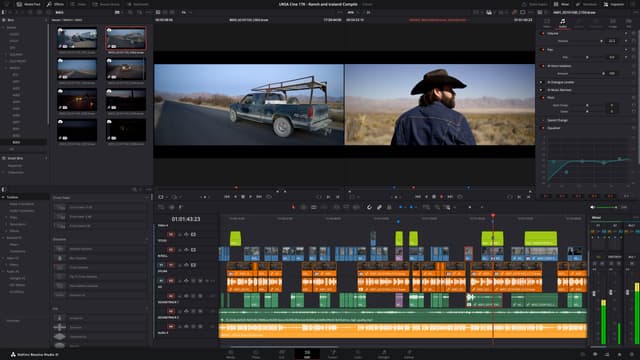
In Premiere Pro, you’ll explore advanced trimming, audio mixing, and multi-camera workflows before moving on to colour grading, captions, and seamless integration with other Adobe tools. In After Effects, you’ll push creative boundaries — mastering complex animation techniques, 3D layers, motion tracking, rotoscoping, and advanced compositing workflows used in high-end video production.
Each stage of the bundle is structured around practical exercises, ensuring you learn by doing. You’ll complete real-world projects that mirror professional post-production pipelines, developing both technical skill and creative fluency.
Delivered in person at our London studios or live online, this intensive training bundle is designed for creatives who want to achieve full mastery of Adobe’s video tools. Whether you’re pursuing a career in video editing, motion graphics, or content creation, this is the ultimate path to professional expertise.
Here is what you will learn in the Video Bundle: Gold in more detail. Click the topics below to explore what is covered in each section.
This bundle includes courses that prepare you for industry-recognized certification exams.
Along with your certificate of completion, you’ll have the option to take the official Adobe Certified Professional (ACP) exam for £175 + VAT. This globally recognised certification highlights your creative expertise and proves your job-ready skills. Select the exam option when booking to include it with your course.
Hear directly from professionals and teams who’ve trained with us, sharing their experiences and the impact our training has had on their creative journeys.
Advanced enough for intermediate learners
The Intermediate Premiere Pro course helped me produce marketing videos, tutorials, and professional social media content. I can now manage complex editing workflows confidently and efficiently.
Very hands-on and structured training
This course helped me get comfortable working with complex timelines, multi-track edits, transitions, and audio mixing. It was a natural step up from the beginner level and made editing far more straightforward.
Intermediate Premiere Pro training with real-world application
I now create polished social media videos, animated intros, and promotional content with confidence. The techniques from the course are ones I use regularly on real-world projects.
Practical Premiere Pro skills for professional projects
I learned how to manage complex edits using multi-track timelines, adjustment layers, and professional audio mixing. These skills now allow me to produce high-quality videos for presentations and client projects.
Boosted my creative video editing capabilities
The intermediate Premiere Pro course helped me produce marketing videos, social media content, and tutorials to a professional standard. I’m now comfortable managing multi-layer timelines and applying effects with confidence.
Intermediate Premiere Pro course was very helpful
Working with adjustment layers, keyframed effects, advanced transitions, and audio correction now feels second nature. Building smoothly on the beginner course, the training helped me produce polished videos for social media and client work.
Clear and structured Intermediate Premiere Pro training
The training walked me through editing workflows, multi-track sequences, audio mixing, and transitions in a really clear way. My videos now have a polished finish, and I’m confident using these techniques on real projects.
Took my Premiere Pro skills to the next level
Handling multiple sequences, advanced transitions, audio mixing, and colour correction now feels straightforward. I’m able to produce cinematic, professional video content for clients efficiently.
Excellent course for progressing video editors
Working with text animation, transitions, and complex timelines now feels much more controlled. I’m able to produce polished videos for campaigns, online content, and client work with confidence.
Practical and engaging Intermediate Premiere Pro course
Editing now feels far more controlled, especially when working with multi-track timelines, transitions, and effects. I’m able to produce marketing videos and social media content efficiently and to a professional standard.
Intermediate Premiere Pro training exceeded expectations
This course strengthened my ability to manage complex timelines, work with multiple clips, and fine-tune audio and transitions. I now feel confident editing longer, more detailed projects and delivering high-quality videos for clients.
From basic edits to professional videos
This course introduced me to multi-track editing, keyframing effects, colour correction, and workflow optimisation. I can now create more complex projects, including promotional videos, intros, and animated graphics. The practical exercises were extremely valuable.
Boosted my video editing confidence
Working with advanced transitions, adjustment layers, and cleaner audio has taken my editing up a level. I’m now producing professional videos for social media, tutorials, and marketing work using techniques that apply directly to real projects.
Perfect progression from beginner to intermediate
Building on what I already knew, this training helped me get comfortable with multi-track timelines, advanced effects, text animation, and colour grading. My videos now have a much more professional finish, and handling complex edits feels far more efficient.
Intermediate Premiere Pro course took my editing skills to the next level
I learned advanced timeline management, multi-track editing, transitions, and colour correction techniques. I now produce polished social media videos, marketing campaigns, and client projects with confidence.
Very hands-on and practical After Effects training
The beginner After Effects course used plenty of hands-on exercises, which made the software easy to pick up. I can now animate text, logos, and video content with confidence.
Beginner After Effects course that delivers
This training explained fundamentals like layers, keyframes, and transitions. I can now produce professional-looking simple animations for university projects.
After Effects basics explained perfectly
The course gave me confidence to create animations for client presentations and digital portfolios. Adobe After Effects feels much more approachable now.
Brilliant for complete beginners
The Beginner Adobe After Effects training helped me design animated social content and simple motion graphics. The course was well-paced and easy to follow.
Made After Effects simple to understand
The Beginner After Effects course taught me all the basics, including layers, compositions, and keyframes. It’s exactly what I needed for my internship projects.
Very beginner-friendly After Effects course
Starting with no prior experience, this course gave me a strong introduction to After Effects. I’m now able to create simple animations, text effects, and motion graphics efficiently.
Exactly what I needed for work
The Beginner Adobe After Effects course gave me skills to create animated slideshows, social media clips, and short marketing videos. It was relevant, practical, and easy to apply to real projects.
Clear and practical After Effects training
This course showed me how to use After Effects for educational materials and simple animations. The beginner training was very practical and easy to follow.
After Effects finally feels approachable
The Beginner After Effects course explained compositions, keyframes, and basic effects effectively. I no longer feel intimidated by After Effects and can start animating confidently.
A must for complete beginners
I needed After Effects to create animated promotional videos. The Beginner Adobe After Effects course taught me the basics of keyframes, layers, and transitions. It was very beginner-friendly and practical.
Beginner After Effects training exceeded expectations
The lessons were clear and hands-on, making the learning process straightforward. I can now create animated presentations, social media content, and video overlays in Adobe After Effects.
After Effects basics finally make sense
Before this course, After Effects felt confusing. Breaking down compositions, layers, and basic animation made everything click, and I can now create social media animations and simple motion graphics efficiently.
A great foundation in After Effects
The Beginner After Effects course covered all the essentials: layers, timelines, keyframes, and basic effects. I now feel ready to work on simple animated videos, intros, and digital content.
Beginner After Effects training made simple
I had never used After Effects before, but this course explained everything step by step. From creating compositions to basic animations and transitions, I now feel confident producing motion graphics for social media campaigns.
Perfect introduction to After Effects
The Beginner Adobe After Effects course helped me understand the basics of motion graphics, layers, and keyframes. I can now create simple animations and animated text confidently. The course was easy to follow and very practical.
Comprehensive beginner training in Premiere Pro
The Beginner Adobe Premiere Pro course gave me a strong foundation in editing. I learned to cut and trim footage, add text, apply transitions, and adjust audio levels. By the end, I could create polished videos for both personal and professional projects.
Beginner Premiere Pro course that delivers
This course explained Premiere Pro fundamentals clearly, including timelines, trimming, audio adjustments, and transitions. I now produce my own videos for school projects and social media confidently, thanks to the practical lessons.
Perfect for complete beginners
I picked up all the basics needed to start editing in Premiere Pro, from importing footage and trimming clips to adding text and transitions. The hands-on approach made video editing feel approachable and easy to get into.
Very thorough beginner video editing training
Starting from scratch, this Premiere Pro course helped me move quickly into editing with confidence. I learned how to cut footage, organise timelines, add simple effects, and export finished videos, all in a very clear and practical way.
Step-by-step beginner Premiere Pro course
This course provided a clear, practical introduction to video editing. I now understand sequences, trimming, adding text, transitions, and exporting. I can confidently produce simple videos for projects and social media campaigns.
Learned Premiere Pro basics quickly
This course made video editing feel manageable from the very start. Learning how to trim clips, organise sequences, add transitions, and balance audio means I can now edit videos confidently from beginning to end, and the practical exercises really helped everything sink in.
Beginner Premiere Pro training made video editing simple
This course was structured and easy to follow. I learned timeline management, basic editing techniques, adding transitions, and adjusting audio levels. I now feel confident producing videos for my clients and personal projects.
Perfect introduction to video editing
I had no prior experience with Premiere Pro, but this course guided me through every step. I learned to import footage, trim clips, add text and transitions, and export professional-looking videos. It gave me a strong foundation to build on.
Beginner-friendly and practical
This beginner Premiere Pro course broke down the essentials of video editing in a clear, easy-to-follow way. From timelines and cuts to transitions and audio, I finished the course able to produce polished content for social media and internal use.
Step-by-step Premiere Pro training that works
I learned to navigate Premiere Pro confidently, organize sequences, and perform basic edits. The course included practical examples like creating short videos and social media clips, which made learning enjoyable. Now I can produce videos without relying on others.
Learned everything I needed as a beginner
The Beginner Adobe Premiere Pro course gave me a complete foundation in video editing. I now know how to cut and trim clips, add simple effects, edit audio, and export videos. It’s structured perfectly for anyone starting from zero.
Beginner Premiere Pro course exceeded expectations
This Premiere Pro course gave me a solid, hands-on introduction to video editing. I learned everything from importing and trimming footage to adding text and transitions, and I now feel comfortable creating content for social media, tutorials, and marketing projects. The practical exercises really helped lock everything in.
Perfect starting point for video editing
Coming in with no experience, I found the Premiere Pro beginner course clear, well structured, and easy to follow. I learned how timelines work, how to cut footage, adjust colour, and use transitions, and by the end I was producing polished videos for both personal and client projects.
Comprehensive beginner training in Premiere Pro
This Beginner Premiere Pro course was extremely thorough and beginner-friendly. I learned to work with sequences, apply transitions, adjust audio, and export videos efficiently. The practical exercises allowed me to start editing my own videos immediately, and I now feel confident handling basic projects from start to finish.
Beginner Premiere Pro course gave me a solid foundation
The Beginner Adobe Premiere Pro course was the perfect introduction to video editing. I learned everything from importing footage and organizing timelines to basic cutting, transitions, and audio adjustments. The step-by-step lessons were easy to follow, and by the end, I could confidently produce simple video projects for social media, presentations, and marketing campaigns.
Advanced Adobe Premiere Pro course was fantastic
From advanced multi-track edits and colour grading to integrating motion graphics and mastering audio, this training pushed my Premiere Pro skills to a new level. I now feel confident producing high-quality videos with a professional finish.
Highly detailed and practical advanced Premiere Pro training
This course helped me create cinematic videos, marketing campaigns, and complex multi-track projects. The Advanced Adobe Premiere Pro course gave me professional skills I now use daily for client and social media projects.
Advanced Premiere Pro skills explained clearly
The training showed me how to handle complex editing workflows, multi-track sequencing, motion graphics, and color grading for professional projects. I now feel capable of producing high-quality videos independently.
Comprehensive and practical advanced Premiere Pro training
I learned how to produce cinematic social media videos, marketing content, and professional projects with advanced color grading, audio mastering, and dynamic editing workflows. The course was detailed, practical, and highly engaging.
Professional Premiere Pro skills in one course
The Advanced Adobe Premiere Pro training helped me manage multi-layered timelines, apply advanced transitions, integrate motion graphics, and perform professional audio mixing. It’s the most thorough Premiere Pro course I’ve taken.
Advanced Premiere Pro course was brilliant
I learned how to manage demanding video projects, from motion graphics and colour grading to multi-track audio. The course has given me the confidence to produce cinematic-quality videos for both digital and broadcast use.
Pushed my Premiere Pro skills to a professional standard
I learned advanced editing workflows, keyframing, audio mastering, color grading, and motion graphics integration. The course helped me produce polished, client-ready videos faster and more efficiently.
Advanced Premiere Pro training worth every minute
The training covered cinematic colour grading, layered edits, audio mastering, and integrating motion graphics. It was very practical and translated directly into my professional video work.
Efficient and practical advanced training
The Advanced Adobe Premiere Pro course showed me how to create complex projects from start to finish. I now use advanced transitions, multi-track editing, motion graphics, and color grading to produce professional videos efficiently.
Advanced Premiere Pro skills that make a real difference
This course helped me master color correction, motion graphics integration, multi-track editing, and audio mixing. I now create polished, high-quality videos for clients, social media campaigns, and marketing projects confidently.
Comprehensive Premiere Pro training for advanced editors
I’m now creating polished marketing videos, engaging social content, and more cinematic projects with confidence. Learning advanced effects, multi-track workflows, and audio post-production made a big difference to both quality and speed.
Premiere Pro feels like second nature now
The Advanced Adobe Premiere Pro course taught me how to manage multi-layered timelines, apply cinematic color grading, integrate motion graphics, and perform audio mastering. My video projects now look highly professional, and I can handle complex projects with confidence.
Advanced Adobe Premiere Pro training exceeded expectations
The course focused on complex workflows, multi-track editing, advanced transitions, and dynamic motion graphics. I can now produce professional cinematic videos, client projects, and social media campaigns efficiently. The practical lessons made applying advanced techniques straightforward.
Perfect for mastering professional video editing
This Advanced Premiere Pro course covered everything from advanced timeline management and keyframing to motion graphics, color correction, and audio mixing. I now produce polished, professional-quality videos for marketing campaigns and client presentations with ease.
Advanced Premiere Pro course elevated my editing skills
The Advanced Adobe Premiere Pro training taught me to handle complex video projects with confidence. I learned advanced multi-track editing, color grading, motion graphics integration, and audio mastering. I can now produce cinematic-quality videos for professional campaigns, social media, and client projects efficiently and with precision.
Advanced Adobe After Effects course was fantastic
The course took me deep into animation, covering everything from advanced keyframing and expressions to motion tracking and particle effects. It’s had a big impact on my After Effects work and helped me create polished, professional animations.
Highly detailed and practical advanced After Effects training
This course helped me produce professional video intros, motion graphics, and complex animations. The Advanced Adobe After Effects course gave me industry-ready skills that I now use daily.
Advanced After Effects skills explained clearly
The training showed me how to handle complex animation workflows, visual effects, and motion graphics for professional projects. I now feel capable of producing high-quality animations independently.
Comprehensive and practical advanced After Effects training
I learned how to create dynamic motion graphics, animated infographics, and professional video content. The course was detailed, practical, and highly engaging.
Professional After Effects skills in one course
The Advanced Adobe After Effects training helped me manage multi-layered projects, automate animations with expressions, and produce professional motion graphics efficiently. It’s the most thorough After Effects course I’ve taken.
Advanced After Effects course was brilliant
The training strengthened my skills in advanced compositions, motion tracking, and visual effects. I can now create high-end motion graphics suitable for professional digital and broadcast projects.
Pushed my After Effects skills to a professional standard
I learned advanced keyframe techniques, particle effects, and 3D animation. The course helped me produce polished, client-ready motion graphics faster and more efficiently.
Advanced After Effects training worth every minute
Working through cinematic animation techniques, motion tracking, and compositing workflows made a big difference to my projects. Everything was taught in a way that could be used immediately.
Efficient and practical advanced training
The Advanced Adobe After Effects course showed me how to create complex animations, apply visual effects, and streamline my workflow. It’s ideal for designers looking to produce professional-level motion graphics.
Advanced After Effects skills that really make a difference
This course helped me master expressions, 3D layers, particle systems, and animation automation. It gave me confidence to take on high-level projects for clients and internal campaigns.
Comprehensive After Effects training for advanced users
This course helped me step up my motion work, from animated infographics to more intricate visual effects. The focus on managing complex, multi-layer projects and improving workflows was especially useful.
After Effects feels second nature now
The Advanced Adobe After Effects course taught me to work with motion tracking, particle effects, and professional compositing techniques. My animations now look polished and cinematic.
Advanced Adobe After Effects training exceeded expectations
The course focused on advanced animation workflows, visual effects, and expression-driven automation. I can now create complex video projects, dynamic intros, and professional-quality animations efficiently.
Perfect for mastering professional After Effects skills
This Advanced After Effects course covered everything from advanced keyframe techniques to motion tracking and 3D layers. I now feel confident producing high-end animations for clients and professional projects.
Advanced After Effects course elevated my skills
The Advanced Adobe After Effects training taught me how to create complex animations, use expressions, and manage multi-layered compositions. I can now produce professional-quality motion graphics for marketing campaigns, videos, and social media.
Advanced enough for intermediate learners
This course really improved the way I approach motion graphics. I’m now able to animate social media content, marketing videos, and polished intros much more quickly, without sacrificing quality.
Very hands-on and structured training
The course taught me how to create animations, diagrams, and overlays specifically for educational content. Building on my existing skills, it helped simplify what used to feel like a very complex piece of software.
Intermediate After Effects training with real-world application
I gained hands-on experience creating animated text, infographics, and logo transitions. The skills from the course are ones I use consistently in my video projects.
Practical After Effects skills for real projects
The intermediate course showed me how to animate UI elements, transitions, and text layers effectively. I now rely on After Effects for both client work and personal projects.
Boosted my creative capabilities
I learned how to create engaging motion graphics, promotional visuals, and dynamic presentations using professional workflows. It really helped me feel more confident working with animation.
Intermediate After Effects course was very helpful
Animating text, infographics, and icons now feels straightforward. The hands-on approach built naturally on what I’d already learned and translated well into real marketing projects.
Clear and structured Intermediate After Effects training
The lessons introduced more advanced animation skills, including motion paths, eased keyframes, and simple expressions. As a result, my video content now looks far more polished and professional.
Took my After Effects skills to the next level
Creating complex animations, animated infographics, and smooth transitions is now part of my regular freelance work. The course gave me practical techniques that I use every day.
Excellent course for progressing designers
Creating motion graphics, animated text, and layered compositions now feels natural. The training has given me the confidence to produce professional animations for social media and marketing.
Practical and engaging After Effects course
I’m now comfortable creating animated slides, logo animations, and video intros for clients. The hands-on exercises made learning After Effects practical and easy to apply.
Intermediate After Effects training exceeded expectations
The course introduced advanced motion techniques, including easing, keyframe interpolation, and simple expressions. Its practical approach helped me create professional motion graphics more efficiently.
Boosted my confidence with After Effects
Animating smooth transitions, dynamic text, and infographics now feels natural. The practical exercises helped me build confidence and take on more complex After Effects projects.
Perfect progression from beginner to intermediate
Moving beyond the basics in After Effects, I learned how to use expressions, parent layers effectively, and create smoother transitions. My video projects now look cleaner, more professional, and better put together.
Intermediate After Effects course took my skills further
The Intermediate Adobe After Effects course helped me move beyond the basics. I learned advanced keyframing, motion paths, and layering techniques. Now I can create more complex animations and professional-quality motion graphics for social media and marketing campaigns.

Neil is an incredible motion graphic designer, animator, editor, cartoonist and book illustrator. His work has been broadcast, published and distributed all over the UK and beyond. His creativity and fun approach to his work is what sets Neil apart.

Ozgur is an award winning filmmaker, animator and motion graphics artist. He is one of the very few people in the world to hold the Master Trainer title for Cinema 4D. He is also an Adobe Certified Video Specialist and Instructor.
As well as creative individuals, we are also the preferred training provider for some of the most successful global brands and organisations.
Just a few of the common questions asked by our students.
No prior experience is required. The courses are designed for beginners and intermediate users alike, guiding you through the interface, tools, and workflows from the ground up.
Fill out the contact form and a member of our team will get back to you shortly—usually within minutes. Whether you're looking to book a course or just need advice, we're happy to assist.
Docklands Media’s Gold Video Bundle is an advanced, all-inclusive training programme for those who want to fully master video editing and motion graphics using Adobe Premiere Pro and Adobe After Effects. This bundle includes 8 days of After Effects training and 8 days of Premiere Pro training, delivering 16 days of in-depth instruction across both applications.
© 2026 Docklands Media. All rights reserved.