DaVinci

DaVinci Resolve Training:
Fast Track Gold

Beginner + Intermediate + Advanced Levels

Master DaVinci Resolve through comprehensive training in advanced editing, multicam, colour grading, Fairlight audio, HDR, Fusion, media management, and professional delivery.

DaVinci Resolve Training: Fast Track Gold

Course Overview

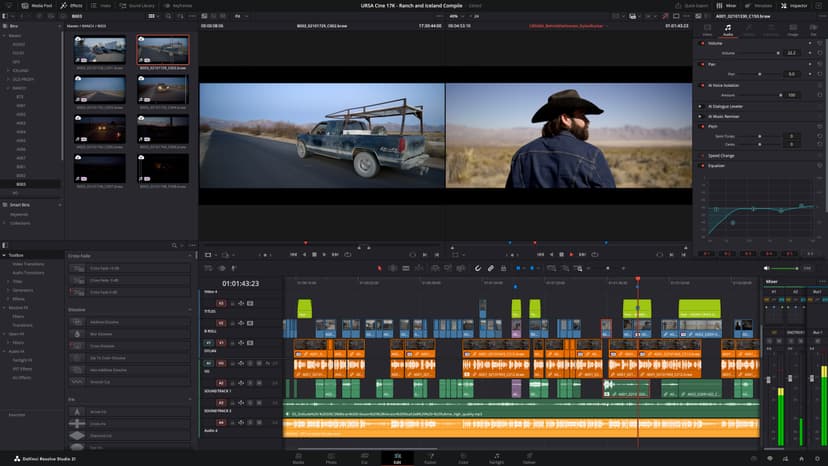
The DaVinci Resolve Fast Track Gold course is an eight-day intensive training programme designed to take you from the fundamentals of professional video editing through to advanced post-production and finishing techniques. Combining our Beginner, Intermediate, and Advanced training, the course provides a structured progression for anyone who wants to develop comprehensive DaVinci Resolve skills through practical, hands-on learning.

Throughout the course, you’ll build a strong foundation in the DaVinci Resolve interface, Media Pool, Edit page, Timeline, and core project workflows. You’ll learn how to import and organise media, edit and trim footage, create sequences, use transitions and effects, and work confidently with titles, audio, and colour correction. As the training progresses, you’ll move into advanced editing techniques including ripple, roll, slip and slide edits, three-point editing, compound clips, adjustment clips, nested timelines, multicam editing, and efficient project organisation.

You’ll then develop sophisticated post-production skills through advanced keyframe animation, dynamic zoom, stabilisation, speed ramps, retiming, layered effects, and complex multicamera workflows. The colour-grading element progresses from essential correction through to professional grading, covering scopes, Lift, Gamma and Gain, LUTs, curves, qualifiers, Power Windows, tracking, structured node trees, camera matching, creative looks, HDR, and colour-managed workflows.

In Fairlight, you’ll develop advanced audio skills covering dialogue processing, EQ, compression, noise reduction, dynamics, routing, buses, sends, automation, limiting, and professional audio mixing. The programme also expands your understanding of Fusion, introducing node-based compositing, masks, tracking, keying, transformations, text, and graphic elements, while showing how Fusion integrates with the wider Resolve workflow.

You’ll also develop professional media-management and delivery skills, including proxy and high-resolution workflows, relinking and consolidating media, project archiving, managing multiple versions, configuring professional codecs and export settings, and preparing multiple deliverables. Advanced HDR and colour-management techniques will help you understand how to prepare projects for different colour spaces, gamma settings

Read more

Dates

Beginner Level

2 consecutive days

Intermediate Level

3 consecutive days

Advanced Level

3 consecutive days
If the training dates listed here don't suit your schedule, let us know and we can arrange a tailored training bundle for you where we can customise both the content and the dates of the courses. To find more about our Tailored Training courses,click here.

Outline

Here is what you will learn in the DaVinci Resolve Training: Fast Track Gold in more detail. Click the topics below to explore what is covered in each section.

Testimonials

Hear directly from professionals and teams who’ve trained with us, sharing their experiences and the impact our training has had on their creative journeys.

Exactly the depth I was looking for

I already had a strong understanding of Resolve, so I wanted training that would push me further. The advanced editing workflows, multicam work and speed ramping were excellent, while the colour and Fairlight sections added another level to my finishing skills.

MC
Matthew ClarkeSenior Video Editor

A much deeper look at colour

The advanced grading work was the highlight for me. Working with structured node trees, qualifiers, tracking, Power Windows, HDR and colour management gave me a much better understanding of how to build consistent professional grades.

ER
Emma RichardsonColourist

Much better control over complex projects

The course helped me become more organised when dealing with large timelines, revisions and multiple camera sources. I also picked up some useful techniques for reusable workflows, keyframes and retiming that have made my editing more efficient.

AM
Alex MorganPost-Production Editor

A great finishing course

I was already comfortable with editing, but wanted to improve the finishing side of my work. The advanced colour, Fairlight mixing and delivery sections were exactly what I needed. I now feel much more confident taking projects all the way through to final output.

CE
Charlotte EvansSenior Videographer

Took my Resolve skills much further

There was a lot of depth to this course, particularly around complex timelines, multicam editing and advanced effects. I also found the speed ramping and retiming techniques really useful for giving edits more control and energy.

DW
David WilsonFilm Editor

Excellent for professional workflows

The focus on media management, archiving and professional delivery was particularly relevant to my work. It wasn’t just about making the edit look good; the course also showed how to manage the project properly from start to finish.

MF
Megan FosterBroadcast Producer

The HDR and node work were invaluable

I wanted to improve my understanding of advanced grading and colour management, and the course went into exactly the areas I needed. Tracking, qualifiers, node structures and HDR workflows are now much clearer to me.

CT
Chris TaylorColourist and Editor

Really useful for complex productions

Managing large projects can become complicated very quickly, so I found the advanced workflow and media-management techniques particularly useful. The combination of editing, colour, audio and delivery made the training very comprehensive.

RH
Rebecca HallPost-Production Manager

A lot more control over the final image

The advanced grading and effects work has changed how I approach finishing. I’m now much more confident using tracking, Power Windows, creative looks and structured node trees to get the result I want rather than relying on trial and error.

AL
Andrew LewisCommercial Director

A strong all-round advanced course

I wanted to bring my editing, colour and audio skills together rather than treating them as separate parts of the process. The training covered all three in considerable depth, with Fusion and professional delivery included as well. It has made my overall workflow much more complete.

SB
Sarah BennettSenior Content Producer

A big step forward

I already knew my way around basic editing, but this course introduced a much more efficient way of working. The advanced trimming tools, multicam editing and timeline techniques were particularly useful. I’m now much quicker when dealing with larger projects.

JW
Jack WilsonVideo Editor

Multicam was a game changer

The multicam section was one of the most useful parts for me. I also learned more advanced colour grading, Fairlight audio and better ways to organise projects. It’s made a noticeable difference to how I approach more complicated edits.

AH
Amelia HarrisFilmmaker

Much more control over my edits

I came away with a much better understanding of advanced editing techniques, adjustment clips, compound clips and timeline organisation. The colour and audio sections were also really useful. I now have far more control over the final result.

RC
Ryan CooperContent Producer

More than just editing

What I liked about this course was that it went beyond editing. We covered colour grading, Fairlight, media management and even an introduction to Fusion. It gave me a much broader understanding of what Resolve can actually do.

CM
Chloe MartinVideographer

My workflow is much faster now

The shortcuts, markers, advanced trimming and project organisation techniques have made a real difference to my day-to-day work. I’m spending less time fighting with the timeline and more time concentrating on the actual edit.

BR
Ben RichardsonFreelance Editor

Perfect for demanding projects

The course helped bridge the gap between basic editing and professional post-production. Multicam, colour grading and Fairlight were all areas I wanted to improve, and I now feel much more comfortable taking on projects with more moving parts.

NB
Natalie BrooksVideo Producer

Loved the multicam edits

I particularly enjoyed learning how to synchronise footage and manage multicam edits. The course also covered colour, audio and delivery, so it felt like a complete workflow rather than just a collection of individual techniques.

GE
George EdwardsDocumentary Filmmaker

I finally get Resolve

I’d been using Resolve for a while but knew I was only scratching the surface. Learning about nodes, qualifiers, Power Windows, Fairlight and Fusion filled in a lot of gaps. I’m now much more confident exploring the software independently.

LT
Lucy TaylorCreative Producer

Plenty of techniques I can use

The training was very practical and covered a lot without feeling rushed. I particularly liked the advanced trimming and colour work, as well as the sections on proxies and project management. These are all things I can apply to real productions.

AB
Adam BrooksPost-Production Assistant

A really worthwhile progression

I wanted to become more efficient rather than simply learn more features. The course delivered on that, especially with the editing shortcuts, timeline organisation and media management. The additional colour and audio training was a big bonus.

JM
Jessica MooreVideo Producer

A great introduction to Resolve

I was completely new to DaVinci Resolve and found the course really easy to follow. I learned how to organise footage, build timelines, make clean edits, add transitions and work with audio. I’m now comfortable putting together complete videos on my own.

OG
Oliver GrantVideo Producer

Finally comfortable with video

I wanted to learn video editing for our marketing team and this course gave me a really good starting point. The exercises covered everything from cutting footage and adding text to basic colour correction and exporting. I’ve already started using the skills at work.

SM
Sophie MitchellMarketing Executive

Very practical and easy to follow

The hands-on exercises made a big difference for me. Rather than just learning where the tools are, I was actually using them to build videos. I’m now able to edit social media content, add titles and transitions, adjust audio and export everything myself.

DF
Daniel FosterContent Creator

Very easy to follow

I had very little editing experience before the course, but the way Resolve was broken down made it surprisingly approachable. I particularly liked learning how to organise media and work across multiple tracks. I can now create videos for internal communications with confidence.

EW
Emily WatsonCommunications Officer

A solid foundation in Resolve

I’d used other editing software before but wanted to get properly familiar with Resolve. The course gave me a clear understanding of the interface, timeline editing, transitions, audio and basic colour correction. It was a useful foundation for developing my skills further.

JP
James ParkerFreelance Videographer

Perfect for social media edits

I mainly work with short promotional and social media videos, so the practical focus was ideal. I learned how to trim and arrange footage, add text and effects, improve audio and make basic colour adjustments. I can now get much more out of my footage.

RT
Rachel TurnerSocial Media Manager

Everything I needed

The course covered the whole process from importing footage through to exporting the finished video. I especially found the sections on audio and colour useful because those were areas I’d previously avoided. I now feel much more confident editing corporate content.

ME
Michael EvansCommunications Manager

A really useful two days

There was a good balance between explanation and actually working in Resolve. I learned the essential editing tools, transitions, titles, audio adjustments and basic colour correction without feeling overloaded. I came away with skills I could use straight away.

LB
Laura BennettDigital Marketing Specialist

Great way to move into video

I already had experience with photography but wanted to start working with video. The course gave me a good understanding of how to organise footage and build an edit, as well as covering sound and colour. It’s given me a much better starting point for video work.

TR
Thomas ReedPhotographer

Clear, practical and well paced

Everything was explained clearly and then reinforced through practical exercises. By the end, I could take a collection of video and audio files and turn them into a finished project with titles, transitions, basic colour correction and a proper export.

HC
Hannah CollinsTraining Coordinator

Meet Your Instructor

Ozgur Gorgun

Ozgur Gorgun

Ozgur is an award winning filmmaker, animator and motion graphics artist. He is one of the very few people in the world to hold the Master Trainer title for Cinema 4D. He is also an Adobe Certified Video Specialist and Instructor.

Clients

As well as creative individuals, we are also the preferred training provider for some of the most successful global brands and organisations.

4
Accenture
Amazon
American Express
Apple
Army
Arsenal FC
BBC
Bentley
Boeing
Cabinet Office
Canary Wharf Group
Chanel
Chelsea
Cisco
Costa
Currys
Deloitte
Disney
DK
Dyson
Excel
F1
Figma
Financial Times
Food Standards Agency
Fujifilm
Global
Google
GOV.UK
Harrods
Heathrow
HSBC
IBM
Itsu
ITV
Jaguar
JCDecaux
4
Accenture
Amazon
American Express
Apple
Army
Arsenal FC
BBC
Bentley
Boeing
Cabinet Office
Canary Wharf Group
Chanel
Chelsea
Cisco
Costa
Currys
Deloitte
Disney
DK
Dyson
Excel
F1
Figma
Financial Times
Food Standards Agency
Fujifilm
Global
Google
GOV.UK
Harrods
Heathrow
HSBC
IBM
Itsu
ITV
Jaguar
JCDecaux
4
Accenture
Amazon
American Express
Apple
Army
Arsenal FC
BBC
Bentley
Boeing
Cabinet Office
Canary Wharf Group
Chanel
Chelsea
Cisco
Costa
Currys
Deloitte
Disney
DK
Dyson
Excel
F1
Figma
Financial Times
Food Standards Agency
Fujifilm
Global
Google
GOV.UK
Harrods
Heathrow
HSBC
IBM
Itsu
ITV
Jaguar
JCDecaux
John Lewis
Just Eat Takeaway
Lush
Macmillan Cancer Support
Mercedes
Metropolitan Police
Microsoft
Ministry of Defence
NATO OTAN
NHS
Nokia
Pandora
Penguin Random House
Pfizer
PlayStation
Porsche
Post Office
Red Bull
Royal Air Force
Savills
Sky
SMG
Sony
Specsavers
Tate
The Independent
The Times
Ticketmaster
TikTok
Turner
UK Parliament
Vevo
Wetherspoon
Wex
Wickes
Wise
World Duty Free
John Lewis
Just Eat Takeaway
Lush
Macmillan Cancer Support
Mercedes
Metropolitan Police
Microsoft
Ministry of Defence
NATO OTAN
NHS
Nokia
Pandora
Penguin Random House
Pfizer
PlayStation
Porsche
Post Office
Red Bull
Royal Air Force
Savills
Sky
SMG
Sony
Specsavers
Tate
The Independent
The Times
Ticketmaster
TikTok
Turner
UK Parliament
Vevo
Wetherspoon
Wex
Wickes
Wise
World Duty Free
John Lewis
Just Eat Takeaway
Lush
Macmillan Cancer Support
Mercedes
Metropolitan Police
Microsoft
Ministry of Defence
NATO OTAN
NHS
Nokia
Pandora
Penguin Random House
Pfizer
PlayStation
Porsche
Post Office
Red Bull
Royal Air Force
Savills
Sky
SMG
Sony
Specsavers
Tate
The Independent
The Times
Ticketmaster
TikTok
Turner
UK Parliament
Vevo
Wetherspoon
Wex
Wickes
Wise
World Duty Free

FAQs

Just a few of the common questions asked by our students.

  • No. The training is suitable for people who are completely new to DaVinci Resolve as well as those who have already used the software and want to develop more advanced post-production skills.

Enquire

Fill out the contact form and a member of our team will get back to you shortly—usually within minutes. Whether you're looking to book a course or just need advice, we're happy to assist.

The DaVinci Resolve Fast Track Gold course is an intensive eight-day training programme designed to provide a comprehensive understanding of professional video editing and post-production. Combining our Beginner, Intermediate, and Advanced courses, this structured programme takes you from the fundamentals of DaVinci Resolve through to sophisticated editing, colour grading, audio, compositing, media management, and professional delivery workflows.

© 2026 Docklands Media. All rights reserved.